GitHub에서 사용할 수 있는 즉시 사용 가능한 Nano Banana 프롬프트 90개 이상


AI 이미지 생성은 프롬프트의 품질에 크게 좌우됩니다. 잘 구조화된 프롬프트 하나만으로도 결과를 완전히 바꿀 수 있으며, 크리에이터가 새로운 수준의 디테일, 스타일, 창의성을 끌어낼 수 있도록 돕습니다. 이를 더 쉽게 만들기 위해 한 GitHub 프로젝트에서 90개 이상의 Nano Banana 프롬프트 를 하나의 라이브러리로 모아 아티스트, 개발자, AI 애호가에게 실험을 위한 즉시 사용 가능한 리소스를 제공합니다.
Nano Banana 프롬프트를 활용한 실제 사례
Nano Banana 프롬프트 라이브러리는 단순한 이론이 아닙니다. 다양한 창의적·전문적 분야의 실용적인 시나리오에 적용되어 왔습니다. 아래 예시는 이러한 프롬프트가 AI의 잠재력을 어떻게 이끌어내는지 보여 줍니다.
참고: 공간 제약으로 인해 여기에서는 처음 30개의 사례만 소개합니다. 90개 이상의 전체 사례 모음은 공식 Nano Banana GitHub 리포지토리를 방문해 주세요.
사례 1: 일러스트를 피규어로(작성자 @ZHO_ZHO_ZHO)
입력 | 출력 |
 |  |
입력: 피규어 생성 대상이 될 참조 이미지를 업로드해야 합니다
프롬프트:
turn this photo into a character figure. Behind it, place a box with the character's image printed on it, and a computer showing the Blender modeling process on its screen. In front of the box, add a round plastic base with the character figure standing on it. set the scene indoors if possible사례 2: 지도 화살표로 지상 시점 생성(작성자 @tokumin)
입력 | 출력 |
 |  |
 |  |
 |  |
입력: 빨간 화살표가 포함된 Google Maps 이미지를 업로드해야 합니다
프롬프트:
draw what the red arrow sees / draw the real world view from the red circle in the direction of the arrow.사례 3: 현실 세계 AR 정보(작성자 @bilawalsidhu)
출력 |
 |
입력: 참조 이미지를 업로드해야 합니다
프롬프트:
you are a location-based AR experience generator. highlight [point of interest] in this image and annotate relevant information about it.참고
프롬프트에 주석을 추가할 관심 지점 [POI]를 입력해야 합니다
사례 4: 3D 건물 추출/아이소메트릭 모델 만들기(작성자 @Zieeett)
입력 | 출력 |
 |  |
 |  |
입력: 해당 객체가 포함된 이미지를 업로드해야 합니다
프롬프트:
Make Image Daytime and Isometric [Building Only]참고
필요에 따라 [대괄호] 안의 정보를 수정하세요(차량, 사람 등으로 설정 가능)
사례 5: 다양한 시대 속 자신의 사진(작성자 @AmirMushich)
입력 | 출력 |
 |  |
입력: 인물 사진을 업로드해야 합니다
프롬프트:
Change the characer's style to [1970]'s classical [male] style
Add [long curly] hair,
[long mustache],
change the background to the iconic [californian summer landscape]
Don't change the character's face
참고
[대괄호] 안의 텍스트를 원하는 시대와 세부 정보로 변경하세요
사례 6: 다중 참조 이미지 생성(작성자 @MrDavids1)
입력 | 출력 |
 |  |
입력: 여러 참조 이미지를 업로드해야 합니다
프롬프트:
A model is posing and leaning against a pink bmw. She is wearing the following items, the scene is against a light grey background. The green alien is a keychain and it's attached to the pink handbag. The model also has a pink parrot on her shoulder. There is a pug sitting next to her wearing a pink collar and gold headphones.참고
프롬프트는 여러 참조 객체를 포함하여 자세히 설명해야 합니다
입력 | 출력 |
 |  |
입력: 보정이 필요한 이미지를 업로드해야 합니다
프롬프트:
This photo is very boring and plain. Enhance it! Increase the contrast, boost the colors, and improve the lighting to make it richer,You can crop and delete details that affect the composition.사례 8: 손그림으로 여러 캐릭터의 포즈 제어(작성자 @op7418)
입력 | 출력 |
 |  |
입력: 캐릭터 이미지와 손그림 스케치를 업로드해야 합니다
프롬프트:
Have these two characters fight using the pose from Figure 3. Add appropriate visual backgrounds and scene interactions,Generated image ratio is 16:9사례 9: 교차 시점 이미지 생성(작성자 @op7418)
입력 | 출력 |
 |  |
입력: 지상에서 촬영한 사진을 업로드해야 합니다
프롬프트:
Convert the photo to a top-down view and mark the location of the photographer.사례 10: 맞춤 캐릭터 스티커(작성자 @op7418)
입력 | 출력 |
 |  |
입력: 스티커 참조 이미지와 캐릭터 이미지를 업로드해야 합니다
프롬프트:
Help me turn the character into a white outline sticker similar to Figure 2. The character needs to be transformed into a web illustration style, and add a playful white outline short phrase describing Figure 1.사례 11: 애니메이션을 실사 코스플레이어로(작성자 @ZHO_ZHO_ZHO)
입력 | 출력 |
 |  |
입력: 일러스트 이미지를 업로드해야 합니다
프롬프트:
Generate a photo of a girl cosplaying this illustration, with the background set at Comiket사례 12: 캐릭터 디자인 생성(작성자 @ZHO_ZHO_ZHO)
입력 | 출력 |
 |  |
입력: 캐릭터 참고 이미지를 업로드해야 합니다
프롬프트:
Generate character design for me (Character Design)
Proportion design (different height comparisons, head-to-body ratio, etc.)
Three views (front, side, back)
Expression design (Expression Sheet) → like the image you sent
Pose design (Pose Sheet) → various common poses
Costume design (Costume Design)
사례 13: 색상 팔레트를 활용한 컬러 라인 아트(by @ZHO_ZHO_ZHO)
입력 | 출력 |
 |  |
입력: 라인 아트 이미지와 색상 팔레트 이미지를 업로드해야 합니다
프롬프트:
Accurately use the color palette from Figure 2 to color the character in Figure 1출력 |
 |
입력: 블로그/기사를 업로드해야 합니다
프롬프트:
Generate an infographic for the article content
Requirements:
1. Translate the content into English and extract key information from the article
2. Keep the content in the image concise, only retaining the main title
3. Use English text in the image
4. Add rich and cute cartoon characters and elements
사례 15: 여러 헤어스타일 변경(by @balconychy)
출력 |
 |
입력: 헤어스타일을 변경할 인물 이미지를 업로드해야 합니다
프롬프트:
Generate avatars of this person with different hairstyles in a 3x3 grid format사례 16: 모델 주석 설명 다이어그램(by @berryxia_ai)
출력 |
 |
주의
주석 결과에는 상당한 수의 오류가 있습니다 ⚠️. Nano-Banana 주석은 완전히 정확하지 않으므로, 사용하기 전에 정보의 정확성을 주의 깊게 확인해야 합니다.
프롬프트:
Draw [3D human organ model display example heart] for academic presentation, with annotations and explanations, suitable for showcasing its principles and [each organ's] functions, very realistic, highly detailed, with extremely fine design.참고
[대괄호] 안의 텍스트를 소개하려는 모델로 변경하세요
사례 17: 맞춤형 대리석 조각상(by @umesh_ai)
출력 |
 |
입력: 참고 이미지를 업로드해야 합니다
프롬프트:
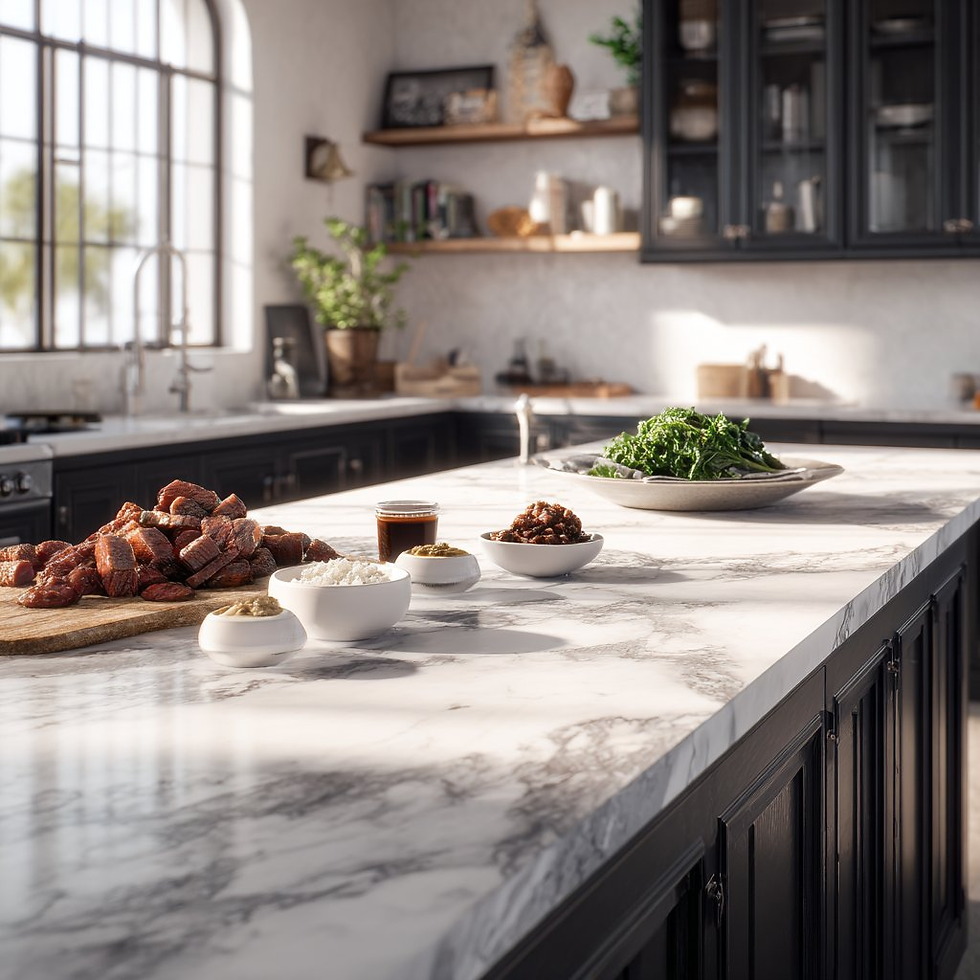
A photorealistic image of an ultra-detailed sculpture of the subject in image made of shining marble. The sculpture should display smooth and reflective marble surface, emphasizing its luster and artistic craftsmanship. The design is elegant, highlighting the beauty and depth of marble. The lighting in the image should enhance the sculpture's contours and textures, creating a visually stunning and mesmerizing effect사례 18: 재료를 바탕으로 요리하기(by @Gdgtify)
입력 | 출력 |
 |  |
 |  |
 |  |
입력: 다양한 재료가 담긴 사진을 업로드해야 합니다
프롬프트:
make me a delicious lunch with these ingredients, and put it on a plate , zoomed in view of the plate, remove the other plates and ingredients.사례 19: 수학 문제 추론(by @Gorden Sun)
입력 | 출력 |
 |  |
입력: 수학 문제를 업로드해야 합니다
프롬프트:
Write the answer to the problem in the corresponding position based on the question사례 20: 오래된 사진 색상 복원(by @GeminiApp)
입력 | 출력 |
 |  |
입력: 복원이 필요한 오래된 사진을 업로드해야 합니다
프롬프트:
restore and colorize this photo.입력 | 출력 |
 |  |
입력: 인물 이미지와 의상 이미지를 업로드해야 합니다
프롬프트:
Choose the person in Image 1 and dress them in all the clothing and accessories from Image 2. Shoot a series of realistic OOTD-style photos outdoors, using natural lighting, a stylish street style, and clear full-body shots. Keep the person's identity and pose from Image 1, but show the complete outfit and accessories from Image 2 in a cohesive, stylish way.입력 | 출력 |
 |  |
입력: 인물 이미지와 의상 이미지를 업로드해야 합니다
프롬프트:
Replace the person's clothing in the input image with the target clothing shown in the reference image. Keep the person's pose, facial expression, background, and overall realism unchanged. Make the new outfit look natural, well-fitted, and consistent with lighting and shadows. Do not alter the person's identity or the environment — only change the clothes.사례 23: 다중 뷰 결과 생성(by @Error_HTTP_404)
입력 | 출력 |
 |  |
입력: 참고 이미지를 업로드해야 합니다
프롬프트:
Generate the Front, Rear, Left, Right, Top, Bottom views on white. Evenly spaced. Consistent subject. Isometric Perspective Equivalence. 사례 24: 영화 스토리보드(by @GeminiApp)
입력 | 출력 |
 |  |
입력: 참고 이미지를 업로드해야 합니다
프롬프트:
Create an addictively intriguing 12 part story with 12 images with these two characters in a classic black and white film noir detective story. Make it about missing treasure that they get clues for throughout and then finally discover. The story is thrilling throughout with emotional highs and lows and ending on a great twist and high note. Do not include any words or text on the images but tell the story purely through the imagery itself.사례 25: 캐릭터 포즈 수정(by @arrakis_ai)
입력 | 출력 |
 |  |
입력: 참고 이미지를 업로드해야 합니다
프롬프트:
Have the person in the picture look straight ahead사례 26: 선화에서 이미지 생성(by @ZHO_ZHO_ZHO)
입력 | 출력 |
 |  |
입력: 선화와 참고 이미지를 업로드해야 합니다
프롬프트:
Change the pose of the person in Figure 1 to that of Figure 2, and shoot in a professional studio사례 27: 이미지에 워터마크 추가(by @AiMachete)
입력 | 출력 |
 |  |
입력: 참조 이미지를 업로드해야 합니다
프롬프트:
Watermark the word ‘TRUMP’ over and over again across the whole image.사례 28: 지식 추론 이미지 생성(작성자: @icreatelife)
출력 |
 |
 |
프롬프트:
Make me an infographic of 5 tallest buildings in the world / Make a colorful infographic of the sweetest things on Earth사례 29: 빨간 펜 주석(작성자: @AiMachete)
입력 | 출력 |
 |  |
입력: 참조 이미지를 업로드해야 합니다
프롬프트:
Analyze this image. Use red pen to denote where you can improve.사례 30: 폭발적인 음식(작성자: @icreatelife)
출력 |
 |
 |
입력: 참조 이미지를 업로드해야 합니다
프롬프트:
Photograph this product in a dramatic modern scene accompanied by explosive outward dynamic arrangement of the key ingredients fresh and raw flying around the product signifying its freshness and nutritional value. promo ad shot, without text, product is emphasized, with the key brand colors as background.remio를 사용하여 프롬프트 자동 저장하기

remio를 사용하면 프롬프트를 쉽게 캡처, 정리 및 검색할 수 있습니다 자동 스크래핑과 대규모 언어 모델(LLM)을 결합하여 제공합니다. 이 기능을 통해 가장 소중한 프롬프트를 절대 잃지 않고 프로젝트 전반에서 원활하게 재사용할 수 있습니다.
Remio를 사용하여 라이브러리에 프롬프트를 저장하는 방법은 다음과 같습니다:
Google Chrome 확장 프로그램 사용을 사용하고 “컬렉션에 추가”을 클릭하여 원하는 컬렉션에 프롬프트를 직접 저장합니다.
remio 홈 인터페이스로 이동하여 @ 기능을 사용해 특정 컬렉션의 이름을 멘션합니다.
remio의 LLM은 해당 컬렉션에 저장된 문서를 검색한 다음, 자연어로 질문하기만 하면 알맞은 프롬프트를 찾을 수 있도록 해줍니다.
이 단계를 따르면 프롬프트가 개인 프롬프트 라이브러리에 자동으로 저장되어 필요할 때마다 쉽게 관리, 정리 및 재사용할 수 있습니다.
결론
GitHub의 Nano Banana 프롬프트 라이브러리는 90개 이상의 세심하게 설계된 프롬프트로 구성된 강력한 리소스를 제공하며, 사용자가 창의적, 기술적, 생산성 중심의 사용 사례를 탐색하도록 돕습니다. 이 글에서는 처음 30개 사례만 다루지만, 더 깊이 살펴보고 싶은 분들을 위해 전체 컬렉션은 GitHub에서 직접 확인할 수 있습니다.
이 라이브러리를 remio의 자동화된 프롬프트 저장 워크플로와 결합하면, 사용자는 개인 맞춤형 프롬프트 라이브러리를 구축할 수 있으며, 이는 시간이 지남에 따라 자연스럽게 성장합니다. Chrome 확장 프로그램을 통해서든 앱 내 @collections 기능을 통해서든, Remio는 프롬프트가 저장될 뿐만 아니라 필요할 때 지능적으로 검색될 수 있도록 보장합니다.
요컨대, Nano Banana 라이브러리는 영감을 제공하고 Remio는 이를 실용적으로 만들어 줍니다. 두 가지를 함께 활용하면 프롬프트 엔지니어링 여정을 한층 강화할 수 있습니다.


