top of page

为什么 Google Pixel 10 的 AI 功能正在悄然重新定义日常智能手机使用

Why the Google Pixel 10’s AI Features Are Quietly Redefining Everyday Smartphone Use

Why the Google Pixel 10 AI features matter for everyday smartphone use

Google Pixel 10 arrives as more than a new phone model; it’s a statement: AI is no longer an add-on novelty but a foundational part of the everyday smartphone experience. From launch, the Google Pixel 10 integrates Gemini—Google’s large multimodal AI models—and a suite of system-level tools like Magic Cue—an AI-powered creative and editing assistant—so routine tasks feel faster, more contextual, and often more creative. This article explores how the Pixel 10 AI features change behavior at the user level, not by flashy demos, but by quietly embedding helpful intelligence into the places people already spend their time.

This piece argues that Google is “doubling down” on AI phones by embedding Gemini into core workflows to make common tasks faster, more creative, and more contextual. Rather than isolating AI in single-purpose apps, the Pixel 10 surfaces AI where users draft messages, capture photos, triage email, and summarize meetings. For background and product framing see Google’s official overview of the Pixel 10 AI features and TechCrunch’s analysis of Google’s broader strategic push into AI-centric devices.

What’s new in the Google Pixel 10: key Pixel 10 AI features and Gemini integration

What’s new in the Google Pixel 10: key Pixel 10 AI features and Gemini integration

The Pixel 10 AI features are a package: tighter Gemini AI integration across the OS, new creative tools under the Magic Cue umbrella, enhanced conversational and assistant capabilities, and performance optimizations that make AI feel instantaneous. Unlike previous Pixel releases where advanced features often arrived as separate apps or optional assistant features, the Pixel 10 folds AI into core UI surfaces — the camera, keyboard, notification shade, and Photos app — so suggestions arrive inline and in-context. See Google’s product overview and media reporting for the cores of these changes.

Google’s strategic intent with the Pixel 10 is to set a practical standard for what an “AI phone” should be: not a marketing term, but a device where AI reduces friction in routine tasks. TechCrunch frames this as a doubling-down on vertically integrated AI experiences that increase the stickiness of Google’s hardware and software stack. Droid Life and Wired catalog the specific features—Magic Cue, smarter Assistant interleavings, and expanded on-device summarization—that make that strategy tangible.

Deep Gemini integration — what it enables

Gemini AI (here defined as Google’s large multimodal models that process text and images and power reasoning and generation) now runs closer to the user through optimized on-device deployments and hybrid cloud fallbacks. In practice, Gemini powers camera edits, real-time conversational replies, faster summarization of threads and meetings, and contextual suggestions that use local app state (calendar events, recent photos, and open tabs) to tailor outputs. This deeper integration reduces latency and yields richer, context-aware responses because the model can leverage more of the device’s immediate context without round trips to the cloud. For product details and technical framing, see Google’s official overview and reporting from CNBC on Gemini’s role in Pixel 10.

Real-world examples:

  • Drafting a reply: Gemini evaluates the most recent message, calendar context, and contact history to suggest a short reply that matches tone and timing.

  • Camera assist: Gemini analyzes a captured image and suggests edits that match the scene (e.g., brighten faces, remove distractions) while offering composition tweaks compatible with the photographer’s past edits.

  • Summaries: Long email threads or meeting recordings are converted to concise action-item lists on-device, with cloud-enhanced expansions available if requested.

Magic Cue and creative + productivity tools

Magic Cue is an AI-powered editing and composition suite that sits inside Photos, Camera, and short-form video workflows. It provides one-tap edits, suggested clip assemblies, and tone-matched captions. The point is not to replace a creator’s intent but to reduce the tedium of common edits and ideation. Droid Life and Wired both document how Magic Cue streamlines content creation by suggesting edits that respect subject intent and preferred style.

Practical Magic Cue examples:

  • One-tap portrait enhancement: AI corrects exposure, softens skin sparingly, and suggests a color grade that matches the existing album aesthetic.

  • Auto-clip assembly: For a 30-second social video, Magic Cue proposes a sequence of the best 10-second moments, a background audio suggestion, and a caption that suits a casual or upbeat tone.

  • Caption suggestions: Based on the image and the user’s most-used phrases, captions are offered in different voices (witty, professional, empathetic).

These are not gimmicks: they reduce the number of manual steps required to make share-ready content and help non-experts produce higher-quality outputs faster. See hands-on feature breakdowns in Droid Life and Wired.

System-level AI — assistant, UI and performance

Beyond camera and creative tools, AI threads through the UI: the Assistant offers contextual suggestions (e.g., “reply with a calendar invite?”), the keyboard suggests more than next words (it proposes whole-sentence rewrites), and core apps like Gmail and Phone surfaced AI summaries and action prompts. Unlike earlier phones where assistant actions often required leaving the active app, Pixel 10 AI features inject suggestions inline where users already work, improving acceptance and reducing task-switching. For product context see Google’s overview and TechCrunch’s strategic analysis.

Performance matters: delivering instant suggestions depends on a combination of hardware acceleration and model optimization (covered later). The user experience goal is predictable latency and minimal battery impact, so AI feels helpful and unobtrusive rather than draining or slow. Wired’s and CNBC’s coverage explore how these optimizations make AI practical for daily use.

Bold takeaway: System-level AI that appears inline and context-aware is significantly more likely to become part of daily habits than isolated, app-based AI features.

Everyday use cases — how Pixel 10 AI features redefine daily tasks

Everyday use cases — how Pixel 10 AI features redefine daily tasks

The Pixel 10 isn’t just a device for early adopters; its AI features are tuned to everyday use scenarios that repeat and compound over time. Below are concrete vignettes showing where time is saved, creativity is enabled, and friction is removed. Each vignette ties a Pixel 10 capability to an outcome you can feel in daily life.

Google Pixel 10 — Photography and content creation: faster, smarter creative flow

Workflow: snap → AI suggests edits → Magic Cue composes context-aware output → publish.

Example vignette: 1. Morning commute: You snap three photos of a street mural. 2. Auto-suggest: Magic Cue analyzes the photos (color, subject, faces) and offers three edits: vivid color grade, crop for social stories, and a subtle perspective fix. 3. One-tap apply + caption: You accept the vivid grade and a suggested caption in a playful tone. Magic Cue also proposes trimming the image into a 9:16 story and recommends background music for a short clip. 4. Publish: You post to social with one fewer app and fewer taps.

Quantified impact (practical estimation based on reported feature behaviors): fewer taps (often 3–6 fewer), reduced editing time (from minutes to under a minute per post for casual creators), and better baseline quality for users without editing skills. Droid Life’s feature breakdown highlights Magic Cue’s suggested edits and automated assemblies as primary time-savers for creators. Wired’s coverage notes that these tools raise the baseline for non-experts and streamline the "capture-to-share" loop.

Actionable tip: For frequent creators, create a small preset library that Magic Cue can match against — that gives fast, consistent outputs and reduces rework.

Google Pixel 10 — Communication: composing, summarizing and translating on-device

Vignette: triaging messages during a coffee break.

  • Scenario: You have a long group chat, an urgent email thread, and a voicemail transcription to review.

  • Pixel 10 AI features: Gemini summarizes the group chat into two bullet points, drafts a short professional reply to the email that references the attached file, and provides a short transcript-plus-action items from the voicemail.

  • Benefit: Reduced cognitive load (you don’t have to read every message), faster response (one-tap reply drafts), and accessibility (voicemail transcribed and summarized).

Real-time translation: During a commute, you receive a message in another language. Pixel 10 offers an inline translated reply and even suggests context-aware tone adjustments to match the original sender’s formality. CNBC and Wired document these communication enhancements as major daily-use win conditions for Pixel 10 users.

Actionable tip: Enable on-device translation and set default tone presets in the keyboard settings — it saves time and ensures replies match your communication style.

Google Pixel 10 — Productivity and daily organization: meetings, notes, and inbox triage

Vignette: the knowledge worker’s afternoon.

  • Scenario: You have three back-to-back meetings, half a dozen follow-up emails, and a voicemail with action items.

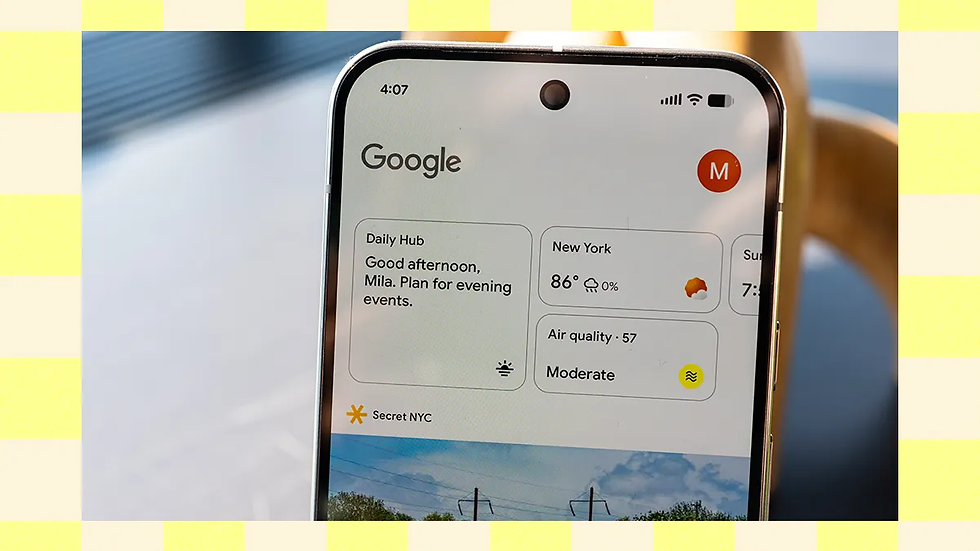
  • Pixel 10 AI features: the Assistant pinpoints the top three takeaways from each meeting recording (on-device), extracts action items, and drafts an email summary to attendees. For your inbox, a “priority view” uses Gemini to surface the three messages most likely needing an immediate reply.

  • Benefit: Less context switching and fewer forgotten follow-ups. Google’s product overview emphasizes these inline productivity gains and shows how AI suggestions appear where users already manage their workflows.

Actionable tip: Use the Pixel 10’s meeting summary feature as a baseline — then customize the summary template to include the precise fields your team expects (action owner, deadline, next steps).

Outcome framing: time saved and behavior change

Across the scenarios, the consistent outcomes are:

  • Time saved: routine tasks that used to take minutes now often take seconds.

  • Creative enablement: non-experts accomplish publish-ready work without learning complex tools.

  • Friction reduction: inline AI suggestions reduce app switching and repeated manual steps.

Bold takeaway: Pixel 10 AI features turn many micro-tasks into near-instant interactions — and micro-savings compound into meaningful daily improvements.

how Gemini runs on-device in the Google Pixel 10

how Gemini runs on-device in the Google Pixel 10

Delivering fast, context-aware AI experiences requires engineering trade-offs: smaller, optimized models for everyday tasks on-device and cloud fallbacks for more complex generations. Google’s approach with the Pixel 10 blends model optimization, dedicated silicon acceleration, and a hybrid execution model—Gemini AI on-device for many interactions, with cloud assistance available for heavier workloads. For background and technical context, see CNBC’s coverage of on-device Gemini and Google’s product explanation on privacy and model behavior.

Short insight: Local inference reduces latency and keeps many sensitive signals on-device; cloud fallbacks enable capabilities the phone cannot yet handle without bandwidth or compute trade-offs.

Model optimization and hardware acceleration

To run Gemini variants locally, Google uses standard model-compression techniques adapted for mobile:

  • Quantization: reducing numerical precision where it doesn’t materially impact output quality.

  • Pruning: removing low-importance weights to shrink models.

  • Compiler and runtime optimizations: fusing operations and optimizing memory access.

  • Dedicated neural accelerators in Pixel 10 silicon: hardware designed to run tensor computations efficiently, lowering latency and energy consumption.

Real-world effect: near-instant replies, faster image editing previews, and AI tasks that use minimal extra battery. CNBC and TechCrunch highlight how these hardware+software co-designs make on-device AI commercially viable for daily use.

Actionable engineering takeaway: For product teams, invest in model lifecycle tooling that supports progressive model drops (small-to-large) and A/B tests that measure both quality and resource use.

Hybrid execution and fallback to cloud

Not every task runs locally. Pixel 10 balances local inference and cloud processing:

  • Local-first: common, latency-sensitive interactions (reply suggestions, basic summarization, on-device translation) are handled on-device.

  • Cloud-assisted: complex creative generations (long-form video edits, high-fidelity multimodal generation) or bursts of heavy computation are optionally offloaded to cloud instances.

  • Transparent UX: the system prioritizes fast local results and offers optional “enhance with cloud” flows for richer outcomes.

The UX is designed to make fallbacks seamless: users get a quick local answer and an optional “improve result using cloud” button if they want a more expansive output. Google’s product materials and reporting explain these design choices as privacy- and latency-aware patterns for hybrid AI.

Update and feedback loops for continuous improvement

On-device models aren’t static. Google uses over-the-air (OTA) model updates, client-side telemetry (with opt-in), and aggregated feedback loops to refine behavior. This enables iterative improvements (e.g., Magic Cue adapting to emergent editing preferences) while maintaining updated models that reflect new data distributions.

  • OTA updates: Ship improved model weights and runtime improvements without needing full OS updates.

  • User telemetry and opt-in signals: Aggregate anonymized signals inform model retraining.

  • A/B testing and EEAT: Google can deploy experiments to measure quality and real-world impact before rolling updates broadly.

This continuous improvement strategy is consistent with TechCrunch’s reporting on Google’s AI-device roadmap and Google’s own descriptions of update mechanisms.

Bold takeaway: Practical on-device AI relies on a hybrid systems approach—optimized local models for speed and privacy, cloud fallbacks for scale, and OTA updates for continuous quality improvements.

Privacy, security and policy for Pixel 10 AI features

Privacy, security and policy for Pixel 10 AI features

As AI becomes more deeply integrated, privacy becomes a central design constraint. The main challenge is that richer, contextual AI benefits from access to sensitive signals (messages, photos, calendar events). Google’s mitigation strategy emphasizes local processing defaults, user controls, data minimization, and clear policy disclosures to reduce the surface area of sensitive data sent to the cloud. Google’s product blog and TechCrunch’s analysis provide the foundation for these claims and details.

Short insight: Privacy is treated as a system-level tradeoff—maximize local inference where possible, make cloud usage explicit, and give users granular control.

On-device defaults and user controls

Google defaults to on-device processing for many core AI interactions (replies, summaries, basic translations). When cloud assistance is necessary, the UI explicitly indicates when data leaves the device and often asks for permission. Users can toggle:

  • Cloud-assisted generation on/off.

  • History retention (whether snippets are stored to improve models).

  • Assistant access to apps and notifications.

CNBC and Google’s product notes emphasize that these defaults are intended to keep sensitive processing local unless users choose otherwise.

Action for users: Review assistant and cloud-assist toggles during initial setup; default local-first settings are recommended for privacy-conscious users.

Data minimization and transparency

Beyond controls, policy language and UX matter. Google publishes descriptions of what data is processed locally, what is sent to the cloud, and what is retained. Anonymized telemetry is used to improve features, with opt-in choices for more detailed personalization. Wired’s analysis highlights the need for clear labeling of AI outputs and transparent rationale for decisions produced by models.

UX recommendations for transparency:

  • Label AI-generated content clearly.

  • Show “what we used” panels that list signals (e.g., calendar, recent photos) contributing to a suggestion.

  • Provide easy undo/history so users can remove data they don’t want models to use.

Regulatory context and industry expectations

Pixel 10’s approach sits amid rising regulatory scrutiny around AI and data protection. Google’s published controls and on-device-first posture may influence industry norms and regulatory expectations around reasonable privacy-by-design for AI phones. TechCrunch and Google’s product notes frame the Pixel 10 as both a technical and policy experiment — a template competitors will be measured against.

Bold takeaway: Strong defaults, explicit cloud interactions, and clear user controls are necessary to scale AI phones while meeting regulatory and consumer trust expectations.

Market impact and industry trends — Pixel 10 as a catalyst for AI phones

Market impact and industry trends — Pixel 10 as a catalyst for AI phones

Pixel 10 signals a clear industry movement: manufacturers will increasingly compete on proprietary AI feature sets and on-device model capabilities rather than only on camera hardware or raw specs. Google’s strategy of combining software, the Gemini model family, and hardware optimization creates a defensible product differentiation in a mature hardware market. TechCrunch positions this as Google leveraging software and AI to maintain hardware relevance; Wired and Droid Life detail the specific features that form part of that competitive edge.

Competitive differentiation through proprietary AI features

Unique features like Magic Cue and system-level Gemini integration create switching incentives: users who rely on those workflows for speed and creativity face friction if they move to another platform that lacks similar inline tools. This can create a form of platform lock-in driven by productivity and creative value rather than just ecosystem services. Droid Life and TechCrunch both discuss how proprietary AI features act as a competitive moat for device manufacturers.

Strategic observation: To match Pixel 10, competitors need not only similar models but also deep OS integration where AI suggestions live inline and respect platform privacy defaults.

Metrics and signals to monitor for adoption

Key performance indicators (KPIs) analysts and product teams should track:

  • Active use of AI features (daily/weekly active users for Magic Cue, Assistant suggestions).

  • Frequency of on-device generation vs. cloud-assisted requests.

  • Retention and engagement uplift correlated to AI feature use (do users who adopt AI features stay more active?).

  • Social virality and creative outputs: are Magic Cue outputs fueling more public sharing and positive word-of-mouth?

Early signals to watch include developer extensions (APIs), carrier partnerships that bundle Pixel capabilities, and user testimonials highlighting time-savings and creative quality. TechCrunch and CNBC note the importance of these signals in forecasting whether Pixel 10 sets a durable market trend.

Bold takeaway: Pixel 10 could accelerate a new era where AI feature sets — and their privacy/UX trade-offs — become primary competitive differentiators in smartphones.

Challenges & Google’s solutions — adoption, trust, and evolving AI

Challenges & Google’s solutions — adoption, trust, and evolving AI

The Pixel 10 strategy is strong but not without challenges. Primary obstacles include user trust and privacy concerns, the complexity of AI-driven UX, and the need to keep models fresh and accurate. Google addresses these with default on-device inference, transparent policies, intuitive education and UI, and continuous updates via Gemini.

  • Building user trust through clear defaults

  • Default to on-device inference for sensitive or common tasks.

  • Provide explicit consent flows for cloud assistance and clear undo/history options.

  • Source alignment: Google’s product blog and Wired’s analysis on trust patterns.

  • Simplifying complex AI into predictable UX

  • Use in-context suggestions, progressive disclosure, and example-driven guidance (show “what this suggestion will do” before applying).

  • Source alignment: Droid Life and TechCrunch describe how inline suggestions and gradual reveal of AI power reduce friction.

Quick recommendations for users and product teams:

  • For users: start with default local-first settings, enable features selectively, and use undo/history to familiarize yourself with outputs.

  • For product teams: instrument clear metrics for adoption and satisfaction, and prioritize transparency and predictable rollbacks for any AI-generated content.

Key takeaway: Adoption hinges on predictable UX, transparent defaults, and visible, reversible controls.

FAQ — common reader questions about Google Pixel 10 AI features

Below are concise answers to common questions about the Pixel 10’s AI capabilities, grounded in Google’s product notes and reporting from CNBC and other outlets.

Q1 — Are Pixel 10 AI features processed on-device or in the cloud?

A: Mostly on-device for common, latency-sensitive interactions (suggested replies, short summaries, basic translations). Cloud processing is used for heavier generation or optional enhancements. Google’s materials emphasize a local-first approach with transparent fallbacks.

Q2 — What is Magic Cue and who benefits most from it?

A: Magic Cue is an AI creative assistant for photos, short-form video, and captions. It benefits casual creators who want quick, high-quality output and professionals who need rapid iteration. Hands-on reviews describe its one-tap edits and suggested clip assemblies as particularly time-saving.

Q3 — How does Google protect my data when using AI features?

A: Protection includes default on-device processing for many features, opt-in telemetry, data minimization practices, and explicit controls for cloud-assisted operations. Google documents these choices and provides toggles in settings.

Q4 — Will Pixel 10’s AI features drain battery or slow the phone?

A: Pixel 10 uses model optimizations and dedicated silicon to reduce battery impacts; common interactions are tuned for efficiency. For very heavy cloud-assisted tasks, battery and bandwidth usage will be higher, but the default local-first behavior aims to minimize everyday costs.

Q5 — Can developers or third-party apps leverage Pixel 10’s AI?

A: Google 已表示 APIs 和 SDKs 可能会随着时间推移推出,以实现第三方集成,但强大的生态系统细节通常在初始发布后才会跟进。预计开发者工具将扩展为 Google 平衡 开放与隐私和平台控制之间的平衡。

Q6 — 竞争对手多久才能匹敌 Pixel 10 的设备端 AI?

A: 设备端 AI 的趋势正在加速;竞争对手将跟进,但差异化将取决于模型质量、集成深度和隐私立场。市场采用时机因供应商策略和芯片可用性而异。

结论 — Pixel 10 AI 的可操作见解和接下来要关注的内容

Conclusion — actionable insights and what to watch next for Pixel 10 AI

Google Pixel 10 的设备端 Gemini 集成以及 Magic Cue 等功能代表了一种务实转变:AI 正在从新奇事物转变为基础设施。通过将智能内嵌于相机、键盘、assistant 和核心应用中,Google 减少了日常任务中的摩擦,并引导用户对手机应有功能的期望。

可操作的要点:

  • 对于用户:尝试 Pixel 10 AI 功能,同时保留隐私默认设置;当需要更丰富的结果时,启用选择性云增强功能。

  • 对于产品团队:优先考虑透明的默认设置、内联建议(而非模态中断),以及采用和满意度的稳健指标。

  • 对于分析师和观察者:监控 Magic Cue 和 Assistant 功能的活跃使用情况、开发者 API 公告,以及对设备端 AI 的监管回应。

接下来要关注的信号:

  • 采用指标(活跃 AI 功能用户和留存率提升)。

  • 开发者生态系统动态(APIs、第三方扩展)。

  • 对设备端 AI 隐私实践的监管和政策反应。

  • Gemini 设备端模型的迭代改进和 OTA 更新节奏。


免费开始

一款本地优先的AI助手,具备个人知识管理功能

为了获得更好的人工智能体验,

remio 目前仅支持Windows 10+ (x64)M-Chip Mac

在你的大脑里添加一个搜索栏

Ask remio

记住一切

​无需整理

bottom of page