Veo 3.1 Update: Vertical Video, 4K Output, and Character Consistency


Google’s release of Veo 3.1 represents a distinct shift in how generative video fits into professional pipelines. Released in mid-January 2026, this update isn’t just about higher fidelity—though the jump to 4K is notable—it’s about workflow integration. The tool is now live across the Gemini API, Google AI Studio, and Vertex AI.
For developers and creators, the focus here is control. The "slot machine" era of prompting is giving way to precise direction, specifically through new features like native portrait mode and the "Ingredients" system.
Here is what is working, what users are finding in the wild, and how to actually use these new capabilities.
The Agentic Workflow: Automating Veo 3.1
Before diving into specs, the most interesting development isn’t coming from Google’s documentation, but from early adopters finding better ways to drive the software.
Users are bypassing the standard chat interfaces in favor of "agentic" workflows. A practical method emerging from the community involves chaining Veo 3.1 with high-level coding agents like Claude Code.
How the Community Is Using It
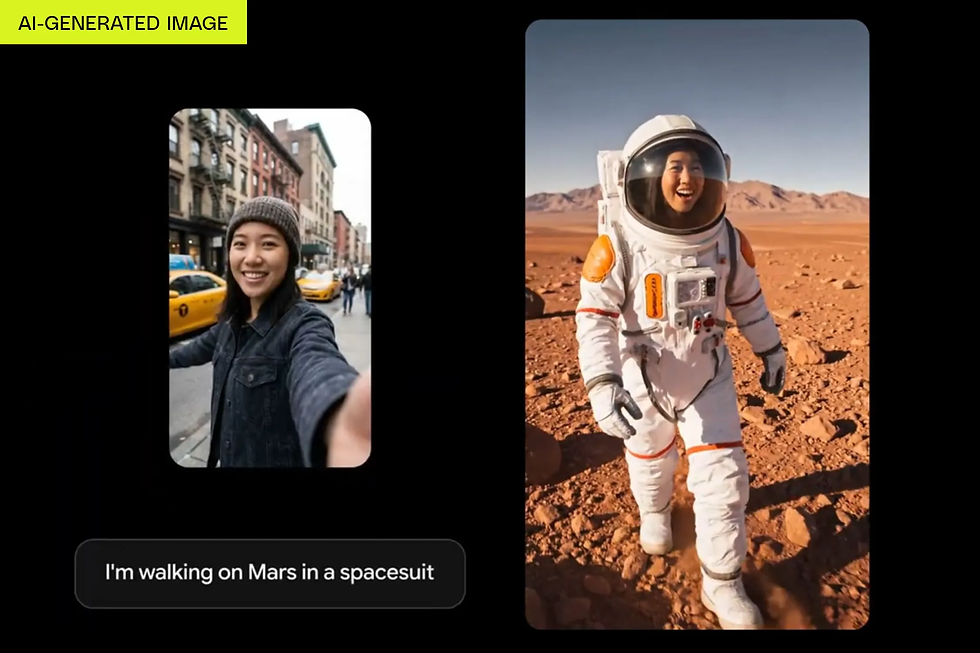
Instead of manually prompting for every clip, users are setting up automated chains. You provide a script or a "character sheet" (a static image defining your subject), and the agent instructs the Google toolchain to generate the video assets.
One user noted that the transition from a static character sheet to full animation was "flawless," maintaining specific physical details that usually hallucinate away in other models. This confirms that the model’s adherence to input images has tightened significantly. If you are building an automated content pipe, the API now supports enough structure to let the AI handle the heavy lifting without constant human correction.
Core Features in Veo 3.1

The official release notes highlight three main functional changes: better mobile support, higher resolution, and tighter narrative control.
Veo 3.1 Native Portrait Mode
Video generation models have historically treated vertical video as an afterthought, often just cropping a landscape generation which ruins the composition. Veo 3.1 introduces native support for 9:16 aspect ratios.
This matters for developers building for YouTube Shorts or TikTok. When you request a vertical video via the API, the model composes the shot for that frame specifically. You aren't losing pixel data to a crop; the subjects are framed correctly for a phone screen from the outset. This signals Google’s intent to move this technology from "cinematic experiments" to "daily social media driver."
Character Consistency with "Ingredients"
The most persistent pain point in AI video is identity drift—where a character changes faces between shots. Google addresses this with an updated "Ingredients to Video" capability in Veo 3.1.
This features allows you to feed the model specific visual context—the "ingredients"—to dictate how the output looks.
Multi-Shot Guidance: You can now provide up to three reference images to guide the generation.
Workflow Integration: The recommended pipeline is to use Nano Banana Pro (the internal codename for Gemini 3 Pro Image) to generate your high-quality base assets, then feed those into Veo.
The result is a system that understands object permanence better than previous iterations. If you show the model a character and a background separately, it composites them with correct lighting and physics interaction.
4K Resolution and 1080p Standards
Visual fidelity has been bumped up. The API and Vertex AI now support outputting Veo 3.1 content in 1080p and 4K. While 1080p is sufficient for most social use cases, the 4K option caters to the "cinematic" crowd—filmmakers using AI for B-roll or storyboarding who need the footage to hold up on large monitors.
Be aware of the cost implications. The pricing model remains similar to Veo 3 for standard definitions, but requesting 4K generation incurs a premium.
Analysis: Veo 3.1 vs. The Competition

The reception to Veo 3.1 helps clarify where Google stands against competitors like Sora.
Physics and "Handpicked" Quality
Feedback suggests that Veo 3.1 excels in physical consistency. While other models might produce more "dreamlike" or chaotic motion, Veo appears to prioritize grounded movement. This makes it less prone to the weird morphing artifacts common in AI video. It feels engineered for commercial and professional use—stock footage, ads, movies—rather than just meme generation.
Safety and Verification
A critical update in this cycle is the full integration of SynthID. Every frame generated by Veo 3.1 contains this imperceptible digital watermark.
Community tests confirm that Gemini can instantly identify video created by Veo. Users can upload a clip to the Gemini App, ask "Is this AI?", and get a verified response. This transparency is likely a requirement for enterprise adoption, where legal liability for unlabelled AI content is a growing risk.
Technical Implementation Guide

For developers looking to integrate this immediately, here is the quick path to using Veo 3.1 features.
Access: The updates are live in Google AI Studio for experimentation and Vertex AI for production.
Coding: Libraries for Python, Go, and Java have been updated.
Model Selection:
For testing: Use veo-3.1-generate-preview.
For production: Use veo-3.1-generate-4k (if high res is needed).
Prompting: If generating for mobile, explicitly define the aspect ratio as 9:16 in your JSON payload to trigger the native portrait training.
Google has positioned this update not as a toy, but as a utility. The improved consistency and watermarking suggest they are ready for these tools to enter actual production environments, rather than just staying in research labs.
FAQ: Veo 3.1 Updates
How do I access Veo 3.1 specifically?
You can access it through Google AI Studio, the Gemini API, or Vertex AI. It is also integrated into consumer-facing tools like YouTube Shorts and Google Vids, though API access gives you the most control over parameters like aspect ratio.
Does Veo 3.1 cost more than the previous version?
Standard resolution generation pricing aligns with Veo 3. However, utilizing the new 4K output capabilities in Veo 3.1 will cost more per second of generated video due to the increased computational load.
Can Veo 3.1 keep a character consistent across different videos?
Yes. By using the "Ingredients" feature, you can upload reference images (up to three) of your character or style. The model uses these as anchors to maintain identity consistency across different generations.
What is the native portrait mode in Veo 3.1?
Unlike tools that crop a landscape video, Veo 3.1 generates video specifically for a 9:16 aspect ratio. This ensures subjects are framed correctly for mobile screens without losing resolution or image quality.
How can I tell if a video was made with Veo 3.1?
All content generated by the model includes SynthID, a digital watermark. You can upload the video to the Gemini App and ask it to verify if the content is AI-generated, and it will detect the watermark.
What is the best way to get high-quality starting images for Veo?
Google recommends using the Nano Banana Pro (Gemini 3 Pro Image) model. Generating your initial assets with this model provides the high-fidelity input "ingredients" that Veo 3.1 needs for the best video output.


