2026 年提升生产力的十大 Sider 替代工具


You want to get more work done and find the best tools like Sider in 2026. Many teams now use AI productivity tools for daily tasks. As more people use AI, more companies look for Sider alternatives that match their needs. The top choices are Notion, IBM Watson Assistant, and ChatGPT. Each one has special AI features for team work.

You can see teams in IT, retail, and finance use AI the most. Picking the right tools helps your team work better and stay ahead.
Key Takeaways
Many AI-powered tools can help teams work better. Notion, IBM WatsonX Assistant, and ChatGPT are good choices. These tools are strong alternatives to Sider for 2026.
The best alternatives have many helpful features. They offer task management and automation. You can work together in real time. AI assistance helps teams work faster and smarter.
Picking the right AI tool is important. It depends on your team’s size and workflow. You should think about your budget. You may need project tracking and automation features.
AI productivity tools save time for teams. They automate routine tasks and improve writing. These tools help manage schedules. They support teamwork on many devices.
Try different AI platforms to see what works best. Compare their features to find the right fit. This helps your team work better and reach your goals.
Sider Alternatives Overview
What Is Sider
Sider is a strong AI platform that helps teams work better. It gives you many tools for working together and managing projects in one place. Sider uses smart AI models like GPT-4o, Claude, and Gemini. You can use it for many jobs, whether you work alone or with others.
AI Reader tools help you look up words, translate, use OCR, and manage documents with ChatPDF.
AI Writer tools help you fix grammar, write essays, and make your writing better.
Video tools let you make videos shorter and work with your team using community features.
Image editing tools let you remove backgrounds, erase text, make images bigger, change backgrounds, and create images with AI.
Sider lets teams chat with AI, get answers from more than one bot, and translate between languages to help everyone talk better.
You can use Sider on browser extensions, iOS, Android, Mac, and Windows, so it works for any project.
There are different prices, including free and unlimited plans, so you can pick what works for you.
Sider helps people who make content, work in business, study, or do research manage projects and work together with AI.
Why Look for Alternatives
You might want to try other options if you need more choices or special features for your team. Some people look for new tools because they want project management that fits how they work or works better with other tools. Some teams want a workspace where everyone can work together at the same time and track projects easily.
Note: The right project management software helps your team stay on track and finish projects faster.
You may also want other options if you need something cheaper or free for your team. Some teams like tools that focus on things like sharing documents or using AI to do tasks. As AI gets better, new sider alternatives come out every year with new features for managing projects and working together. If you compare different choices, you can find the best one for your team’s work and goals.
Best Productive Alternatives in 2026
1.remio
Overview
remio is one of the top tools for 2026. You can put all your notes, files, emails, and web stuff in one place. The AI learns how you work and changes to fit you. This helps both people and teams get more done and manage projects better.
remio collects info from your notes, files, emails, and web pages.
You can write articles, answer emails, and fill forms with AI help.
Automation lets you spend time on what matters most.
Pros
Connects many data sources easily.
Fast AI search and easy questions.
Good for professionals, students, researchers.
Strong browser and file plugins for summaries and answers.
Cons
No sharing or collaboration features.
2.Monica AI

Overview
Monica AI is great for teams who want smart AI tools. You can use many language models, chat with AI, and get summaries from web pages, YouTube, PDFs, and pictures. Monica AI also has creative tools and helps you keep track of your own info.
Summarizes web pages, videos, PDFs, and pictures.
Makes images and videos with text and edits pictures.
Helps with writing, translating, and saving notes.
Has voice input and quick prompts.
Pros
Users say it helps them work faster.
Many creative and useful features.
Quick summaries and translations.
Works with lots of platforms and voice input.
Cons
Lots of features can be hard to use at first.
Free version has some limits.
Monica AI gets a 5.0/5 rating from 689 users, showing people like it for making work easier.
3.Merlin

Overview
Merlin is a top choice for people who want help with tasks and teamwork. You can sort tasks, set up schedules, and use focus mode to block distractions. Merlin’s AI learns what you do and helps you pick what to do first. It is good for teams and project leaders.
Sets up schedules with your calendar.
Focus mode stops distractions.
Shows reports and trends for productivity.
AI helps pick important tasks.
Teams can assign tasks and track progress.
Pros
Makes work easier and helps teams work together.
Connects data and gives smart reports.
Project Copilot assigns tasks and sets schedules.
Easy to use and can be changed to fit you.
Cons
Some things need training to use well.
Reports may be too much for some people.
Teams using Merlin finish projects up to 30% faster and save 20% on costs, so it is a good pick for getting more done.
4.Dia Browser

Overview
Dia Browser makes browsing better and helps you get more done. It uses AI skill galleries to automate boring tasks and lets you change how you work with simple scripts. You can manage projects, automate browsing, and use notes and calendars built in.
You can change browsing with smart shortcuts.
Notes, tasks, and calendars are built in.
AI fills forms and pulls out data for you.
Works on desktop and mobile and syncs your stuff.
Pros
Automates many steps in browsing.
Lets you work on projects while browsing.
Helps remote workers and digital pros do more.
Keeps your data safe and clear.
Cons
Full automation needs lots of data access.
Some people may worry about privacy and safety.
Dia Browser is special because it helps with workflow and project management, not just research.
5.Microsoft Edge Copilot

Overview
Microsoft Edge Copilot puts AI in your browser, making it a top tool for multitasking and teamwork. You get smart new tab pages, help on web pages, and automated tasks. Copilot Vision looks at your screen and gives tips right away.
Feature | Description | Productivity Enhancement |
Puts search, chat, and navigation in one place with Copilot. | Makes work easier by cutting down on switching tabs. | |
Contextual Assistance | Gives help on pages like changing recipes or pulling info. | Saves time by doing data work for you. |
Agentic Task Automation | Does things like booking, making lists, and writing emails. | Cuts down on manual work and helps you do more. |
Copilot Vision | Looks at your screen and gives quick help. | Helps you understand info faster and get answers. |
Pros
One place for search, chat, and commands.
AI helps and automates in real time.
Strong privacy and user control.
Works well with Microsoft 365 and other tools.
Cons
Some things need a Microsoft account.
Not many long-term reviews yet.
Users like Copilot because it helps them switch tasks faster and keeps projects moving.
6.HARPA AI
Overview
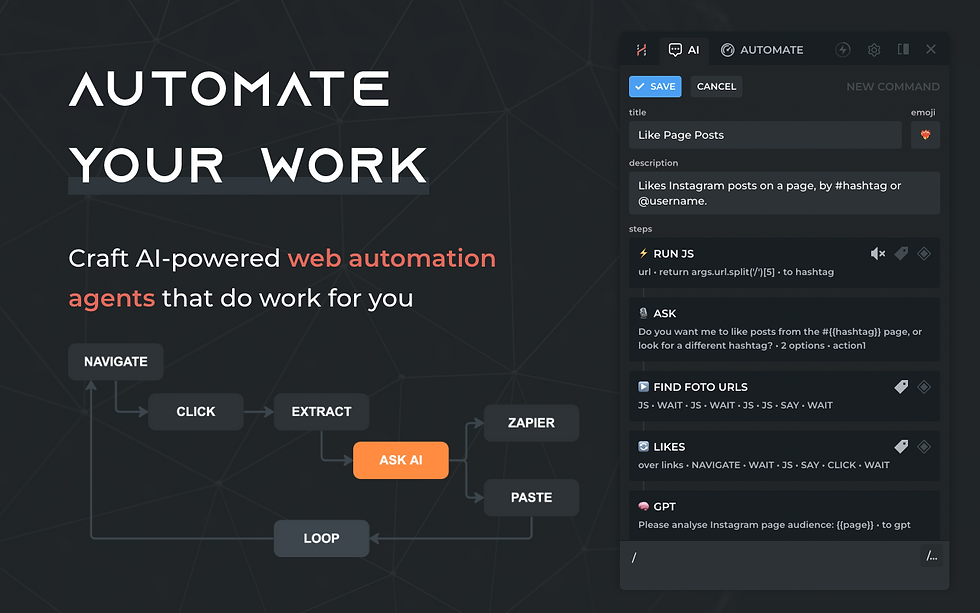
HARPA AI is a top pick for automation and connecting with other apps. You can make content, watch web pages, and use robots for over 100 commands. HARPA AI works with many apps and has a free version.
Feature/Aspect | HARPA AI | Sider |
Automation Capabilities | Lots of automation, web watching, robots, and 100+ commands for marketing, SEO, HR, and more. | Focuses on AI research help. |
Integration Options | Connects with 25+ apps like ChatGPT, Google Docs, YouTube, and more. | 15 connections, smaller range. |
Pricing Model | Free version and trial, no paid plan now. | Free, trial, and paid plans. |
Deployment Platforms | Web, iPhone, iPad, Android, Windows, Mac, Linux, Chromebook. | Same as HARPA AI. |
Unique Strengths | Big automation, web watching, lots of connections, free price. | Research-focused features. |
Pros
Easy to set up for page watching and scheduled summaries.
Runs in Chrome, so you don’t switch apps.
Connects with many AI and teamwork tools.
Cons
Many features take time to learn.
Privacy settings need careful checking for automation.
Users say HARPA AI helps them do more by automating boring jobs and making work smoother.
7.Do Browser
Overview
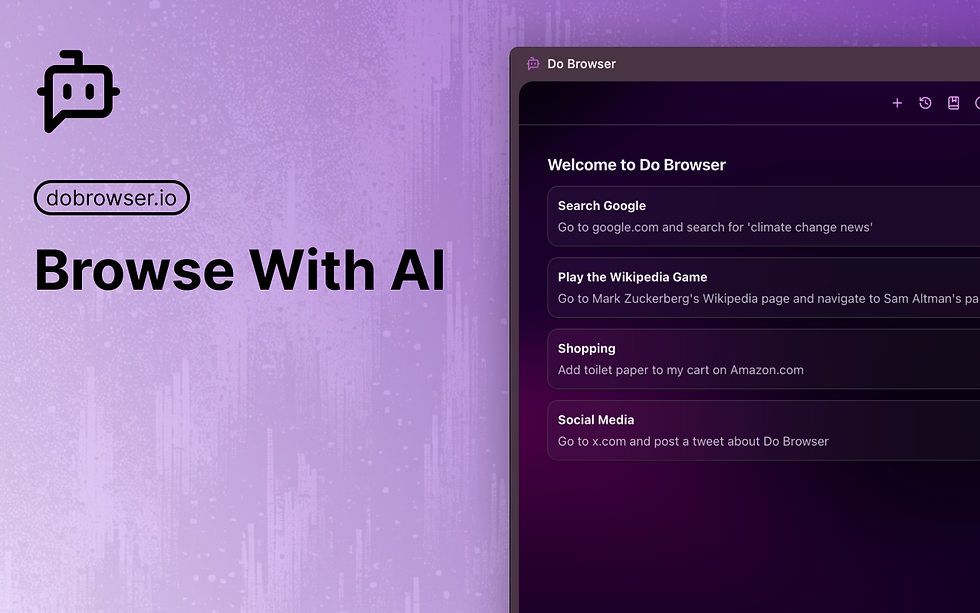
Do Browser is made for people who want a browser that helps them work. You can automate jobs, manage projects, and use AI to sum up info or make reports. Do Browser works with popular teamwork tools and helps teams work together.
Pros
AI built in for summaries and making content.
Project tools for teams.
Connects with big teamwork apps.
Helps automate work and manage tasks.
Cons
Some features need a paid plan.
New users may need time to learn.
8.TinaMind

Overview
TinaMind is a Chrome add-on that brings AI to your daily work. It helps with translation, grammar checks, and quick summaries of web pages and YouTube videos. You can use many file types and over 800 prompts for easy AI help.
Translates, checks grammar, and writes emails or articles.
Summarizes web pages and video highlights.
Simple and easy to use.
Works with ChatGPT, Claude, Gemini, and more.
Supports web pages, PDFs, Word, PPT, Excel, and code.
AI Search gives info right away.
Quick Commands for fast text work.
Pros
Easy to install and start using.
Real-time info and quick commands.
Writes and replies to emails automatically.
Makes voices and translates subtitles.
24/7 chat support for tech problems.
Cons
Some things need premium access.
Only works fully as a Chrome add-on.
9.Compose AI

Overview
Compose AI is a writing helper that saves you time and keeps your writing the same. It uses AI to finish sentences, learns your style, and works with Gmail, Google Docs, and Slack. You can write emails, documents, and posts faster.
与 Gmail、Google Docs 和 Slack 兼容。
随着时间推移,根据个人提示变得更好。
将内容复制到模板中以生成标准文档。
团队语音和 API 的高级功能。
优点
加快写作和内容制作速度。
保持您的语气和风格一致。
支持多个平台,便于工作。
修正语法并支持多种语言。
团队协作写作工具。
缺点
部分功能需要付费计划。
可能需要时间来匹配您的写作风格。
Compose AI 非常适合发送大量电子邮件、从事营销或团队协作并希望提高效率的用户。
10.Brave Leo AI

概览
Brave Leo AI 是一款浏览器助手,保护您的信息安全,并帮助您更高效地工作。它使用大型语言模型进行摘要、回答和内容生成,同时遵循严格的隐私规则。
AI 搜索和个性化结果。
总结文章、撰写电子邮件,并根据浏览内容生成内容。
注重隐私,无日志记录。
节省能源并提升安全性。
协助内容创作、翻译和编程。
优点
强大的隐私保护,确保数据安全。
浏览快速且无干扰。
实时更新和个性化 AI 帮助。
缺点
部分功能可能并非始终正常运行。
高级 AI 工具可能需要一定学习。
Brave Leo AI 最适合注重隐私并希望获得安全、高效浏览体验的用户。
2026 年 AI 生产力工具
领先的 AI 功能
如今,您可以使用有史以来最好的 AI 生产力工具。这些 AI 应用帮助您更快完成任务并与其他工具协作。您可以在几秒钟内制作演示文稿、更新项目并总结文档。2026 年的顶级 AI 工具帮助您和团队提高效率。
AI 可以管理项目并立即提供更新。
它可以设置您的日程并自动调整任务。
您可以使用简单问题搜索信息。
无代码工具让您无需编程即可自动化工作。
智能搜索帮助您快速找到所需内容。
安全功能保护您的数据免受他人侵害。
超过 100 个连接器让 AI 与您喜爱的应用协同工作。
AI 可以撰写笔记并总结文档以节省时间。
像 Zapier 这样的工具使用 AI 帮您处理繁琐工作。
以下是比较不同平台顶级功能的表格:
AI 如何提升生产力
AI 应用帮助您完成任务、规划一天并制作内容。2026 年,这些工具比 2023 年强大得多。现在,AI 代理可以完成工作、管理日历并适应您的工作方式。您可以立即获得更新、提醒和智能提示。借助 AI,您在无聊工作上花费的时间更少。
许多人使用 AI 工具完成任务的速度快 40%,结果提升 30%。您可以专注于重要工作,而 AI 处理简单任务。例如,AI 可以保护您的专注时间并改善会议效果。AI 写作工具帮助您快速撰写、总结和整理信息。
研究表明,AI 帮助技能较低的人赶上专家。在一项研究中,使用 AI 的出租车司机找到地点的速度快 5%。技能较低的司机提升了 7%,几乎与顶级司机相当。这意味着 AI 不仅让您更快,还帮助团队更好地协作。
提示:尝试使用 AI 应用进行任务管理、工作自动化并规划一天,以在 2026 年实现最高生产力。
Sider 替代方案比较表
功能与定价
选择项目管理软件时,您希望了解每个软件的差异。2026 年最好的 Sider 替代方案拥有众多AI 驱动的工具。这些工具可以匹配您的工作风格、预算和设备。许多平台提供免费试用,还具备灵活的价格和针对个人及团队的智能 AI 功能。
以下表格展示了Sider 及其顶级竞争对手的主要计划、价格和功能:
Sider 为您提供 AI 额度并支持多设备使用。如果选择更高阶计划,您将获得更多 AI 功能和设备支持。GitHub、GitLab、Jira 和 CircleCI 等其他选择也提供免费试用和不同价格。像 GitLab 这样的开源项目管理软件允许您自定义并节省成本。大公司通常选择具有强大 AI 且可扩展的工具。
提示:通过查看 AI 功能、价格层级、设备支持以及与其他工具的集成度来比较项目管理软件。这有助于您为团队和预算选择最佳工具。
大多数替代方案支持 iOS 和 Android 手机。主要差异在于价格、免费试用和智能 AI 功能。有些工具针对小型企业,其他则针对需要强大 AI 和项目管理功能的大型公司。
选择合适的 Sider 替代方案
评估您的需求
您希望团队更高效地工作并取得更好成果。首先,了解团队的任务执行和协作方式。考虑团队规模和项目类型。如果有很多选择,请使用筛选器排除不合适的工具。如果选项较少,请并排比较其功能。这将帮助您为团队工作空间选择最佳 AI 工具。
选择 Sider 替代方案时请考虑以下因素:
团队拥有的选择数量
帮助您筛选选项的工具
轻松比较功能的方法
支持任务管理和工作自动化的功能
是否与您当前的 AI 应用和工作流兼容
是否支持实时协作和任务自动化
提示:写下团队协作和任务管理的首要目标。这将帮助您将 AI 工具与团队需求匹配。
将工具与工作流匹配
您需要一款符合团队日常工作方式的工具。寻找内置团队工作空间功能的 AI 工具。这些功能应帮助您管理任务、自动化工作并创建内容。确保该工具支持团队实时协作和共享更新。
查看此表了解每个工具与团队工作的匹配情况:
工具名称 | 任务管理 | 自动化 | 团队协作 | 集成团队工作空间 | 实时协作 |
是 | 是 | 是 | 是 | 是 | |
Monica AI | 是 | 是 | 是 | 是 | 是 |
Merlin | 是 | 是 | 是 | 是 | 是 |
Dia Browser | 是 | 是 | 是 | 是 | 是 |
选择与团队工作匹配并帮助实现目标的工具。合适的 AI 工具将帮助您管理任务、自动化简单工作并提升团队协作。当工具与工作流契合时,团队将取得更好成果。
2026 年,您有许多强大的 Sider 替代方案可提升生产力。每款工具都使用 AI 帮助您管理任务、整理信息并更快工作。您可以使用 AI 进行写作、搜索和日常工作自动化。这些 AI 工具支持团队协作并使工作流更顺畅。尝试不同的 AI 平台,找到最适合您需求的工具。分享您的反馈或订阅以获取更多 AI 生产力提示。您对 AI 工具的选择可以改变每天的工作方式。
常见问题
是什么让 AI 生产力工具优于传统项目管理软件?
AI 生产力工具帮助您更快完成工作。您可以获得智能提示、摘要和自动化。这些工具学习您的工作方式并简化流程。您可以管理项目并自动化工作。它们帮助团队实时协作并共享工作空间。
我如何为团队选择最佳的 Sider 生产力替代方案?
考虑团队的需求。检查工具是否具备 AI 自动化、任务管理和协作功能。确保软件与团队工作方式匹配。尝试免费选项,看看哪些 AI 工具有助于创建和自动化任务。
AI 应用能否帮助自动化任务和日程安排?
是的,AI 应用可以自动化工作并设置日程。许多 AI 工具内置日历和提醒功能。这些功能帮助您规划项目并按时完成。AI 日程安排节省时间并提升团队效率。
是否有支持团队协作的 Sider 免费替代方案?
有许多支持团队协作的免费选择。这些 AI 工具提供项目管理、实时协作和自动化功能。您可以使用它们进行创建、自动化工作并共享工作空间。尝试不同的 AI 应用,找到最适合团队的方案。
AI 驱动的解决方案如何改善工作流和内容创作?
AI 驱动的工具通过为您处理繁琐工作使工作更轻松。您可以使用 AI 撰写、总结和整理信息。这些工具帮助管理项目、团队协作和任务自动化。您将获得更快的结果和更好的工作成果。


