top of page

Google 的 Gemini 借助 Nano Banana 升级新增多轮、多图像 AI 编辑功能

Introduction to Google Gemini Nano Banana upgrade and multi-turn multi-image editing

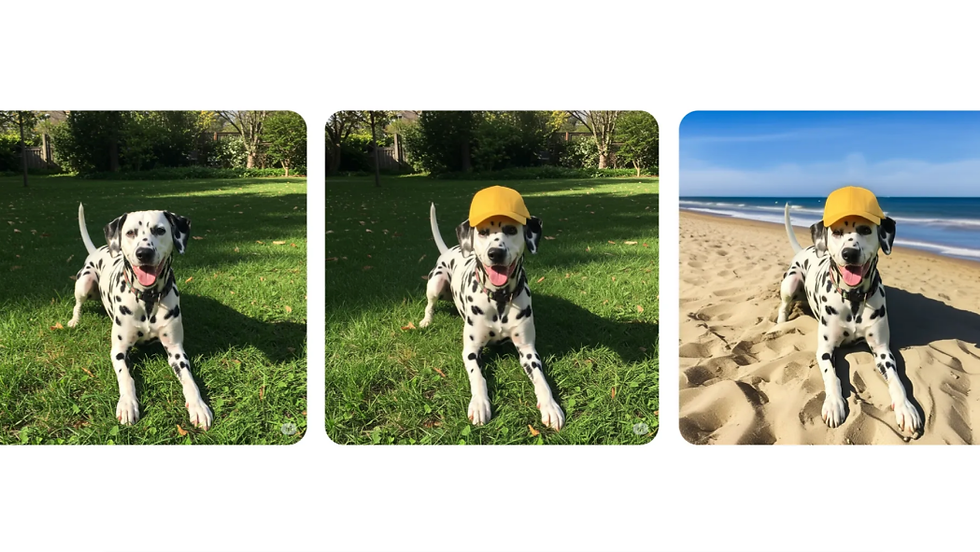
Google’s latest update to its image model — marketed as the Gemini 2.5 Flash Image update and colloquially dubbed the Nano Banana upgrade — introduces true conversational image editing that spans multiple turns and multiple images. At its heart this release enables multi-turn image editing (iterative, stateful edits across a conversation) and multi-image editing (coordinated edits applied to several assets in the same session), letting creators request refinements, rollbacks, and cross-image consistency without leaving the chat flow. Google’s Cloud announcement summarizes the Gemini Image 2 roadmap and MLOps improvements that underlie this change, and early coverage highlights the user-facing Nano Banana improvements and experiments.

Why this matters: creators, product teams, marketers, and researchers all wrestle with iteration costs. Multi-turn image editing gives more granular control by maintaining a conversational state so designers can say “make the shirt red” then “rotate the pattern slightly” without re-uploading or re-specifying the whole scene. Multi-image editing dramatically cuts batch effort — think creating consistent ad variants or localized product shots where the same asset transformations must be applied across many images. That combination affects speed, consistency, and the creative feedback loop.

This article walks through the technical foundations, typical user workflows and case studies, analytics and troubleshooting patterns, and the regulatory and ethical considerations teams should weigh when adopting Gemini 2.5 Flash Image and the Nano Banana upgrade. Throughout, you’ll find concrete examples, implementation signals, and practical next steps to help teams test and scale conversational image editing.

Insight: The Nano Banana upgrade shifts image editing from isolated one-off operations to interactive, stateful collaboration between human intent and model-driven transforms.

Key takeaway: Gemini’s multi-turn, multi-image pipeline reduces iteration time and increases control, especially for batch creative and prototyping workflows.

Gemini 2.5 Flash Image features, multi-turn and multi-image editing explained

Gemini 2.5 Flash Image features, multi-turn and multi-image editing explained

Gemini 2.5 Flash Image extends Gemini’s image capabilities with conversation-aware editing, enabling users to iteratively refine a composition, apply linked edits across images in a session, and use semantic commands (add, erase, alter attributes) in natural language and visual references. The Nano Banana upgrade focuses on responsiveness and coherency: lower latency for edit turns, improved consistency when editing the same element across several images, and UI affordances that make versioning and rollback more intuitive. Google’s Vertex AI documentation provides the mechanics of image edits and masks used by Gemini-style systems, and the Nano Banana press coverage highlights the upgrade’s multi-image coherency and performance claims.

User-facing capabilities include:

  • Iterative refinements across conversational turns (change color, then texture, then lighting).

  • Simultaneous editing of multiple images with shared transformations (apply a style or object insertion consistently).

  • Semantic add/erase/manipulate controls that understand high-level instructions (e.g., “remove the background person, replace with a bicycle”).

  • UI affordances: conversation history, visible version thumbnails, drag-to-link edits across images, and mask preview overlays.

Performance claims and practical limits: Gemini 2.5 is engineered to reduce round-trip latency for short edits and to handle common image sizes used in web and mobile creative work; however, very high-resolution raw assets, extremely large batch sizes, or ultra-fine pixel edits remain slower or less precise than manual tools. Google’s Cloud announcement discusses the MLOps and deployment improvements that help lower latency and scale inference.

Insight: the interface matters as much as the model — better versioning, previewing, and link controls multiply model utility.

What Gemini 2.5 Flash Image delivers to users

Gemini 2.5 Flash Image supports sequences such as:

  • Refine: “Make the sofa teal,” then “increase cushion shadow detail,” then “slightly flatten the fabric texture.”

  • Rollback: request a prior version by saying “undo the last two changes.”

  • Blend: combine elements from two images, such as “place the hat from image 2 onto the model in image 1 and match color temperature.”

Multi-image sessions are initiated by uploading multiple images into a single conversation or by referencing earlier images with names (e.g., “apply to all product shots in this conversation”). The system tracks identifiers for each image and allows linking operations so that a mask or reference from one image can be reused as a template across others.

Key takeaway: Multi-turn sequences allow designers to iterate naturally — submit a high-level intent, evaluate a proposed edit, and refine it conversationally without losing context.

Nano Banana upgrade highlights and benchmarks

The Nano Banana upgrade called out improvements in:

  • Quality: better object grounding and fewer unnatural artifacts in iterative edits.

  • Speed: reduced per-turn latency through inference optimizations and caching of intermediate latent states.

  • Multi-image coherency: improved color, geometry, and attribute alignment when applying the same edit across multiple assets.

Benchmarks used in early reports include perceptual similarity measures across edit sequences and latency averages for small (512×512) to medium (2048×2048) images. Real-world scenarios to test:

  • A/B creative generation: measure time-to-first-acceptable-variant.

  • Batch style application: measure inter-image color consistency metrics.

  • Iterative retouch: measure number of turns to reach designer approval versus traditional tools.

Key takeaway: Benchmarks matter, but evaluate using your own creative acceptance criteria: perceived quality, iteration count, and time savings.

UX changes for iterative image editing

To support conversational flows, Gemini’s UI introduces:

  • Conversation history pane with thumbnail snapshots for each turn.

  • Versioning controls (label, compare, revert) and timeline scrubber for edits.

  • Mask editing tools and alignment guides for linking edits across images.

  • A “link edits” toggle that applies the same semantic operation to selected images.

These UX changes help preserve edit intent and make undo/redo meaningful in a multi-turn context. For example, users can create a mask over a product and then link that mask across five photos to apply an identical color change while adjusting lighting per image.

Key takeaway: Good UX prevents context drift by surfacing intent and making edit scope explicit.

Practical limits and best use cases

Where Gemini excels:

  • Creative design, moodboard exploration, and rapid prototyping.

  • Batch creative tasks like marketing variants, product mockups, and localized ads.

  • Early-stage concept art where speed and ideation matter more than pixel-perfect realism.

Where it may struggle:

  • Extremely fine-grained photorealism that demands complex manual retouching.

  • Very large batches requiring deterministic, pixel-accurate transformations across thousands of images.

  • Cases where strict provenance and legal attribution require complex audit trails absent from basic interfaces.

Key takeaway: Use Gemini 2.5 Flash Image for idea generation, consistent styling across moderate batches, and workflows where human-in-the-loop validation is acceptable.

How multi-turn image editing works in Gemini, technical overview

How multi-turn image editing works in Gemini, technical overview

At a high level, multi-turn image editing in Gemini coordinates three pieces: a conversational state that stores prior prompts and versions, an edit-intent parser that maps language to editing operators, and a stateful image representation that can be transformed and re-rendered across turns. The system must persist masks, latent representations, and alignment metadata between turns so edits remain consistent and composable. Vertex AI’s image-edit overview explains mask-aware editing and the importance of stateful handling for repeatable edits, and academic work on semantic image editing provides background for the operations Gemini performs.

Insight: multi-turn editing is an orchestration problem as much as a modeling problem — storing and applying intent reliably across turns is the core technical challenge.

Conversation state, prompts and edit intents

Gemini maps natural language prompts to discrete edit intents such as insert object, erase element, change attribute, or spatial transform. The conversation state holds the sequence of intents, associated masks, and metadata (e.g., which image(s) were targeted, user approvals, and version labels). When a user issues “remove the lamp and brighten the corner,” the intent parser splits and prioritizes operations, generates or refines masks, and schedules the transforms to avoid conflicting edits.

Practical implementation details:

  • Intent parsing uses language understanding modules trained to recognize editing verbs and object references.

  • Confidence scores guide when the system should ask a clarifying question (e.g., “Do you mean the lamp on the left or the floor lamp?”).

  • State persistence caches intermediate latent representations to speed up subsequent render steps.

Actionable takeaway: Structure prompts clearly (verb → target → attribute) to reduce clarification loops: for example, “erase the lamp on the left; brighten the upper-left corner by 20%” yields faster, accurate edits.

Semantic image editing building blocks

The main building blocks for semantic editing are:

  • Segmentation and mask generation: identify pixel regions for targeted changes.

  • Mask-aware synthesis: inpainting or compositing conditioned on the preserved surroundings.

  • Attribute control: disentangled controls for color, texture, lighting, and geometry so each attribute can be adjusted without unintended changes.

These operations depend on robust segmentation models and latent-space editors that can alter attributes without degrading unrelated content. Academic literature on semantic editing techniques describes mask-guided inpainting and disentangled attribute control that underpin commercial systems.

Actionable takeaway: Provide high-quality reference images and explicit mask hints when possible — the model performs best with clear spatial constraints.

Multi-image pipelines and synchronization

To coordinate edits across images, Gemini uses shared templates, linked masks, and cross-image conditioning. Techniques include:

  • Shared masks: reuse a mask created in one image as a spatial template in others, with automatic alignment adjustments.

  • Reference frames: anchor edits to a canonical pose or object and transform coordinates to each image’s geometry.

  • Latent conditioning: store a style or attribute vector (color profile, texture logits) and apply it consistently across assets.

These patterns help maintain cross-image coherency for attributes like color temperature, object placement, and style. The system also supports exceptions: apply a linked edit to five images but exclude one with a single toggle.

Actionable takeaway: When planning batch edits, create a canonical reference—one image that defines masks and style—and link others to that reference for best consistency.

Prompt engineering and control knobs for stable outputs

Best prompt practices for multi-turn sessions:

  • Be explicit: separate actions (erase/insert), targets (object/location), and attributes (color/size).

  • Use reference anchors: “match the blue from image 3” to tie edits to existing assets.

  • Include constraints: “keep shadows consistent” or “preserve face details” to preserve delicate regions.

  • Use short verification turns: after a major edit, ask the model to summarize the applied operations to validate intent.

Control knobs commonly available involve temperature-style sampling settings, size/quality trade-offs, and a “strict adherence” flag to prioritize deterministic transforms over creative variation.

Key takeaway: Prompt discipline reduces context drift and speeds convergence to desired results.

Multi agent systems and multi modality models behind Gemini image editing

Multi agent systems and multi modality models behind Gemini image editing

Modern conversational image editing is frequently implemented as a coordinated set of specialized agents rather than a single monolithic model. Multi-agent systems distribute tasks to agents that handle intent parsing, mask generation, layout planning, and final rendering, then reconcile outputs into a single edit. This orchestration pattern improves modularity and enables targeted scaling: each agent can be optimized, validated, and updated independently. Academic work on integrating vision, graphics, and NLP provides patterns for this orchestration and shows how agents can exchange structured representations to maintain coherence.

Insight: decomposing the pipeline into agents reduces the cognitive load on a single model and enables tighter control and auditing of each editing stage.

Multi agent orchestration for interactive editing

Typical agent roles include:

  • Intent agent: parses natural language into structured operations.

  • Perception agent: performs segmentation and object detection to create masks and identify key assets.

  • Layout agent: plans spatial arrangements, resolves occlusions, and proposes transformations.

  • Rendering agent: performs mask-aware synthesis, lighting consistency, and texture blending.

  • Verification agent: checks for artifacts, policy compliance, or unmet constraints.

Coordination protocols are lightweight: agents exchange JSON-like structures (e.g., {operation: "insert", target: "hat", mask_id: 12, style_vector: X}) and use confidence scores to request clarifications. This architecture also makes it easier to add human-in-the-loop checkpoints where a reviewer can approve or modify an intermediate mask.

Actionable takeaway: For production deployments, design agent interfaces so each stage can emit interpretable logs and checkpoints for auditing.

Vision graphics and NLP integration patterns

Bridging free-form instructions to pixel edits involves several intermediate representations:

  • Scene graphs or object lists that capture semantic relationships (object A sits on object B).

  • Spatial grids or keypoints for geometric alignment.

  • Latent style vectors for color and texture control.

From an engineering standpoint, these representations allow deterministic transforms (e.g., scale this object by 10%) and generative synthesis without repeating entire rendering pipelines from scratch. Research on integrating graphics and NLP demonstrates how mapping language to discrete scene edits reduces ambiguity and improves repeatability.

Actionable takeaway: Use structured prompts that implicitly or explicitly build a scene graph (e.g., “place the red mug to the right of the laptop, slightly rotated toward the camera”).

Advances in multi modality VLMs and their impact

Progress in multi-modality vision language models (VLMs) drives improvements in object grounding, commonsense layout, and cross-image coherency. Better grounding reduces hallucinated details, and models that handle both language and pixels can reason about edits (e.g., “make the lamp smaller so it fits the table”) with improved spatial awareness. These capabilities amplify the power of multi-turn editing by reducing misinterpretation across conversational turns.

Key takeaway: Improvements in VLMs translate directly into fewer clarification cycles and more reliable multi-image consistency.

MLOps and scaling considerations for production use

Production systems must address deployment, latency, and continuous improvement:

  • Model deployment patterns: use segmented agents and autoscaling for high-reliability inference.

  • Latency minimization: cache intermediate latent representations and use model distillation for faster turn responses.

  • Continuous improvement cycles: collect labeled feedback (accept/reject scores) and retrain intent parsers to reduce clarification frequency.

Actionable takeaway: Run small pilots with telemetry on turn counts, clarification rates, and per-turn latency to prioritize optimization efforts.

Practical applications and case studies for Gemini multi image editing in creative workflows

Practical applications and case studies for Gemini multi image editing in creative workflows

Gemini’s multi-turn and multi-image editing maps cleanly to many creative and commercial workflows. Artists can iterate on concepts quickly, marketing teams can generate localized creative variants, ecommerce teams can produce consistent product images, and researchers can visualize hypotheses without investing in heavy manual retouching. Early press coverage and community experiments illustrate how the Nano Banana upgrade improves batch consistency and iteration velocity.

Insight: multi-image editing converts repetitive manual work into a high-leverage creative process.

Creative artists and AI art workflows

A typical artist workflow: 1. Generate several base compositions from prompts. 2. Pick a concept and request iterative edits to refine pose, lighting, and style. 3. Use linked edits to apply a successful color palette or pattern across the whole series for a cohesive body of work.

Example: an illustrator generates 6 concept images, selects one and asks Gemini to “swap the jacket color to deep mustard, increase fabric texture, and add stitched seams,” then applies the same style to the other five images with a single command. This reduces the repetitive tuning artists often perform.

Actionable takeaway: Use multi-turn editing to move from ideation to a consistent series in fewer than half the manual editing steps.

Commercial content generation and marketing assets

Marketing teams can:

  • Produce A/B variants: tweak headlines, background colors, or product placement across dozens of images in one session.

  • Localize creatives: change signage language or color palettes to match regional tastes while preserving brand composition.

  • Produce consistent product mockups: place the same product in multiple scenes with matched lighting and style.

Case scenario: a retail brand uploads ten product shots, creates a mask for the product area in one image, and links the mask to others to change the fabric pattern consistently for a seasonal campaign.

Actionable takeaway: Create canonical templates early in the workflow (masked reference images and a style vector) to speed multi-image batch edits.

Research, education and prototyping scenarios

Researchers and educators use multi-turn editing for:

  • Visualization of models and experiment results by iteratively refining plotted elements.

  • Classroom demos showing progressive changes (e.g., how color grading affects mood).

  • Rapid prototyping of UI/UX concepts by testing multiple look-and-feel variants in a single conversation.

Actionable takeaway: Use multi-turn editing as a teaching tool to demonstrate causal changes (change one attribute at a time and document outcomes).

Community case snapshots and press highlights

Early adopters and press highlight:

  • Faster iteration cycles and reduced need for manual compositing.

  • Improved cross-image coherency in batch use cases as demonstrated in Nano Banana previews.

  • Community-shared prompt templates for common operations, accelerating onboarding for new users.

Key takeaway: The greatest immediate ROI is in workflows that previously required repeated manual adjustments across multiple assets.

User experience, analytics, community troubleshooting and best practices

User experience, analytics, community troubleshooting and best practices

Adoption of multi-turn, multi-image editing depends on discoverability, stable UX patterns, and robust community support. Understanding how users behave and the common failure modes helps teams design better onboarding and troubleshooting instructions. While public analytics dashboards vary, common signals reported by early deployments include high engagement in first sessions and drop-off at points of model confusion (clarification loops).

Insight: User education on prompt structure and session management cuts friction dramatically.

用户行为分析洞察

典型监控指标:

  • 首次成功编辑时间:用户获得可用结果所需的时间。

  • 收敛轮次:达到最终版本的平均对话轮次。

  • 跨会话留存:用户是否会返回多图像编辑器,还是回退到传统工具。

可执行要点: 对界面进行检测以捕获轮次级接受/拒绝信号,并收集带注释的示例用于再训练。

多轮会话的常见问题与修复

已报告的故障模式与修复:

  • 遮罩不匹配:自动生成的遮罩遗漏了对象部分。修复:手动优化遮罩或提供边界参考(“包含灯座”)。

  • 上下文漂移:模型在长会话中遗忘早期约束。修复:重述关键约束或使用命名引用(“颜色保持‘StudioStyle1’”)。

  • 跨图像色彩不一致:由单独渲染过程导致。修复:创建并应用共享风格向量或参考图像。

可执行要点: 鼓励用户频繁保存检查点并标记版本,以降低回溯成本。

社区教程、模板和共享提示

社区正在发布常见任务的模板:

  • 产品样机模板,带有可复用遮罩和简短提示模式。

  • A/B 生成提示包,指定要测试的变体(颜色、背景、标题)。

  • 常见伪影的排查清单。

这些社区资源可缩短上手时间,并使结果更可预测。

可执行要点: 维护一个针对品牌需求定制的内部提示库,并与设计师和营销人员共享。

可靠迭代编辑的最佳实践

操作建议:

  • 会话管理:限制单个对话线程的会话长度,并在重大编辑后设置检查点。

  • 检查点:导出中间版本并记录应用的意图以便审计。

  • 参考使用:始终上传主参考图像用于风格或属性迁移。

  • 人工审核门:对于生产资产,在发布前要求人工批准步骤。

关键要点: 将多轮会话视为有状态事务——保存、标记并审计每个有意义的里程碑。

Gemini 生成图像的监管、伦理与版权考量

Regulatory, ethical and copyright considerations for Gemini generated images

随着 AI 生成图像成为常规做法,法律与伦理防护至关重要。美国版权局及其他机构正在积极明确 AI 辅助创作与作者身份和版权性的交集。美国版权局提供了关于 AI 生成内容的指导,概述了当前归属和人类作者身份的法律基线。组织还必须解决来源、源图像同意以及防止滥用的保障措施。

洞察:负责任的使用需要在工作流中内置来源和人工监督,而非事后添加。

美国版权局指导与法律基线

官方指导的关键要点:

  • 人类作者身份重要:完全由机器生成且无创造性人类输入的作品通常面临版权资格问题。

  • 当人类做出超越常规操作的创造性选择时,AI 辅助作品可获得版权。

  • 组织应记录人类在创作中的角色,以支持作者身份主张。

可执行要点: 记录人类提示、批准步骤和编辑,以构建支持作者身份主张的审计轨迹。

归属、来源与同意最佳实践

实用步骤:

  • 存储来源元数据:原始图像来源、提示历史、使用的遮罩和用户批准。

  • 获取源图像的权利,并记录输入中任何可识别人物的同意。

  • 在政策或平台规则要求时使用可见或嵌入的归属标签。

可执行要点: 在上传时实施自动元数据捕获,并在整个编辑轮次中保留。

防止滥用或侵权输出的缓解措施

减少滥用和侵权的控制:

  • 内容过滤和策略模型,用于标记风险编辑(例如创建公众人物的深度伪造)。

  • 对潜在敏感输出的 人工审核门。

  • 对可能用于复制受保护作品的高容量操作进行速率限制和审计。

可执行要点: 将自动审核与人工在环审查相结合,处理边缘情况和政策敏感输出。

企业采用与治理建议

治理清单:

  • 政策:定义允许用例、受限内容类别和批准工作流。

  • 日志:维护编辑历史、用户 ID 和版本差异。

  • 培训:教育团队了解归属、同意和质量期望。

  • 法律审查:就生成图像的许可模式咨询法律顾问。

关键要点: 企业应将对话式图像编辑视为具有合规义务的功能——从第一天起就设计策略和遥测。

关于 Google Gemini 多轮多图像编辑与 Nano Banana 升级的常见问题

FAQ on Google Gemini multi turn multi image editing and the Nano Banana upgrade

Q1: 什么是多轮图像编辑,与单次编辑有何不同? A1: 多轮图像编辑 意味着系统保留对话状态和先前编辑,以便迭代优化图像(例如先改颜色,再改纹理),而单次编辑仅应用一次性转换且无内置先前步骤记忆;实施机制详见 Vertex AI 的图像编辑概览,其中解释了遮罩感知和有状态编辑流程

Q2: Gemini 能否在同一会话中编辑多张图像并保持编辑一致? A2: 可以——Gemini 的多图像会话功能允许您链接遮罩和风格参考,以便在资产间应用相同的语义编辑,并具备对齐和色彩一致性控制,如 Nano Banana 升级的多图像一致性改进的新闻说明 所示。

Q3: 如何构建迭代编辑提示以避免上下文漂移? A3: 使用明确的指令序列(操作→目标→属性)、参考锚点(例如“匹配图像 2”),并定期检查点重要约束;这些技术与 Vertex AI 文档中描述的多轮管道最佳实践一致。

Q4: 常见故障模式有哪些,如何快速排查? A4: 常见问题包括遮罩不匹配、色彩不一致和上下文漂移;通过手动优化遮罩、使用共享风格向量或参考图像,以及标记检查点以便在模型发散时回退来修复。

Q5: Gemini 2.5 Flash Image 的输出是否可获得版权,归属方面需要了解什么? A5: 版权性取决于人类创造性贡献以及保留的创造性控制程度;保留提示、批准和编辑的来源记录以支持作者身份主张,并遵循 美国版权局关于 AI 生成作品的指导

Q6: 团队如何将 Gemini image editing 集成到生产 MLOps 管道中? A6: 从记录每轮遥测(接受/拒绝、延迟、遮罩)的试点开始,使用模块化代理设计进行推理扩展,并按照 Gemini/MLOps 公告中的部署讨论建议,使用带标签反馈构建再训练循环。

Q7: 哪里可以找到社区教程和模板以加速采用?A7: 社区中心和供应商提供的画廊经常发布提示模板和遮罩示例;用针对品牌约束和产品需求定制的内部模板库补充社区材料,以确保一致性。

Q8: 使用多图像编辑时应启用哪些隐私和内容审核控制? A8: 为敏感类别启用内容过滤,要求源图像中可识别个人的同意,并为可能产生误导或有害的输出配置人工审核门,与企业治理最佳实践保持一致。

结论:Gemini 图像编辑的趋势、可执行洞察与未来展望

Conclusion: Trends, actionable insights and future outlook for Gemini image editing

Gemini 2.5 Flash Image 的 Nano Banana 升级标志着从单次图像工具向对话式、有状态和批量编辑的实际转变。多轮图像编辑多图像编辑 的结合解锁了更快的迭代周期、更好的批量一致性,以及与创意团队现有工作方式(迭代与协作)一致的工作流。

近期(12–24 个月)值得关注的趋势:

  • 持续提升照片真实感并减少所需的迭代修正。

  • 随着 VLM 更稳健地学习表示风格向量,跨图像一致性更强。

  • 更精细的企业来源、审计和审核控制。

  • 与创意套件和营销平台更深入集成。

  • 社区驱动的提示模板和共享库的出现。

机会与第一步:

  • 尝试多轮提示:运行小型设计冲刺,比较迭代次数和相对于手动工作流节省的时间。

  • 采用社区模板并创建内部提示库以实现品牌一致性。

  • 从第一天起纳入来源元数据捕获(上传来源、提示历史、遮罩)。

  • 运行聚焦遥测收集(轮次计数、延迟、接受率)的试点 MLOps 测试。

  • 建立治理:定义允许用例、启用审核控制,并要求对生产资产进行人工批准。

不确定性和权衡依然存在:法律框架正在演进,非常高保真修图仍受益于专家手动工作,扩展到数千张图像需要工程投入。将当前能力视为创意构思和批量创意工作的强大加速器,同时设计人工监督和可审计性。

最终要点: Nano Banana 升级使 Gemini 成为迭代、对话式图像工作流的强大工具——结合严谨提示实践、来源捕获和人工监督的团队将获得最大价值并管理风险。


免费开始

一款本地优先的AI助手,具备个人知识管理功能

为了获得更好的人工智能体验,

remio 目前仅支持Windows 10+ (x64)M-Chip Mac

在你的大脑里添加一个搜索栏

Ask remio

记住一切

​无需整理

bottom of page