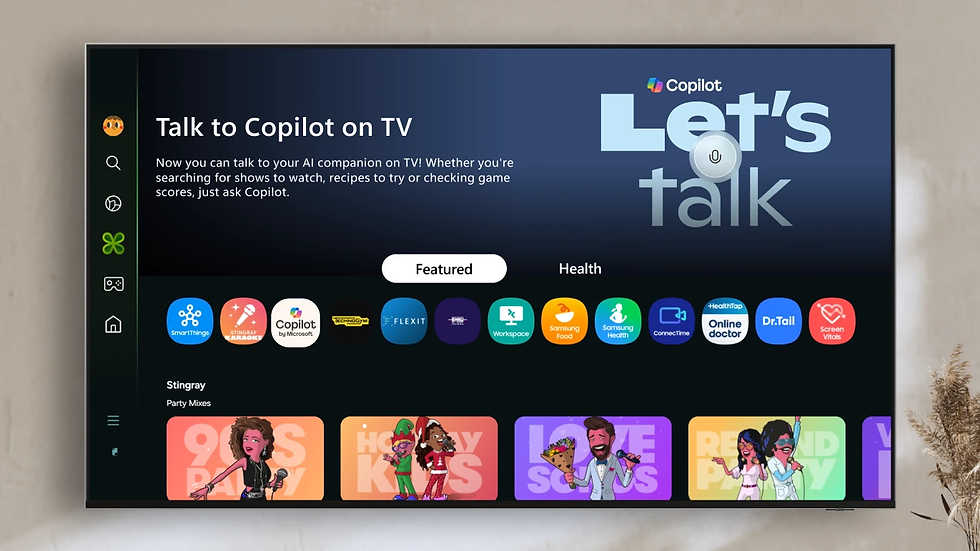
CES 2026: Why Smart TV AI Features Are Ruining the Viewing Experience


If you bought a television recently hoping for a better picture, you might have noticed you received a surveillance device instead. The trend coming out of CES 2026 confirms that manufacturers are no longer content with just selling you a screen. They want to sell you a relationship with an AI agent—whether you want one or not.
The integration of Smart TV AI has shifted from helpful voice commands to invasive overlays that shrink your video content to make room for data you didn't ask for. With companies like Hisense, Samsung, and Google pushing features that clutter interfaces and harvest viewing habits, users are looking for ways to opt out.
Here is a breakdown of how Smart TV AI is impacting user experience, followed immediately by how you can take control of your hardware.
How to Disable Invasive Smart TV AI and Tracking

Before analyzing the industry shifts, let’s address the most practical concern: reclaiming your TV. Many users feel that the current implementation of Smart TV AI degrades performance and violates privacy. You don't have to tolerate it.
The "Dumb Monitor" Method
The most effective way to stop a smart TV from analyzing your behavior is to never give it internet access.
Disconnect Wi-Fi and Ethernet: During the initial setup, skip the network connection step if the firmware allows. If you are already connected, go to settings and "Forget Network" or physically unplug the Ethernet cable.
Use External Streaming Devices: Rely on an Apple TV, Nvidia Shield, or a dedicated PC for streaming. These devices generally offer cleaner interfaces and less aggressive data harvesting than the native OS of a budget Samsung or LG TV.
Manage Firmware Updates: Manufacturers often introduce new ad placements or restrictions in software updates. Keeping the TV offline prevents features from degrading over time.
Blocking Telemetry via DNS (Pi-hole)
If you must use the TV’s native apps (for casting or specific proprietary features), you can block the "phone home" signals at the router level.
Many tech-savvy users now deploy a Pi-hole. This is a network-wide ad blocker that acts as a DNS sinkhole. By monitoring the requests your Smart TV AI makes, you can blacklist the domains used for tracking and ads. This allows the TV to stream Netflix but stops it from sending screenshots of your content back to the manufacturer.
Addressing ACR (Automatic Content Recognition)
Samsung and other major brands use ACR technology to capture pixels from your screen—up to every 500 milliseconds—to identify what you are watching. This data is sold to advertisers.
Samsung: Look for "Viewing Information Services" or "Voice Recognition Services" in the Terms & Conditions section of the settings and disable them.
LG: Check under "General" > "AI Service" and toggle off AI recommendations.
Vizio/Other: Look for "Smart Interactivity" or "Viewing Data" in the system menu.
The Problem with Smart TV AI in 2026

The backlash against Smart TV AI isn't just about privacy; it is about the fundamental degradation of the product. The television is supposed to be a portal to cinema and gaming. CES 2026 showcases suggest it is becoming a billboard for generative algorithms.
Cluttering the Screen
The most jarring development is the theft of screen real estate. Hisense, for example, showcased an AI agent capable of pulling up real-time data on football players. While technically impressive, this requires the TV to display sidebars and overlays that compress the actual video.
To accommodate this data flood, Hisense even prototyped a 21:9 aspect ratio display. They literally changed the shape of the television not to show movies better, but to fit the Smart TV AI interface alongside the content. For the average user with a 60-inch or 70-inch screen, these overlays turn a cinematic experience into a cluttered desktop environment.
Latency and "Feature" Bloat
Google’s demonstration of its Veo model on televisions highlighted another issue: the hardware can't keep up. The feature allows users to generate images or videos on the TV. However, generating a simple 8-second video clip took nearly two minutes of processing time.
When Smart TV AI features cause menu lag or force users to wait for simple tasks, the "smart" functionality becomes a liability. Users want instant response times, not a two-minute wait for a generative video gimmick.
Privacy Concerns and Legal Pushback
The aggressive data collection required to power these AI features has crossed legal lines. Smart TV AI relies on knowing what you are doing to offer "help."
A recent temporary restraining order in Texas against Samsung highlighted the severity of ACR usage. The allegation is that the TVs utilize this technology to capture screen content without sufficient consent, effectively spying on the user's living room consumption habits.
This legal friction suggests that the industry's rush to monetize viewer data through AI is moving faster than consumer protection laws can handle. The "value" provided to the customer (recipe recommendations or sports stats) is often disproportionately small compared to the value of the data extracted from them.
The Contextual Search Fails
Amazon’s Alexa Plus and similar tools now allow users to jump to specific scenes in a movie by describing them. While this sounds useful on paper, in practice, it complicates a simple remote-control interaction. Voice controls introduce friction—misunderstandings, server lag, and the uncanniness of talking to your appliance—where a simple button press used to suffice.
The Market Gap: The Demand for "Dumb" Tech

As manufacturers pour R&D budgets into Smart TV AI, a clear gap is forming in the market. There is a growing, vocal cohort of consumers asking for "dumb TVs"—high-quality panels with high dynamic range (HDR) and fast refresh rates, but zero operating system bloat.
Budget Brands Closing the Gap
Interestingly, budget brands like TCL and Hisense (despite their AI prototypes) are accidentally servicing this need better than premium brands. Their hardware innovations in Mini-LED and quantum dot technology have narrowed the picture quality gap with Sony and Samsung.
Because these "budget" sets are cheaper, users feel less guilt about disconnecting them from the internet and ignoring their built-in software entirely. The strategy for 2026 is becoming clear: buy the best panel you can afford from a value brand, keep it offline, and bring your own processing power via a console or external stick.
Shipment Declines
Data from Omdia indicates a 0.6% year-over-year drop in TV shipments in the third quarter leading up to 2026. While the economy plays a role, product fatigue is real. If the new "upgrade" involves more ads and more surveillance via Smart TV AI, consumers have little incentive to replace their older, faster, less annoying televisions.
What to Expect Next

The industry trajectory suggests a conflict between manufacturer incentives and user desires. TV makers need recurring revenue from ads and data to subsidize hardware costs. Users just want a display.
Expect the Smart TV AI ecosystem to become a walled garden. We will likely see more exclusivity, where an LG TV works best with other LG appliances, or a Samsung TV refuses to play nice with non-Samsung soundbars without "AI configuration."
However, the workaround remains simple. As long as HDMI ports exist, the smartest move is often to make your TV as dumb as possible.
FAQ: Managing Smart TV AI
1. Can I completely remove the Smart TV AI operating system?
No, you cannot replace the firmware on most modern TVs like you can with a computer. However, you can bypass the OS entirely by not connecting the TV to the internet and using an external HDMI streaming stick for all your content.
2. What is ACR technology in Smart TVs?
ACR stands for Automatic Content Recognition. It is a tracking feature that captures pixels or audio from your screen to identify what you are watching. Manufacturers use this data to recommend content and serve targeted advertisements.
3. Does turning off Wi-Fi disable all AI features?
Disconnecting Wi-Fi stops data transmission, remote ad loading, and voice assistants like Alexa or Google Assistant. However, some on-device AI processing for picture upscaling or motion smoothing will still function without an internet connection.
4. Why is my Smart TV menu so slow?
Newer TVs often run background processes for Smart TV AI, content indexing, and ad caching, which uses up the processor's resources. Disconnecting the internet often speeds up the menu system by stopping these background data calls.
5. Are there any high-end TVs that don't have smart features?
Truly "dumb" commercial TVs are rare and usually consist of expensive commercial signage displays. The best consumer alternative is to buy a high-quality Smart TV and treat it as a dumb monitor by never accepting the smart hub terms of service during setup.
6. Is Pi-hole effective against Smart TV tracking?
Yes, a Pi-hole is highly effective. It sits between your TV and the internet, blocking requests to known ad servers and telemetry trackers while still allowing legitimate video traffic from apps like Netflix or YouTube to pass through.