The Best 10 AI Meeting Note Takers for Busy Professionals in 2026

Updated: Dec 29, 2025

If you’re searching for the best AI meeting note taker to keep up with your busy schedule, the top 10 AI meeting note taker tools for 2026 include remio, Tactiq, Otter.ai, Fireflies.ai, Bluedot, Avoma, Granola, Lindy, Sembly AI, and Supernormal. Each AI meeting note taker is designed to help you capture meeting notes quickly and generate concise meeting summaries in no time. The market for AI meeting note taker solutions is projected to grow from $9.54 billion in 2024 to $11.11 billion in 2026. By using an AI meeting note taker, you save valuable time as these apps handle your notes and action items automatically, allowing you to focus on the conversation. To choose the best AI meeting note taker for your needs, review the comparison table and consider factors like accuracy, integrations, privacy, pricing, and user-friendliness.
Key Takeaways
AI meeting note takers help you save time. They write down notes and action items for you. This lets you pay attention to the talk.
When picking a tool, think about how well it types what people say. Check if it works with your other apps. Make sure it keeps your info safe. This helps it fit your work style.
Find tools that type what is said right away. Look for ones that track action items too. These features help you stay organized and get more done in meetings.
Many AI note takers have free plans or trials. Try these out to see which one you like best. You can do this without paying at first.
Privacy and security are very important. Pick tools that use encryption or local processing. This keeps your private info safe.
Top 10 AI Meeting Note Taker Tools
Quick Comparison Table
You want to pick the best ai meeting notetaker for your work. The table below lets you compare the top 10 ai note takers for 2026. You can check their best use, what devices they work on, how much they cost, privacy, and special features. This table helps you choose the right ai meeting assistant for your needs.
Notetaker | Best Use Case | Supported Platforms | Pricing | Privacy & Security | Unique Features |
1.remio | Personal knowledge management | Windows, Mac, Web | Free unlimited | Local ASR, user data | Unlimited free transcription, local processing, multi-source capture |
2.Tactiq | Chrome, Google Meet | Free/Paid | GDPR compliant | Speaker-specific transcription, OpenAI integration | |
Meeting autopilot | Zoom, Teams, Google Meet | Free/Paid | Team controls | AI Chat, slide capture, collaborative notes | |
Accuracy powerhouse | Web, Chrome, Zoom, Teams | Free/Paid | Secure cloud storage | 95% accuracy, 100+ languages, analytics | |
5.Bluedot | Fast summaries | Web, Mobile | Free/Paid | End-to-end encryption | Quick summaries, action item tracking |
6.Avoma | Sales & customer meetings | Web, Zoom, Teams | Free/Paid | SOC2, GDPR | Conversation intelligence, CRM integration |
7.Granola | Note enhancement | Windows, Mac, Web | Free | Local device audio | Bot-free, manual note enhancement |
8.Lindy | AI assistant integration | Web, Slack, Email | Free/Paid | User-controlled | Multi-source, AI copilot, workflow automation |
9.Sembly AI | Team collaboration | Web, Zoom, Teams | Free/Paid | GDPR compliant | Action item tracking, team summaries |
10.Supernormal | Automated summaries | Google Meet, Zoom, Teams | Free/Paid | SOC2, GDPR | Instant summaries, CRM updates |
Key Features Compared
You should know what makes each AI note taker special. The best AI meeting assistants give you real-time transcription and track action items. They also work with your favorite tools. Privacy is important, so many notetakers use local processing or strong encryption. These tools are easy to use, so you can start fast and get help without training. Some ai meeting note takers send organized data into your workflow. This saves you time. Others let you take notes and make summaries with one click. You can pick a notetaker that fits your work and keeps your notes safe.
Tip: Try to find AI note takers that work on your devices and have features like speaker identification, templates you can change, and support for many languages. These features help you get more from your meeting notes.
How We Chose the Best AI Meeting Notetakers
Evaluation Process
People want an AI meeting note taker that works well for your needs. Our team tested each tool in real meetings. We looked at how well each app captured spoken words and turned them into notes. We checked if the ai meeting assistants could handle different accents and noisy backgrounds. We tried the tools on many devices, like laptops and phones. We also explored how easy it was to start using each app. You do not want to waste time learning a new tool. We made sure the setup was simple and the interface was clear.
Tip: You should look for tools that let you start quickly and do not need much training. Ease of use helps you save time and focus on your work.
We also checked how each tool connects with other apps. You may use Slack, Gmail, or Google Docs every day. Integrations help you move your notes into your workflow without extra steps. We paid close attention to privacy. Some tools use local processing, which keeps your data safe on your device. Others use strong encryption to protect your information.
Criteria for Professionals
When you choose an ai meeting note taker, you should think about these important points:
Transcription accuracy matters most. In legal or compliance meetings, you need notes that are almost perfect. Some tools reach up to 95% precision.
Integrations save you time. Tools that send notes to your CRM or email help you work faster.
Privacy keeps your data safe. Local ASR and encryption protect sensitive information.
Ease of use makes your day easier. You want a tool that feels simple and friendly.
Pricing affects your choice. Free options help small teams. Paid plans offer more features for big companies.
Unique features like real-time transcription, action item tracking, and bot-free note taking add extra value.
You should match these criteria to your daily workflow. The best ai meeting assistants help you stay organized and productive.
AI Note Takers: In-Depth Reviews

1. remio
Overview
remio is an AI meeting note taker for people who want more than just simple notes. You get unlimited free transcription because Remio uses a local ASR model. This means you can record as many meetings as you want. You do not have to worry about extra costs. Remio treats your recordings as one big source of information. You can search, ask questions, and find details from all your notes. You do not need to split up your content by meeting. You also do not have to deal with weak search tools. Remio can capture web content, add files, and mix knowledge from different places. You can use Remio to organize, summarize, and work with your meeting content in new ways.
Feature | Description |
Quietly grabs web content and adds files, so you can focus on learning. | |
AI Search | Lets you search your notes with exact source links. |
Smart Organization | Suggests groups for related information to make finding things easy. |
AI Summarization | Shortens long articles into main ideas, saving you time. |
Multi-Session Optimization | Makes Remio a good helper for long projects. |
Adds new information to your old notes in a smart way. | |
Smart Write | Helps you make content with AI. |
Pros
You get unlimited free meeting transcription with local processing.
Remio can capture notes from Slack, Gmail, and Google Docs.
You can search and talk to your notes using natural language.
Remio has advanced tools for summaries and organizing.
The tool works on Windows, Mac, and Web, so you can use it anywhere.
You can use plugins to summarize web pages and YouTube videos.
Cons
Not designed for sharing or teamwork.
Mobile app features might not be the same as desktop.
Pricing
Tool | Pricing | Free Version | Free Trial |
Remio | $19.90 per month | Yes | Yes |
Remio gives you a free version with unlimited recordings. The paid plan lets you use longer files, faster processing, and more storage.

2. Tactiq
Overview
Tactiq is a top AI meeting notetaker for real-time transcription. You can use it as a Chrome extension with Google Meet. Tactiq highlights important points and makes meeting summaries while you talk. You can ask Tactiq to write follow-up emails or Jira tickets. If you use the same prompts often, you can save them as actions. This makes your work faster. You can share transcripts with your team easily.
Feature | Description |
Real-time Transcription | Writes down meetings as they happen, marks key points, and makes summaries. |
Personalized Actions | Writes follow-up items like Jira tickets or emails. |
Reusable Actions | Turns common prompts into actions you can use again. |
Easy Sharing | Shares meeting transcripts with others. |
Pros
You can write down meetings as they happen.
Tactiq shows who is talking and adds timestamps.
You can make AI workflows to share notes and summaries.
The free plan is good for small businesses.
Labels and tags help you sort meeting notes.
Tactiq is very secure and SOC II compliant.
Cons
The web interface can be slow.
Speaker recognition is not always correct.
Pricing
Feature | Tactiq | MeetGeek |
Price (Business Plan) | N/A | |
Price (Enterprise Plan) | Custom pricing | N/A |
AI Credits | Limited on lower tiers | Unlimited on all plans |
Transcripts | Unlimited from Pro upward | Hours per plan; summaries unlimited |
Meeting Recordings | Depends on meeting platform | Built-in across all methods |
Security Features | SAML SSO on Business/Enterprise | Public SOC 2 Type II, GDPR/CCPA/HIPAA posture |
Best for | Browser-first workflows | Mixed capture needs and high-volume AI summaries |

3. Otter.ai
Overview
Otter.ai is a well-known AI note taker for making meeting notes and summaries. You get real-time written transcripts and can organize and share your notes with your team. Otter.ai helps you set up action items and works with storage platforms. You can use Otter.ai to help everyone join in meetings.
Key Features | Privacy Measures |
Real-time written transcripts | Tell people before you record. |
Organize and share meeting notes | Use platforms with strong data security like end-to-end encryption. |
Enhance accessibility for attendees | Make sure you follow rules about recording conversations. |
Integrations with storage platforms | Control who can see, edit, and share transcripts and recordings. |
Automate action items | Store transcripts safely and delete data you do not need. |
User-friendly interface |
Pros
You get a simple and easy-to-use interface.
OtterPilot and AI Chat Assistant help you with meeting notes.
You can export and share notes easily.
The free plan is good for light users.
Otter.ai works with calendar apps.
Cons
Transcription accuracy is not always the same.
Not many ways to change or edit notes.
Integrations are not as strong as some other tools.
Free plan limits longer meetings.
No video recording.
Pricing
Free plan: 300 minutes each month, 30-minute limit per meeting.
Pro plan: $8.33 per user per month (annual) or $16.99 monthly.
Business plan: $20 per user per month (annual) or $30 monthly.

4. Fireflies.ai
Overview
Fireflies.ai is an ai meeting assistant that focuses on accurate transcription and workflow automation. You can connect Fireflies.ai with big video platforms, CRMs, and project tools. The AskFred feature lets you ask questions and get answers during meetings. You control when the AI joins meetings, which helps with privacy. Fireflies.ai works with Zoom, Meet, Teams, and more.
Feature | Fireflies.ai Unique Aspect | Other AI Note Takers Aspect |
Connects with big platforms for smooth workflow | Varies, sometimes only works with certain tools | |
Real-time Assistance | AskFred gives answers during meetings | Usually does not have this feature |
Automation and Security | You decide when the AI joins meetings | Often auto-joins without user control |
Cross-platform Functionality | Works with Zoom, Meet, Teams, and more | May only work with some platforms |
Pre-built AI Apps | Over 200 ready-made workflows to automate tasks | Fewer or no ready-made options |
Pros
Very accurate transcription with custom words.
Advanced conversation intelligence.
Strong integrations and workflow sync.
Smart search and archive tools.
Good price for the Pro Plan.
Cons
Speaker labels are not always right.
Summaries can be slow or delayed.
Default settings can be too strong.
The interface takes time to learn.
Pricing
Free plan available.
Pro plan: $10 per user/month (annual).
Business plan: $19 per user/month (annual).
Enterprise pricing: Custom for big teams.

5. Bluedot
Overview
Bluedot is a bot-free ai note taker that cares about privacy and is easy to use. You do not need to add a bot to your meetings. Bluedot can write notes in over 100 languages and understands technical words. You get automatic meeting notes and summaries. Bluedot works with CRM systems and puts notes and action items into your workflow.
Bot-Free Experience: No bots join your calls, so meetings feel normal.
Advanced Transcription: Works with over 100 languages and technical words.
AI Summaries & Notes: Makes note-taking automatic so you can focus.
CRM Integration: Puts notes and action items into your workflow.
Native Support for Google Meet: Works smoothly without bots.
Generous Free Plan: Good for teams who want to save money.
Focus on Privacy: Made for people who do not like bots.
Pros
Natural recording without bots
Accurate transcriptions, even with technical words
Works with many platforms and languages
Easy CRM integration for updates
Customizable notes and templates
Privacy-focused with secure data
Bot-free meeting recording
Strong Google Meet integration
Automatic meeting notes and summaries
Cons
Free plan only lets you record 5 meetings a month
Some learning curve for new users
Setting up integrations can take time
Mobile app features may not be as strong
Not many platforms supported
Needs Chrome extension
Newer to the market
Pricing
Plan | Price (per month) |
Free | Record and write notes for up to five meetings (max 1 hour each) |
Basic Plan | $14/month (annual) for unlimited recordings and storage |
Pro Plan | $20/month for longer recordings and custom templates. |
6. Avoma
Overview
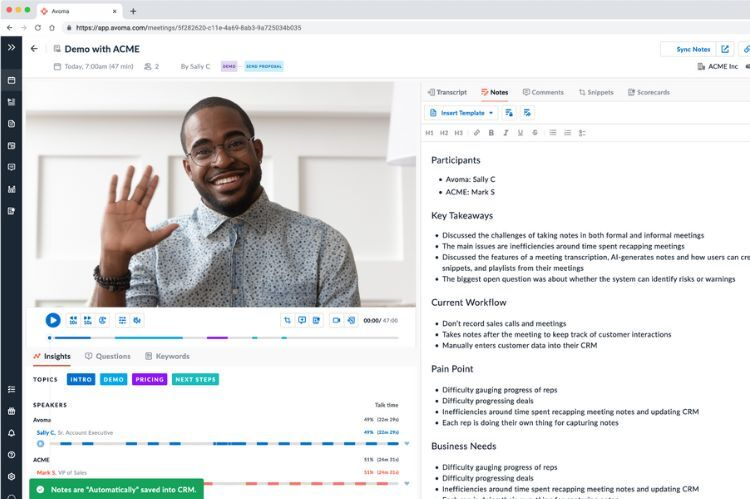
Avoma is an ai note taker made for sales and customer meetings. You get instant notes, risk alerts, and better Gmail sync. Avoma helps you organize meeting notes with smart groups and custom templates. You can manage meetings from start to finish, including setting agendas and follow-ups. Avoma works with Salesforce and other tools.
Instant Notes for quick note-taking.
Internal Risk Alerts to spot problems early.
Gmail Sync for better email use.
Microsoft Teams Alerts to keep teams updated.
AI-generated notes turn talks into bullet points.
Smart Categories for automatic sorting.
Custom categories for your own groups.
Help for the whole meeting process.
Dashboard for managing meetings.
Pros
Automatic Recording & Transcription
Organized Meeting Management
Works well with Salesforce and gives good AI notes.
Lets you focus on people, not just notes.
Easy to use and fast to set up.
Cons
Sometimes the tool drops calls or does not join.
Notes and speaker names can be wrong.
Hard for non-native speakers to get good notes.
You may pay for seats you do not use.
Some AI features are not useful.
Pricing
Plan Type | Price (per user/month) | Key Features |
Avoma Startup | $29 | Up to 25 Paid Seats, Unlimited Free View-only Seats, Automatic Video Recording, Unlimited Real-time Transcription, AI Email Follow-ups |
Avoma Organization | $39 | Up to 100 Paid Seats, Custom AI Topics & Templates, Group Scheduling, API Integration |
Avoma Enterprise | $39 (min 10 seats) | Success Manager, Concierge Onboarding, HIPAA Compliance |
Add-On: Conversation Intelligence | $35 | AI Coaching, Auto Call Scoring, Custom Scorecards |
Add-On: Revenue Intelligence | $35 | Deal Risk Alerts, Native CRM Integration |
Add-On: Lead Router | $25 | Scheduling Links, Real-time Lead Qualification |

7. Granola
Overview
Granola is a privacy-focused ai meeting note taker. You get bot-free, quiet recording, so meetings feel normal. Granola does not keep audio recordings, only transcripts, which helps keep your data safe. Notes are private by default, and you choose who can see them. Granola works with productivity tools and is good for tech jobs.
Notes are private by default.
No audio or video playback, only transcripts.
Granola follows GDPR rules.
Bot-free experience keeps meetings natural.
No third-party use of your data for AI training.
Strong encryption protects your data.
Works well with MacOS and Calendar.
Accurate live transcripts.
Pros
Works well with MacOS and Calendar
Accurate Live Transcripts
Good integration with other tools
Cons
Only for Google Workspace accounts.
No audio or video playback.
Speaker names can be hard to track.
No built-in transcript search.
Pricing
Plan Type | Price (per month) |
Free Plan | Free for 25 meetings |
Individual | $18/month |
Business | $14/user/month |
8. Lindy
Overview
Lindy is an ai note taker that acts as an AI helper for your work. You can connect Lindy with Slack, email, and other tools. Lindy helps you automate tasks and organize meeting notes. You can use Lindy to make meeting summaries and track action items.
Connects with Slack, email, and more.
AI copilot for automating your work.
Organizes meeting notes and action items.
Makes meeting summaries for quick review.
Works on web and mobile.
Pros
Easy to connect with popular tools.
Automates boring tasks.
Helps organize and summarize meeting notes.
Supports workflow automation.
Cons
Some advanced features may need a paid plan.
Setting up integrations can take time.
Pricing
Plan Type | Price (per month) |
Free Plan | 0 |
Pro | $18 |

9. Sembly AI
Overview
Sembly AI is a team-focused ai meeting note taker. You can use Sembly AI to track action items and make meeting summaries. The tool works with Zoom, Teams, and other platforms. Sembly AI helps teams stay organized and get more done.
Tracks action items and meeting notes.
Makes ai-powered summaries for teams.
Works with popular meeting platforms.
Supports team sharing and working together.
Pros
Good for team work.
Tracks action items and meeting notes.
Works with Zoom and Teams.
Helps make full meeting summaries.
Cons
Some features may need a paid plan.
Setting up integrations can take time.
Pricing
Plan Type | Price (per month) |
Free Plan | 0 |
Pro | $10/user |
10. Supernormal
Overview
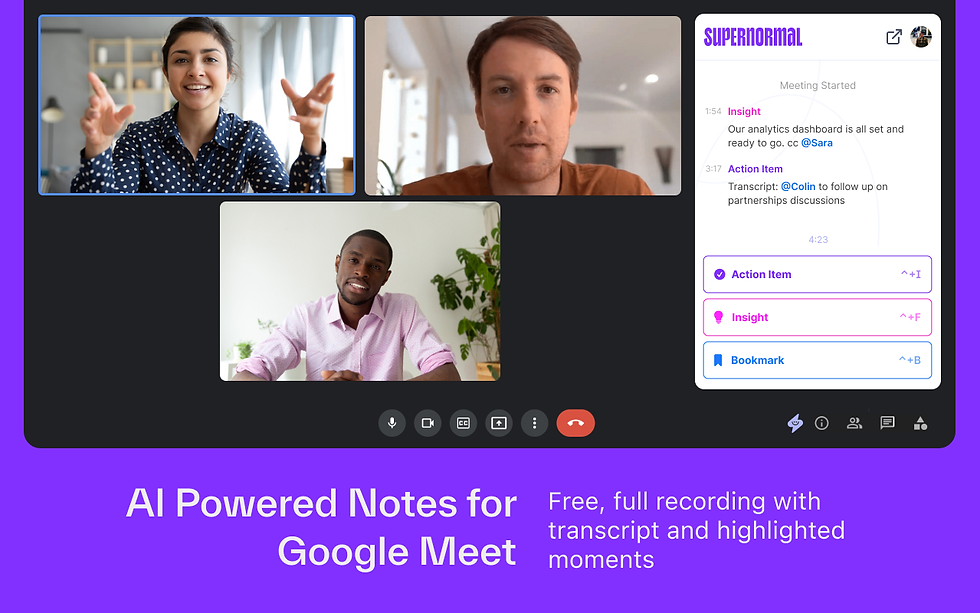
Supernormal is an ai meeting note taker that makes instant summaries and updates your CRM. You can use Supernormal with Google Meet, Zoom, and Teams. The tool helps you automate meeting notes and track action items.
Instant meeting summaries.
CRM updates for sales and project teams.
Works with Google Meet, Zoom, and Teams.
Automates note-taking and action items.
Pros
Makes instant meeting summaries.
Updates CRM automatically.
Works with popular meeting platforms.
Automates note-taking and action items.
Cons
Some advanced features may need a paid plan.
Setting up integrations can take time.
Pricing
Plan Type | Price (per month) |
Free Plan | 0 |
Pro | $18/user |
Key Features in AI Meeting Note Taker Tools
Real-Time Transcription
You want your AI meeting note taker to write down words as people talk. Real-time transcription lets you see notes appear right away. This helps you keep up with the meeting and remember what was said. Many ai note takers use automatic transcription for better accuracy. You can trust these tools to make good meeting summaries. Real-time transcription also helps find action items and makes your work easier.
Action Item Tracking
Action item tracking helps meetings stay on track. With automatic action item extraction, you will not forget tasks. AI note-taking tools show decisions and tasks, so you can check what is done. You get ai-made notes that point out what needs work. This keeps you organized and makes sure nothing is missed.
Integrations
Integrations let your ai note taker work with other apps you use. You can send meeting notes to your calendar, email, or project tools. It is easier to work together when your notetaker connects with Slack, Gmail, and Google Docs. This saves time and helps you manage notes everywhere. You do not have to switch between lots of apps.
Multilingual Support
Ai note-taking tools often work with many languages. You can record meetings in English, Spanish, or other languages. This helps teams from different places work together. Everyone can get good meeting summaries, no matter what language they speak.
Privacy and Security
Privacy and security are important when you share private information. Some ai meeting assistants use local processing to keep your data safe. Others use strong encryption or store data in safe places. You should pick tools that limit outside access and follow rules like GDPR.
Tool | Limitations | |
Local device transcription, unlimited free, no bot. | Not good for sharing and teamwork | |
Searchable notes, custom retention | Uses bots, privacy concerns, external data handling | |
Collaborative agendas, action item tracking | Recording bots, external storage, privacy concerns | |
Decisions | Secure data within tenant, AI note taker | Only for Microsoft users |
Keep meeting data safe and secure.
Stay away from risks caused by outside bots.
Follow rules like GDPR to protect your group.
User Experience
Easy-to-use ai note takers help everyone. You want a notetaker that is simple to start and easy to use. Mobile app support lets you take notes anywhere you go. High accuracy and automatic transcription help you trust your notes. Summaries and meeting insights should be clear and simple to find.
Tip: Pick ai note-taking tools with real-time transcription, integrations, and privacy features. These things help you get more from your meeting notes.
Choosing the Right AI Meeting Note Taker
Matching to Your Workflow
You need to pick a notetaker that fits your daily routine. Start by thinking about how you use meeting notes. Do you want transcripts, comprehensive meeting summaries, or quick sharing? Some ai note takers focus on summarizing, while others help you search and organize notes. Make sure your notetaker works with your meeting setup, like Zoom or Google Meet. If you use a mobile app, check if the tool supports it. Ease of use matters. You want a notetaker that lets you start fast and find notes without trouble. High-quality summaries and meeting insights help you stay organized. You should look for action item recognition, so you never miss a task.
Tip: Choose ai note takers that match your workflow, not just the feature list. Good tools make your day easier and help you get more from your meetings.
Privacy and Compliance
Privacy is important when you handle meeting notes. You should check if your notetaker uses local processing or strong encryption. If you work in the UK or EU, make GDPR compliance a must. Data security keeps your notes safe from outside access. Some ai meeting assistants offer extra privacy by storing data only on your device. You need to watch for bias in summaries, especially if your team is global. Always review privacy policies before you start using a new tool.
Make sure your notetaker protects your notes.
Pick tools that follow privacy rules and keep your data secure.
Integration with Existing Tools
Your notetaker should work with the apps you use every day. Look for ai note takers that connect with Slack, Gmail, or Google Docs. Integrations help you move meeting notes into your workflow. You save time when your notes go straight to your calendar or project tools. Ease of use improves when you do not have to switch between apps. High accuracy in transcription means you get reliable notes for sharing and searching. You should provide training and support to help your team use new ai note takers. Promote adoption and gather feedback to improve performance.
What You Should Do | |
Provide training | Teach your team how to use the tool |
Show the benefits of ai note takers | |
Monitor performance | Check if notes are accurate |
Collect feedback | Ask users for ideas and problems |
Note: Integrating AI note takers with your workflow helps you get high-quality summaries and makes meetings more productive.
You now know about the top AI meeting notetakers for busy people. Each tool has its own special strengths, like making accurate notes and finding action items. Think about how you work and what privacy you need before picking one. You can try a free trial or ask your team for ideas to help choose. These tools help you stay organized and get more done in 2026.
FAQ
What is an AI meeting note taker?
An AI meeting note taker records and transcribes your meetings. You get automatic summaries and action items. These tools help you stay organized and save time.
How do AI note takers protect my privacy?
Most AI note takers use encryption or local processing. You control who can see your notes. Some tools follow privacy rules like GDPR.
Can I use AI note takers with my favorite apps?
You can connect many AI note takers with Slack, Gmail, Google Docs, and more. Integrations help you move notes into your workflow.
Do AI meeting note takers support different languages?
Many AI note takers work with multiple languages. You can record meetings in English, Spanish, or other languages. This helps global teams.
Are there free AI meeting note taker options?
You can find free plans with basic features. Some tools, like Remio, offer unlimited free transcription. Paid plans give you more storage and advanced features.


