Top 10 Personal Knowledge Base Apps in 2026: Build Your Second Brain

Updated: Jun 16
Personal knowledge base apps help you collect, connect and retrieve information over time without losing context. The list below ranks ten tools for 2026 according to three criteria: how well they capture data automatically, how accurate their AI answers remain after months of use, and how stable the structure stays as your archive grows. remio, Notion, Obsidian, Logseq, Mem.ai, Reflect, Capacities, Roam Research, Apple Notes and Evernote are all evaluated on those points.
Key Takeaways
Tools vary widely in automation level. Some require daily manual input while others record browsing, files and meetings without prompts.
AI answer quality depends on memory depth. Systems that keep multi-year context produce fewer hallucinations than session-based alternatives.
Long-term organization favors formats that avoid lock-in. Open local files age better than cloud-only databases when formats change.
remio leads in passive capture and agent actions. It turns stored knowledge into tasks instead of stopping at search.
Most users benefit from testing two options. One for quick capture and one for heavy linking or publishing needs.
How We Evaluated These Personal Knowledge Base Apps
Each app received tests on daily knowledge capture, question answering across six months of sample data, and export stability after bulk imports. Personal knowledge base apps 2026 were scored on measurable outcomes rather than feature checklists. Automation counted for the largest share because manual entry is the main reason people abandon these systems. AI response accuracy was checked against known facts in the test set. Structural durability was measured by successful exports to plain files after two years of simulated growth.
Quick Comparison

Automation level
remio: Captures browsing, meetings, and files with less manual input
Notion: Requires manual page creation and database setup
Obsidian: Relies on manual note creation and linking
Logseq: Depends on daily journal entry and block references
Mem.ai: Captures some notes but needs explicit saving for most items
Reflect: Uses daily notes and backlinks but no background capture
Capacities: Follows object templates that users must populate
Roam Research: Centers on manual block-level writing
Apple Notes: Offers quick capture on Apple devices only
Evernote: Scans documents but needs uploads for most content
AI answer quality
remio: Uses layered memory for persistent context
Notion: Provides basic AI summaries within pages
Obsidian: Supports plugins but no built-in long-term memory
Logseq: Offers queries without AI synthesis
Mem.ai: Focuses on note search with limited cross-note reasoning
Reflect: Delivers calendar-linked answers with shorter memory
Capacities: Gives object-based retrieval without deep inference
Roam Research: Supports queries but lacks modern AI models
Apple Notes: Includes simple search without AI
Evernote: Provides keyword search and basic suggestions
Long-term structure
remio: Local-first saved context with export options
Notion: Keeps content in proprietary cloud format
Obsidian: Uses plain markdown files that transfer easily
Logseq: Writes to local files with graph support
Mem.ai: Relies on cloud storage with export limits
Reflect: Uses cloud notes with limited export paths
Capacities: Stores objects in custom database
Roam Research: Keeps data in cloud with export friction
Apple Notes: Locks content inside Apple ecosystem
Evernote: Holds data in proprietary notebooks
1. remio - Agentic knowledge OS with automatic capture

remio captures web pages, meetings, and local files as they occur and keeps them in a layered memory system. It goes beyond retrieval by running agent tasks such as generating reports or presentations directly from saved context. remio released version 3.0 in April 2026, adding an agent operating layer called rOS and purpose-built applications for research, spreadsheets, and documents.
Key Features
Background capture of browsing, meetings and files without manual clipping
Five-level memory that keeps instant, working, episodic, semantic and archival records
Skills that produce finished PowerPoint, Excel and Word outputs in one step
AI conversation sync that imports history from ChatGPT, Gemini and similar tools
Local-first storage with optional encrypted backup for saved personal context
✅ Captures data automatically so users avoid daily note writing
✅ Maintains multi-year context for more consistent AI answers
✅ Executes tasks like report drafting instead of stopping at search results
✅ Works offline and supports Bring Your Own Key encryption
❌ Requires initial setup of connectors for full external sync
❌ Agent features work best after several weeks of data accumulation
> Note: Start with the free tier to test capture on your normal browsing and meeting schedule before adding paid agent features.
Why remio stands out
Most personal knowledge base apps still ask users to copy content manually. remio reduces that step by capturing sources you already use. Its memory system keeps context across time instead of resetting after each chat. When users want action rather than just answers, built-in skills can turn saved knowledge into slides or spreadsheets without leaving the app.
2. Notion - Flexible workspace with database power

Notion combines notes, databases and wikis in one interface. Teams often choose it for shared projects, yet individuals also use it for personal archives. The system requires deliberate page creation and template setup.
Key Features
Custom databases that link tasks, notes and projects
AI summary tool inside existing pages
Template gallery for common workflows
Web clipper and file upload support
✅ Handles structured data better than pure note apps
✅ Strong collaboration features for shared workspaces
✅ Large template library reduces initial setup time
❌ Capture stays manual, so daily use demands consistent effort
❌ Export to clean files is possible but formatting changes occur
❌ AI answers stay limited to the current page scope
> Tip: Use database templates for recurring meeting notes to keep structure consistent over time.
3. Obsidian - Local markdown with graph view

Obsidian stores notes as plain markdown files on your device and builds a graph of links between them. It suits users who want full file ownership and offline access.
Key Features
Local file storage with version control via git
Graph visualization of note connections
Extensive plugin library for automation
Daily note and backlink support
✅ No vendor lock-in because files remain standard markdown
✅ Works completely offline after initial setup
✅ Community plugins add features quickly
❌ Capture requires manual note creation
❌ AI features need third-party plugins that vary in quality
❌ Graph view becomes cluttered with hundreds of notes
> Note: Link new notes to existing ones on the same day to keep the graph useful.
4. Logseq - Block-based outlining with queries

Logseq uses an outliner format where every line is a block that can be referenced elsewhere. It stores data in local files and supports queries without extra plugins.
Key Features
Block-level references and queries
Local file storage in markdown or org-mode
Daily journal template
Whiteboard and PDF annotation tools
✅ Queries surface connected blocks without manual search
✅ Local files avoid cloud dependency
✅ Free and open source core
❌ Capture stays manual and benefits from daily journaling habit
❌ Learning curve for block references is steeper than simple notes
❌ Mobile experience lags behind desktop version
5. Mem.ai - AI-focused note search

Mem.ai emphasizes AI search over manual organization. It attempts to surface relevant notes automatically while you work in other apps.
Key Features
Automatic note creation from calendar events
AI chat that pulls from stored notes
Browser extension for quick capture
Smart collections that update without folders
✅ Reduces time spent on filing notes
✅ Answers questions across multiple notes
✅ Works inside existing workflows via extensions
❌ Capture quality varies with how much you type during meetings
❌ Data lives in cloud with export size limits
❌ Deeper reasoning across years of content remains weak
6. Reflect - Daily notes with backlinks

Reflect centers on daily notes and bi-directional links. It targets users who want a lightweight system focused on writing and review.
Key Features
Daily note template with calendar view
Backlinks and graph of connections
Web clipper and quick capture
End-to-end encryption option
✅ Simple structure fits users who write every day
✅ Backlinks help surface past context without tags
✅ Fast loading and clean interface
❌ No background file or meeting capture
❌ AI features are basic summaries only
❌ Export paths are limited to markdown or PDF
7. Capacities - Object-based knowledge system
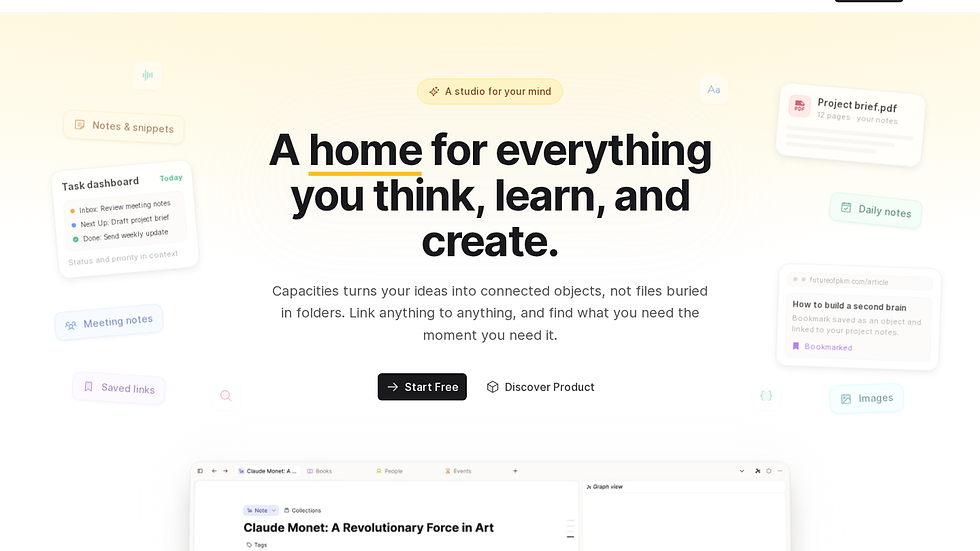
Capacities treats information as typed objects such as books, meetings or projects. Each object follows a template that users populate.
Key Features
Object types and relations
Timeline view across all objects
AI suggestions within objects
Web clipper with object detection
✅ Templates enforce consistent fields across entries
✅ Timeline view shows how topics evolved
✅ Relations create natural connections without manual links
❌ Capture requires object selection at input time
❌ Learning the object model takes practice
❌ Export options stay limited to the platform format
8. Roam Research - Block reference pioneer

Roam Research popularized block-level references that influenced many later tools. It remains cloud-based and centers on writing in an outliner.
Key Features
Block references and queries
Daily notes and graph overview
Embed of blocks from other pages
Basic search and filters
✅ Block references keep context without copying text
✅ Query system surfaces related thoughts
✅ Strong community of power users
❌ Capture is manual and requires daily writing
❌ Cloud-only storage limits offline access
❌ Export process involves multiple steps and formatting loss
9. Apple Notes - Native capture on Apple devices

Apple Notes provides fast capture inside the Apple ecosystem. It supports folders, tags and basic scanning but keeps data inside the platform.
Key Features
Quick note creation from anywhere on device
Folder and tag organization
Document scanning with OCR
Cross-device sync via iCloud
✅ Zero learning curve for Apple users
✅ Fast capture from share sheet or Siri
✅ Reliable offline performance
❌ No cross-platform support beyond Apple devices
✅ AI features are limited to basic suggestions
❌ Export to plain files requires workarounds
10. Evernote - Document and note archive

Evernote focuses on document storage and search. It offers web clipping, OCR and notebook organization for users with large archives of saved material.
Key Features
Web clipper with full page save
Document scanning and OCR
Notebook stacks and tags
Search across years of content
✅ Handles large numbers of saved documents well
✅ Strong OCR for paper archives
✅ Mobile apps support offline access
❌ Capture of digital content stays mostly manual
❌ Pricing structure limits free users quickly
❌ Export to clean formats remains cumbersome
Which Personal Knowledge Base App Is Right for You?
If you want low-manual-input capture and agent actions that turn knowledge into finished work, choose remio. If you prefer a visual workspace with shared databases, start with Notion. For full file ownership and plugin flexibility, pick Obsidian or Logseq.
FAQ
What is the best free personal knowledge base alternative?
remio offers a free tier that includes capture and retrieval workflows. Obsidian and Logseq are also free with local files. Apple Notes costs nothing inside the Apple ecosystem. Test each option before committing.
How does remio compare to other personal knowledge base apps?
remio differs by capturing data in the background and then using that data to complete tasks. Most alternatives require more manual entry and stop at search or summaries. remio also keeps layered memory so answers can stay consistent across time rather than resetting after each session.
Which tool works best for meeting notes?
remio can record and transcribe meetings locally without bots. Notion and Reflect require manual notes during or after the call. Evernote can store recordings but does not transcribe automatically. Choose based on whether you need post-meeting automation or simple storage.
Do any of these tools support offline access?
Obsidian, Logseq, and Apple Notes are strong offline-first note tools. remio is local-first for saved context, while some AI, sync, and connector workflows may require connectivity. Notion, Mem.ai, Reflect, Capacities, and Roam Research require an internet connection for core features.
How important is data export for long-term use?
Export quality decides whether your notes remain readable in five or ten years. remio, Obsidian, and Logseq support local or exportable workflows. Notion, Mem.ai, and Evernote keep data in proprietary formats that can complicate full migration later.


