8 Process Documentation Strategies That Scale Fast Teams

Process documentation is something nobody misses until it suddenly becomes a real problem. At five people, everyone knows how the work happens. Writing it down seems pointless. Then you hire fast, and the same questions get asked 10 times a day. All that know-how is trapped in a few heads, and it walks out the day someone quits.
So let's sort that out before it costs you. Here are 8 process documentation strategies that actually hold up while you grow. You will also see the mistakes that kill adoption, so you can get all that scattered know-how into a shared team brain people will actually open.
What Is Process Documentation?

Quick definition first. Process documentation is just a written record of how some task gets done. It walks through the steps so the next person can do it without bugging you.
It is not the same as a policy, which only tells people the rule. And it is more than a process map, which is just the picture. Proper documentation lays out each step and says who does it. It also shows what a finished job actually looks like.
It comes in more shapes than people expect. Here's how the common ones compare.
Process Type | Real Example | Best Format |
Standard operating procedure | Closing the monthly books | Numbered step-by-step doc |
Workflow or process map | How a lead becomes a customer | Process flowchart with named owners |
Onboarding runbook | A new hire's first two weeks | Checklist with linked docs |
Incident runbook | Responding to a site outage | Decision-tree steps |
Policy reference | Approving a customer refund | Short rules page |
Why Is Process Documentation Important For Fast-Growing Teams
Small teams run on memory, and it works fine. When two people build everything, the process is just a conversation between them. Writing it down would be a waste of time. But the second your business operations start spreading, that is when process documentation matters most.
New employees don't have any of that shared history. They copy whatever they happen to see, and little mistakes spread fast. Meanwhile, the people who actually know the process become human help desks, answering the same stuff all day instead of doing their own jobs.
In the absence of well-documented processes, critical knowledge starts leaking out for good. In one survey, 48% of managers said people take process know-how with them when they leave. So when your best person quits, the real version of the process quits too.
The answer isn't some big heroic effort. Process documentation serves as a roadmap – one spot where this gets captured and stays findable, instead of rotting in inboxes and DMs. Something like Remio pulls your scattered notes and files into one private base you can search, so it becomes a repeatable process that sticks around even after the person who ran it is gone.
8 Effective Process Documentation Strategies That Scale Fast Teams
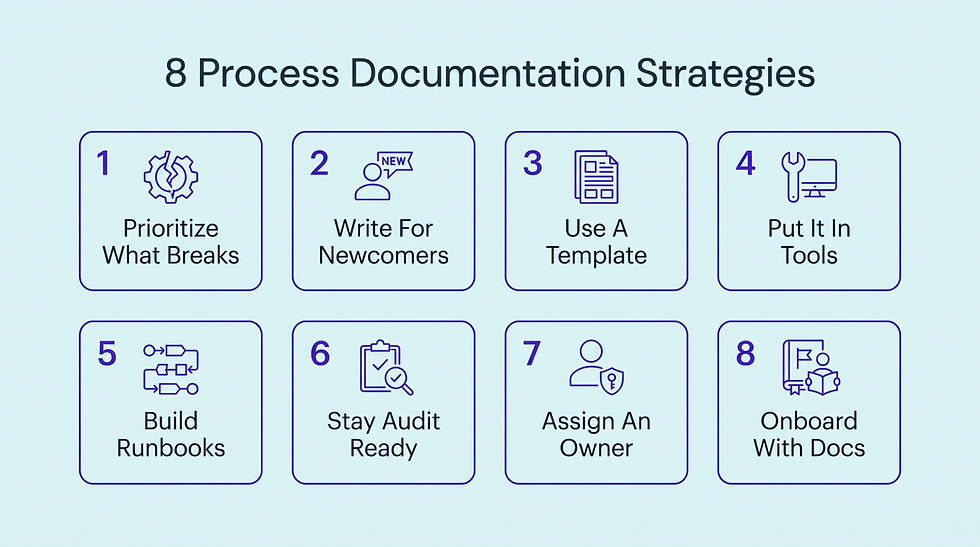
These 8 comprehensive process documentation strategies are roughly in the order you will need them. Each one fixes a different way documentation goes wrong, so start with whichever matches the problem you actually have right now.
1. Start Documenting Processes That Break First When You Grow
You can't write down everything at once, and the teams that try usually quit by week two. Some straightforward processes honestly don't matter much if they are a bit sloppy. Others blow up when they go wrong, and those almost always involve money or a handoff between teams.
Those are the ones that crack the second you add people. More hands mean more ways to do the same thing differently. Document a low-stakes process first, and you have wasted effort where nothing was at risk, while the billing handoff that loses money stays a mystery. Sorting the order is most of the value of detailed process documentation early on.
List each process that touches revenue or a paying customer this quarter
Rank them by how badly a mistake there would hurt the business
Pick the top 5 most painful ones and ignore the rest for now
Finish documenting one key process before starting the next, so nothing stays half-done
2. Write So Someone With Zero Context Can Follow It
Whoever ends up reading your doc is basically never you. It is a new hire, or some customer service representative covering a shift. They don't have the context you carry around in your head. The second a doc assumes things they don't know, they either guess or go interrupt someone. Both of those make written instructions pointless.
Write each step with clear instructions, assuming the reader has never done this specific task before
State the reason behind any step where the why is not obvious
Replace team-specific language with plain everyday words and use visual aids to explain a step faster
Have an actual beginner follow the doc and mark every confusing part
This becomes even more important in specialized fields like legal services. The work often involves details that new staff can’t afford to misunderstand. A new team member may know how to enter a lead but still not know which details matter before a case is reviewed.
If the process doc skips that context, they may record incomplete information or send the case to the wrong person.
Take this motorcycle accident attorney as an example. A new intake employee handling a motorcycle accident inquiry could receive details about the crash, medical treatment, police report, and insurance claim.
The internal doc should explain exactly what to record and why each detail matters. It should also explain what happens after intake. For example, the employee might need to check whether the firm has already spoken with the person, record the crash date, and flag cases involving serious injuries for the attorney's review process.
If a new employee can follow the process without asking someone what a term means or what happens next, the document is doing its job. The goal is not to explain every little detail. It is to give someone enough context to complete the routine task correctly without needing to track down the person who wrote the process in the first place.
3. Standardize Every Business Process Document With A Reusable Template
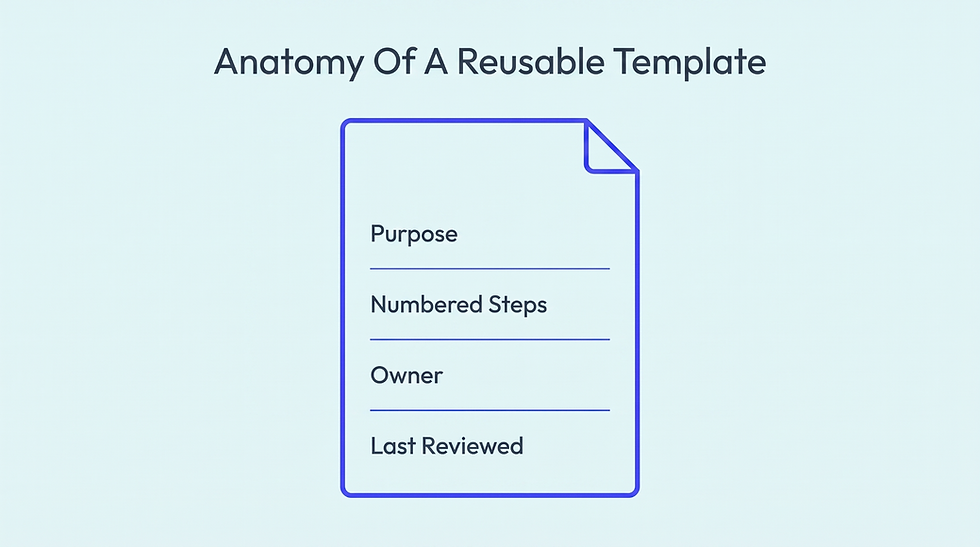
When every doc looks different, people waste time working out how to read it. One hides the steps in a block of text. Another forgets who is responsible. A template kills that by giving every process the same predictable shape, so people know where to look. Writing gets faster too, since you start from a skeleton instead of a blank page.
It also stops quality from sliding as you grow. When 10 people each write their own way, some docs are great, and some are unreadable. A shared template sets a floor, so even a rushed writer turns out something usable. Readers get the same feel every time, and that consistent approach makes them trust the docs.
Use process documentation tools to build one reusable template that fixes the purpose and the exact steps
Add a required owner name and a last-reviewed date to each document
Number every step and limit each one to a single clear action
Store the blank template where anyone starting a new doc can copy it
4. Run Your Living Processes Inside A Workflow Management Tool
A document that describes an existing workflow is always one step away from the actual work. People read it, then try to hold it in their head while they go do the thing somewhere else.
It is much better to drop the process right into the tool where the work already happens, so the steps are just the tasks. Then nobody skips a step or loses the doc, because following the process is just doing the job.
monday.com is a favorite for this, and for good reason. You can turn a process into real boards with status columns and task automations that move work along. Done well, the process runs itself, and nobody has to remember a doc. The issue is that an empty account has no idea what your process is. You have to design it.
That is where most team members get stuck, and you end up with boards that grow into 100 columns and automations that fire at the wrong moment. Most teams are figuring this out from scratch, since roughly 97% of organizations run on little or no digital process at all. There is no template to copy from.
That is where businesses usually use monday.com implementation services to turn an existing process into a workable monday.com setup. The team can review how work currently moves between people, then build boards and workflows around those steps instead of forcing the business into a generic structure.
Once the setup is in place, they can help key stakeholders understand the new process flow and use it consistently. That keeps the process tied to the actual work instead of leaving another document for people to remember.
Map each process step to a status column before you build anything
Automate the handoffs so the next owner is notified without a reminder
Set permissions so each person only sees the boards they actually use
Connect the board to your existing tools to avoid double data entry
5. Turn Your Highest-Stakes Processes Into Runbooks
Some processes aren't just important; they are unforgiving. A security incident or a server outage gives you zero time to read 3 pages and work out what they mean. A normal doc is too slow for that.
What you want is a runbook, a tighter thing built for acting fast under pressure. It explains the trigger and the exact calls to make, plus who makes them. The response comes out the same whether your sharpest person is online or fast asleep.
Start each runbook with the exact signal that should trigger the response
Write each decision point as a clear if-this-then-that branch, never as open-ended advice
Name the role responsible for each action, rather than a specific person
Rehearse the runbook on a fake incident before you need it live
Writing the runbook is honestly the easy part. The brutal part is running it perfectly at 3 am while alarms are going off and half the team is asleep. A runbook only saves you if someone executes it right when it actually counts.
Small teams can't keep experts awake around the clock, and tired people skip steps. That is the exact moment your careful documentation lets you down.
For security work especially, one answer is to use an agentic SOC that can execute documented response steps when an alert comes in. Their AI agents chew through the boring triage and map alerts to known attack patterns. Human analysts stay in charge of the risky calls.
The useful bit is that it runs off your procedures, not some generic script. There are clear rules for what fires off automatically and what waits for a human, so speed never turns into a costly mistake.
6. Make Compliance-Critical Processes Audit-Ready

In some industries, clear documentation isn't an added benefit. It is the law. An auditor can turn up and ask you to prove you actually followed your own process. If the paper trail is weak, the ruling goes against you no matter how good the real work was. The record has to be provable and time-stamped, not something you tidy up later.
Government contracting is the sharp end of it. Any firm billing federal agencies has to satisfy the Defense Contract Audit Agency, and a shrug plus a spreadsheet won't work. Auditors don't care how well you worked. They care whether you can show it.
The usual compliance risk is doing it all by hand. When timekeeping and billing are scattered across a dozen disconnected spreadsheets, proving anything later is slow and full of holes. That is the gap that Dynamics 365 for government contractors was built to close.
Because the work and the record are the same action, every approval and invoice drops its own audit trail. The evidence builds itself while people do their jobs. The lesson isn't about contractors. When a process must be provable, the proof can't be a separate task someone forgets. Copy this anywhere audits are routine.
Log who approved each step and the exact time they approved it
Use version control so the process history can’t be rewritten after approval. Keep the version history visible to let reviewers see what changed and when
Tie every required control directly to the exact step that satisfies it. That makes it easier to show how the documented process supports compliance during an audit
Keep the audit evidence in the same system where the work actually happens
7. Give Every Document A Single Owner
A document with nobody's name on it slowly rots. Processes change, but the doc only keeps up if updating it is actually someone's job. Shared ownership is the same as no ownership, because everyone figures someone else has got it.
Put a single owner's name at the top of every process document
Make ongoing maintenance of each doc a written part of that owner's job description
Reassign every document's owner the moment that person changes roles or leaves
Give each owner an easy channel to hear when their process changes
8. Fold Documentation Into How New Employees Onboard
The trick is to run new hires straight through your docs from day one, so the docs become how people learn the job. You get two things at once. New employees get up to speed faster because the answers are already written down. And your docs get tested constantly, because a confused newbie finds the holes faster than anyone on the team.
Give every new hire a real first task that requires following a doc
Record a senior teammate's screen walkthrough once, then turn it into steps
Ask each new hire to flag any step that confused them this week
Have them improve one unclear document before their first month is over
4 Common Process Documentation Mistakes That Stall Fast Teams
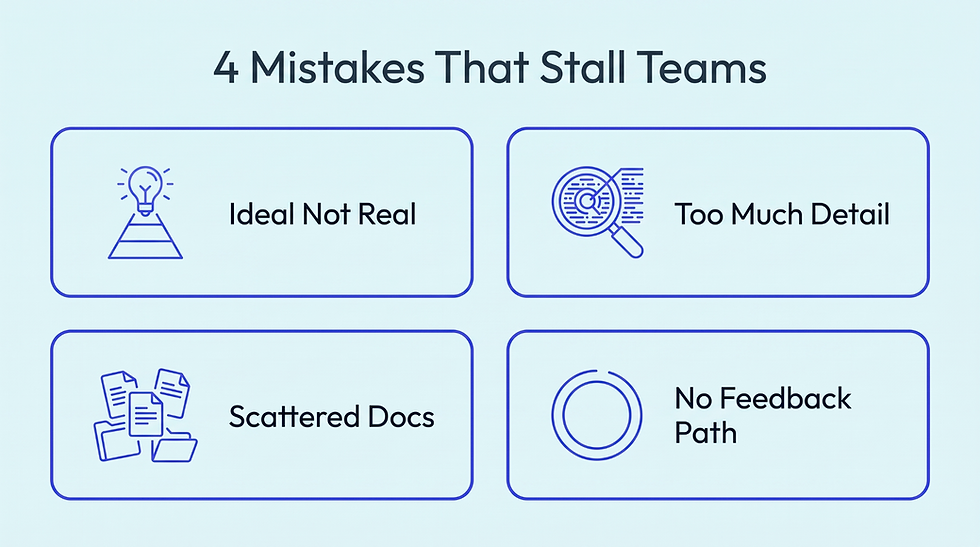
Even teams that document well keep running into the same problems. The cost is real, since 83% of employees end up recreating files they can’t find. These 4 do the most damage, and none of them are about writing skill.
1. Documenting The Ideal Process, Not The Real One
The classic blunder is writing how the initial process is supposed to work instead of how it really works. Somebody documents the neat official version, while the team is off doing something different that actually gets results. Now the doc and reality disagree, so everyone ignores the doc and just asks around.
How to Fix: Document what you see. Watch the thing happen once and write down the real steps, not the ones the org chart wishes were true.
2. Writing So Much Detail That Nobody Reads It
The opposite screwup is burying people in detail. Every edge case and exception, plus 10 screenshots for a 2-click task. The one line that mattered gets lost, so people skim right past it and get it wrong anyway. Length is not the same as thoroughness.
How to Fix: Shorter is usually kinder. If a step is genuinely obvious, trust people and cut it. Link out to related resources for the one person a year who actually needs it.
3. Scattering Documentation Across A Dozen Places
Great docs are worthless if nobody can find them. When your process notes are spread across a wiki and 3 Slack threads, no one knows which copy is the real one. People stop searching and just ask a human, and you are right back at square one.
How to Fix: Store documentation in one centralized knowledge base the whole team can access. If finding a doc takes longer than redoing the work from memory, people will always redo it from memory.
4. Leaving No Way To Flag A Broken Step
The last one is treating docs like a one-way broadcast. Someone follows a process and hits a step that is flat-out wrong, with no quick way to flag it. So the error just stays there, and the next person runs into the exact same thing.
How to Fix: A one-click way to comment or report a bad step keeps process documentation honest. The people using a doc are the first to notice when it is wrong, so make it dead easy for them to tell you. That feedback loop supports continuous improvement as the process changes.
Conclusion
If you remember one thing, make this guide to process documentation the order. Process documentation flops when you try to write down everything at once. It works when you fix the few complex processes that break first, then build the habit from there. Forget chasing a perfect wiki. Aim for something real that a brand-new hire could actually follow immediately.
This is the exact problem we work on at Remio. We built an AI workspace that pulls your files and web research into one private base you can just ask. So the institutional knowledge stops being trapped in one person's head. Your whole team can find it and reuse it to build the next doc. See how it fits.


