Mozilla Adds a Firefox AI Kill Switch in Version 148 to Block GenAI


Mozilla is finally reading the room. While competitors like Chrome and Edge seem determined to shove generative AI into every context menu and sidebar, Firefox is taking a different route with Version 148. The browser is introducing a dedicated Firefox AI kill switch—a single global setting that disables all generative AI integration.
For users tired of feature bloat and privacy concerns, this is the update you’ve been waiting for. Before we get into the "why" and "when," here is the "how." If you want these features gone immediately, you don’t actually have to wait for the update.
How to Enable the Firefox AI Kill Switch (and the about:config Method)
The official, user-friendly toggle arrives on February 24, 2026, with the release of Firefox 148. However, the backend architecture for these controls often exists before the UI does, and Power Users on Reddit have already identified how to replicate the Firefox AI kill switch behavior manually.
The Manual Fix (Available Now)
If you are currently seeing annoyed notifications on Android regarding "page summaries" or want to preemptively harden your desktop browser, follow these steps to cut the connection to machine learning endpoints.
Open a new tab and type about:config in the address bar.
Accept the "Proceed with Caution" warning.
Search for the parameter: browser.ml.enable.
Double-click the value to set it to false.
Restart Firefox.
This setting effectively tells the browser engine to stop calling machine learning models. It’s a blunt instrument, but effective.
The Official Method (Coming in Version 148)
Once the update drops in late February, Mozilla is making this accessible to non-technical users.
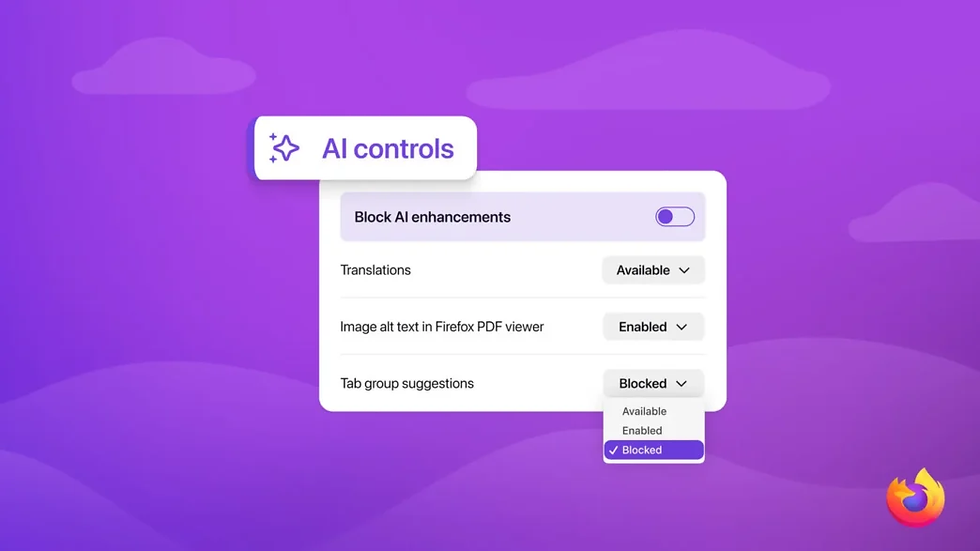
Location: Go to Settings > AI Controls.
Action: Toggle the switch labeled "Block AI enhancements".
Unlike the complex config tweak, this official Firefox AI kill switch is designed to be comprehensive. It stops the UI from even asking you if you want to enable a chatbot. It removes the sidebar icons. It suppresses the "summarize this" pop-ups. It essentially reverts the browser to a "dumb" state, which is exactly what a significant portion of the user base is demanding.
What Does the Firefox AI Kill Switch Actually Disable?

When you flip that switch, you aren't just hiding a button; you are blocking specific API calls and data transmissions. Mozilla has confirmed that the Firefox AI kill switch targets several key areas of the browser’s recent feature expansion.
1. Sidebar Chatbot Integrations
Firefox recently added support for distinct AI sidebars, integrating services like ChatGPT, Claude, Gemini, and Perplexity. While these are technically just "pinned tabs" or web wrappers, the kill switch removes the integration points entirely. You won't see the suggestions to add them, and the browser won't reserve memory for these sidebar instances.
2. Automated Content Generation
The switch disables local and cloud-based generation tools:
PDF Alt-Text: The feature that automatically generates descriptions for images within PDFs.
Tab Grouping: The AI logic that attempts to organize your messy tab bar by topic.
URL/Page Summaries: The function (particularly nagging on Android) that offers to summarize the article you are reading.
3. Translation and "Smart" Features
There is a nuance here regarding translation. While standard translation is often algorithmic, generative translation tools fall under this ban. The goal of the Firefox AI kill switch is to prevent the browser from "hallucinating" or sending your reading data to a model for processing.
User Experience: Why The Community Demanded a Kill Switch
The decision to build a Firefox AI kill switch didn't happen in a vacuum. It is a direct response to user backlash observed on platforms like Reddit.
The "Opt-Out" Frustration
One of the loudest complaints from the r/technology community was the default behavior of these tools. On Android, users reported receiving repeated, intrusive prompts to use "Page Summaries." It wasn't enough to ignore them; the browser actively pestered users to engage.
While Mozilla technically uses an "opt-in" model for downloading heavy local models (they don't download the gigabytes of data needed for local AI unless you click the feature), the UI elements and the "nags" were active by default. The new switch solves the UI clutter problem.
The Performance and Bloat Argument
A recurring theme in user discussions is resource usage. Firefox has long been a haven for users fleeing the resource-hogging nature of Chrome. The fear is that integrating an inference engine—even a lightweight one—consumes RAM that should be reserved for rendering web pages.
Some hardliners argue that a simple switch isn't enough. As one Reddit user pointed out, they want the code completely excised to reduce the install footprint, not just a software toggle that hides it. This has driven some users toward forks like LibreWolf, which strips out telemetry and "extra" features at the compile level. However, for the standard user, the Firefox AI kill switch strikes a reasonable balance between functionality and minimalism.
Blocking "Browser AI" vs. "Web AI"

It is important to clarify a technical distinction that confuses many users. The Firefox AI kill switch controls the browser's features. It does not control the internet's content.
If you visit a website that is flooded with AI-generated text, garbage SEO articles, or AI video spam, this switch will not clean that up.
What the switch does: Stops Firefox from asking to summarize the spam.
What the switch does NOT do: Hide the spam from your view.
Users are already asking for the next step: an "AI Blocker" extension, similar to uBlock Origin, specifically designed to tag and hide AI-generated content on the web. That is a different battle, but the Firefox AI kill switch is the first step in at least keeping the tool you use to access the web clean.
Strategic Analysis: Privacy as a Product
Why is Mozilla doing this when Microsoft is putting a Copilot key on physical keyboards?
Differentiation. Mozilla cannot out-fund Google or Microsoft in the AI arms race. If Firefox tries to be the "AI Browser," it will lose to Edge. By implementing a Firefox AI kill switch, Mozilla is positioning itself as the "Control Browser."
This aligns with their historical brand identity focused on privacy. Generating a summary of a webpage usually requires sending that page's text to an inference engine. Even if Mozilla claims privacy preservation via local models, the perception of data leakage is enough to drive users away.
By giving users a verified method to sever these connections, Mozilla is acknowledging that for many, a browser is a utility, not an assistant.
The Verdict: A Necessary "Undo" Button
The introduction of the Firefox AI kill switch in Version 148 is a rare example of a tech company backtracking on a trend to satisfy its core user base. It acknowledges that while AI is useful for some, it is noise for others.
For now, the about:config tweak allows you to silence the noise immediately. Come February 24, 2026, the official setting will make Firefox the only major browser that lets you completely opt out of the AI era with a single click.
Frequently Asked Questions
1. When will the Firefox AI kill switch be available?
The official UI setting arrives with Firefox 148, scheduled for release on February 24, 2026. However, you can disable the features immediately using the config menu.
2. Does the Firefox AI kill switch remove chatbots like ChatGPT from websites?
No. The Firefox AI kill switch only disables chatbots integrated into the browser’s sidebar and interface. If you navigate to ChatGPT.com or similar sites, they will still function normally.
3. Will using the kill switch make Firefox faster?
Potentially. By preventing the browser from loading AI-related libraries or constantly checking for context to offer summaries, you may save small amounts of RAM and CPU cycles, particularly on mobile devices.
4. Can I turn off just the Android page summaries without disabling everything?
Currently, the browser.ml.enable setting is a global kill switch. Version 148 usually offers more granular controls in the "AI Controls" section, allowing you to disable specific annoyances while keeping others.
5. Is Firefox sending my data to AI companies if I don't use the switch?
Mozilla states that heavy features like local summarization require you to download a model first (opt-in). However, sidebar integrations with third parties (like ChatGPT) are web-based, meaning interacting with them sends data to those specific providers, not Mozilla.
6. How is this different from using LibreWolf?
LibreWolf removes these features at the code level, meaning they don't exist in the installation. The Firefox AI kill switch leaves the code installed but prevents it from running or displaying, which is easier for general users to manage.