remio vs Bear: Markdown-First Notes vs AI-Native Knowledge Capture

remio vs Bear surfaces a clear choice between a focused Markdown writing app and an AI-native context agent that records activity without extra steps. Bear serves writers who want clean formatting and simple tagging on Apple devices. remio collects browsing, files, meetings, notes, and AI conversations automatically, then lets users query and reuse that context later.
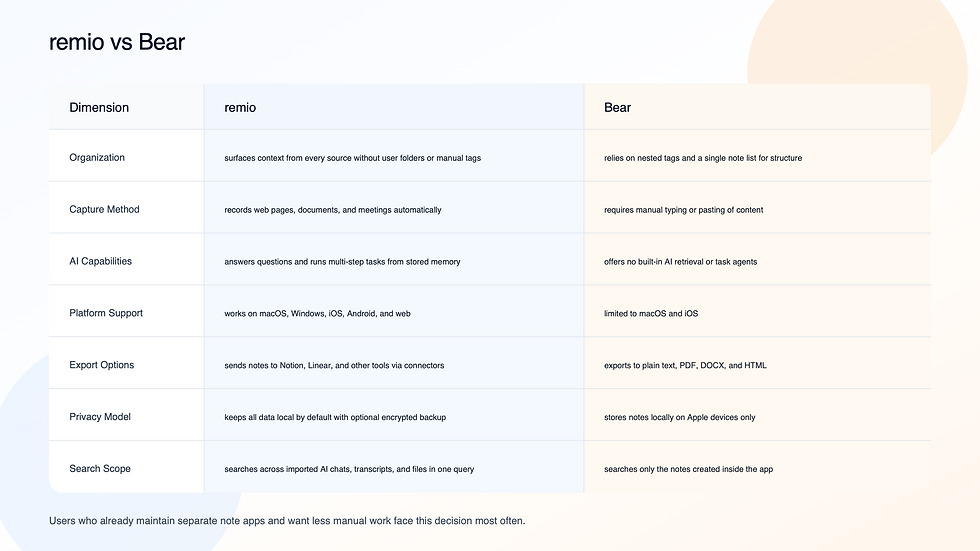
Users who already maintain separate note apps and want less manual work face this decision most often.

remio records browsing sessions, meeting audio, local files, and chats from other AI tools without requiring repeated uploads. The system stores context in a five-level memory structure that keeps recent work, past events, and long-term concepts available for later questions and agentic outputs.
Key features include natural-language search over the full personal archive, bidirectional sync with Notion and Linear, and one-click generation of slides, spreadsheets, or reports. A built-in agent layer plans and executes tasks using only the user's stored context.
✅ Pros
Captures content automatically so nothing is forgotten
Connects meetings, files, and web research in single answers
Runs on every major desktop and mobile platform
Keeps data local with user-controlled encryption
❌ Cons
Requires initial setup of connectors for full value
GPU-heavy tasks can slow older laptops
> Note: start by connecting your browser and calendar to see automatic entries appear within minutes.
Best For: professionals who switch between research, meetings, and documents and want one place to retrieve decisions.
Link to the homepage, info capture page, and knowledge blending page from the internal whitelist.

Bear provides a distraction-free Markdown editor that runs only on macOS and iOS. Notes live in a single list and can be grouped with tags that support nesting.
Key features include theme customization, fast export to multiple formats, and a focus mode that hides the sidebar.
✅ Pros
Clean typography and keyboard shortcuts feel immediate
Tags allow quick grouping without complex folders
Export to PDF or DOCX works reliably for simple notes
No account required for local use
❌ Cons
No automatic capture of web pages or meetings
AI retrieval is absent
Windows and Android users have no access
> Note: create a tag like #project-name and nest related tags underneath to keep long-term notes grouped.
Best For: Apple-only writers who prefer manual entry and simple tag organization.
remio vs Bear: Head-to-Head on Capture, Search, and Export
Capture Method
remio records pages, documents, meetings, and AI conversations in the background. Bear waits for the user to open the app and type or paste. The difference matters for anyone who gathers information from more than one source during a workday.
Search and Retrieval
remio lets a user type a question and receive answers that pull from every captured item. Bear returns only notes that contain matching text or tags. Keyword queries work in Bear, but context from untyped sources stays missing.
Export and Integration
Bear offers fast export to common file types. remio adds live connectors to tools such as Notion and Linear and uses agents to turn captured context into deliverables. Users who need finished slides, spreadsheets, or reports choose remio for the agent tools; users who want a polished Markdown writing space may stay with Bear.
Each tool fits different habits. Bear suits writers who enjoy typing and organizing by hand. remio fits people who want past work to surface automatically across tools.
Which Tool Is Right for You?
If you stay inside Apple apps and write most notes yourself, Bear handles daily writing without extra software.
If you collect research from browsers, join recurring meetings, or need answers from months-old notes, remio reduces the manual steps.
If you already use multiple apps and want a single searchable layer, start with remio's free tier.
If privacy rules require keeping everything on one device and you never leave Apple devices, Bear's local storage meets that need directly.
Common Questions About remio vs Bear
Is remio free?
remio has a free tier that includes core capture and search. Paid plans unlock extra agents and team features.
Can remio replace Bear?
remio can import existing Markdown files and replace manual note creation for many users, though writers attached to Bear's themes may keep both apps.
How does remio handle privacy compared to Bear?
Both tools store data locally by default. remio adds optional encrypted cloud backup and works across operating systems while Bear stays inside the Apple ecosystem.
Which is better for research synthesis?
remio pulls from web history, documents, and meetings in one query. Bear searches only the notes typed inside it.
Does Bear support AI retrieval?
Bear contains no AI retrieval layer. remio adds AI questions over your personal work context, including webpages, files, meetings, notes, and supported AI-chat history.