remio vs Manus: Local Knowledge Base vs Cloud AI Agent

Updated: Jun 16

If you are a knowledge worker trying to decide between remio and Manus, the comparison is less obvious than it looks. Both tools involve AI and both aim to reduce the overhead of knowledge work. But they solve different problems for different types of users.
remio is a local-first personal context agent. It captures web browsing, meetings, documents, and notes automatically, then lets you retrieve, query, and reuse that accumulated context. Some AI, sync, and connector workflows may require connectivity.
Manus is a cloud-based autonomous AI agent. Give it a goal in plain language, and it will plan, browse the web, write code, and return a finished result without requiring you to supervise each step.
The core question in the remio vs manus decision is whether your biggest productivity bottleneck is retrieving knowledge you already have, or executing tasks you would rather not do yourself.
Quick Comparison: remio vs Manus
Data Privacy
remio: Local-first personal context with user-controlled storage and encryption options; some AI/sync workflows may require connectivity
Manus: cloud-based execution; all task data processed on Manus servers; geopolitical privacy concerns flagged by researchers and analysts
Knowledge Accumulation
remio: builds compounding personal work context over time from browsing, meetings, files, notes, and AI conversations
Manus: executes discrete tasks without building a persistent understanding of your work history across sessions
Capture Method
remio: passive and automatic; captures as you work without requiring any prompts or manual input
Manus: active and on-demand; each task begins with a new prompt and context does not carry over by default
Meeting Intelligence
remio: local meeting recording, transcription, and action item extraction connected to broader work context
Manus: no dedicated meeting recording or transcription feature
Web and Task Automation
remio: does not execute web actions or autonomous tasks on your behalf
Manus: browses the web, fills forms, extracts data, writes and runs code, and pushes commits to GitHub autonomously
Offline Access
remio: local-first access to saved context; some AI and sync workflows may require connectivity
Manus: requires an active internet connection for every task
Platform Coverage
remio: macOS desktop and iOS mobile
Manus: web app, desktop app (macOS and Windows), with integrations for Slack, WhatsApp, and Telegram
These differences reflect two distinct product philosophies. remio is built to help you surface and synthesize the knowledge you have already accumulated. Manus is built to execute tasks you would otherwise do yourself. The right choice depends on where your actual bottleneck is.

remio records browsing sessions, meeting audio, local files, and chats from other AI tools without requiring uploads. The system stores everything in a five-level memory structure that keeps recent work, past events, and long-term concepts available for later questions.
Key features include natural-language search over the full personal archive, bidirectional sync with Notion and Linear, and one-click generation of slides, spreadsheets, or reports. A built-in agent layer plans and executes tasks using only the user's stored context.
✅ Pros
Captures content automatically so nothing is forgotten
Connects meetings, files, and web research in single answers
Runs on every major desktop and mobile platform
Keeps data local with user-controlled encryption
❌ Cons
Requires initial setup of connectors for full value
GPU-heavy tasks can slow older laptops
> Note: start by connecting your browser and calendar to see automatic entries appear within minutes.
Best For: professionals who switch between research, meetings, and documents and want one place to retrieve decisions.
Link to the homepage, info capture page, and knowledge blending page from the internal whitelist.
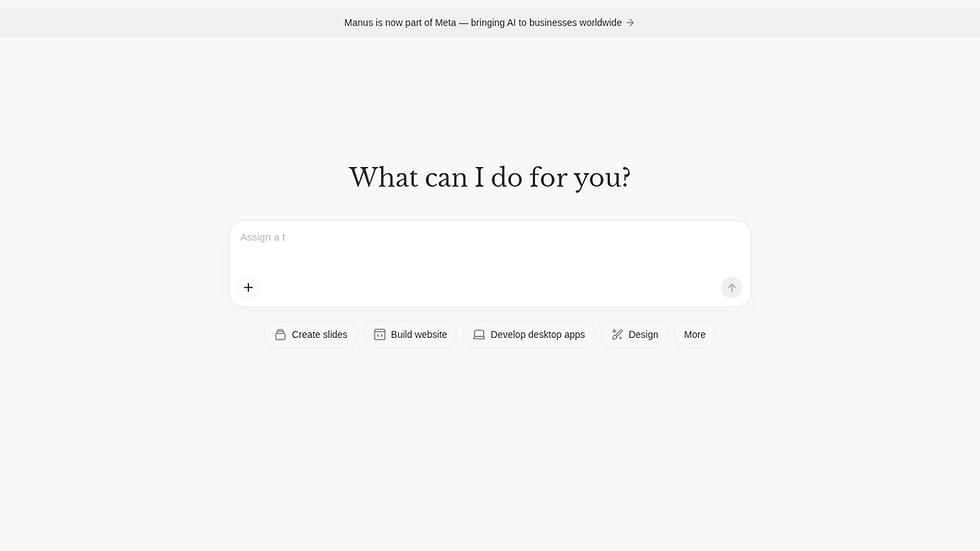
Manus is a cloud-based autonomous AI agent developed by Butterfly Effect, the team behind Monica.im. It launched in early 2025 and quickly attracted attention for its ability to take a single natural language prompt and execute complex multi-step tasks end to end, without ongoing supervision.
Rather than suggesting what you should do, Manus does it: it browses the web in real time, writes and executes code, manages files, and delivers finished outputs while you focus on other work. Internally, it uses a multi-agent architecture where specialized sub-agents handle planning, browsing, coding, and data analysis independently, then coordinate to complete the overall task.
Key Features
End-to-end task execution from a single natural language prompt, with no need to break tasks into manual steps
Background processing: tasks continue running even when you disconnect, so complex jobs finish without active supervision
Live monitoring dashboard showing which pages the agent opens, what searches it runs, and what code it writes in real time
Code writing and execution with the ability to push commits directly to GitHub
Web browsing and form interaction in a cloud sandbox
Web App Builder and AI-powered slide creation, added following the attempted acquisition by Meta in late 2025
Integrations with Slack, WhatsApp, and Telegram for task triggering and result delivery
Pros
Genuinely executes tasks rather than suggesting how to execute them, which saves meaningful time on repetitive research, data collection, and reporting workflows
Background operation means complex tasks finish without requiring you to stay connected or supervise each step
Natural language setup makes it accessible to non-technical users who cannot or do not want to write scripts or logic
GitHub integration is useful for developers who want to go from prompt to deployed code without manual git operations
Cons
Cloud-based architecture means all task data is processed on Manus servers, which creates real privacy concerns for workflows involving sensitive or confidential information
Reliability issues are widely reported across G2 and user communities: service load errors block task creation during peak usage periods
Credit consumption is unpredictable; complex tasks can burn through credits faster than expected, making it difficult to plan costs or get budget approval
Less suited to workflows requiring strong domain judgment or technical opinions, since Manus makes architectural decisions autonomously
> Note: Before committing to a paid plan, run several representative tasks on the free tier to measure how many credits your actual workflows consume. Credit burn rate varies significantly depending on task complexity.
Best For: Freelancers, developers, and non-technical users who need to delegate repetitive multi-step digital tasks such as competitive research, data extraction, content aggregation, and code deployment pipelines.
remio vs Manus: Head-to-Head on Three Key Dimensions
Data Privacy and Storage
This is where remio and Manus diverge most sharply. For many users in regulated industries, it is the deciding factor before any other comparison is relevant.
remio stores everything locally by default. Web pages, meeting transcripts, and indexed documents live on your machine. AI queries are processed against that local store. There is no cloud server to breach, no third-party data processing agreement to manage, and no ambiguity about where your data resides. For teams handling confidential client information, proprietary research, or regulated data, this architecture removes an entire category of compliance risk.
Manus operates entirely in the cloud. Every task you delegate runs in a Manus cloud sandbox, and your prompts, browsing sessions, code outputs, and task results are processed on external servers. Multiple privacy researchers and analysts have flagged concerns about Manus's data handling practices, particularly regarding server locations and whether data could be subject to Chinese regulatory jurisdiction given the company's origins. The blocked Meta acquisition in April 2026 also left long-term ownership and governance unresolved, which adds uncertainty for users considering a long-term commitment.
If data sovereignty is a hard requirement for your work, the remio vs manus decision is straightforward on this dimension. The two tools occupy opposite ends of the privacy spectrum.
Knowledge Accumulation vs. Task Execution
remio and Manus represent two different answers to the same underlying productivity question: how do you get more done with less effort?
remio's answer is retrieval and context reuse. Much of what a professional needs already exists somewhere in their work history: meeting transcripts, research from last quarter, documents they opened and closed. The bottleneck is surfacing the right piece at the right moment and turning it into useful outputs. Over weeks and months, remio builds compounding personal context that makes synthesis and decision-making progressively faster.
Manus's answer is delegation. The assumption is that certain tasks are time-consuming and repeatable but require capabilities that go beyond simple lookup: browsing the web for competitive data, pulling and formatting information from multiple sources, writing and deploying code. Manus handles the execution and returns a finished result.
For many knowledge workers, both bottlenecks are real. A researcher might use remio to build and query a compounding base of documents and past meetings, while using Manus to gather new data from the web. The tools are genuinely complementary in that scenario. But they address different problems, and the choice between them should be driven by where your time actually disappears, not by which tool sounds more interesting.
Passive Capture vs. Active Prompting
remio runs in the background without requiring deliberate filing. It captures web pages as you browse, records meetings as they happen, and indexes files as you open them. Your personal context grows passively, so it accumulates value even when you are not thinking about knowledge management.
Manus is activated on demand. Each task begins with a new prompt, and the agent does not retain context about your work from previous sessions by default. If you need Manus to understand your preferences or past work, you have to include that context explicitly in each new prompt.
This difference matters for how each tool fits into a daily workflow. remio is infrastructure that runs quietly and accumulates value over time. Manus is a tool you actively invoke when you have a specific task to delegate. Neither model is inherently superior, but they suit different working styles and different use cases.
Which Tool Is Right for You?
If your primary need is retrieving and synthesizing your own accumulated work history, remio is the better fit. It is designed specifically for knowledge workers who need to surface past decisions, meeting outcomes, and research context without manually organizing anything.
If your primary need is executing repetitive multi-step tasks, Manus is the better fit. Web research, data extraction, competitive analysis, and code deployment pipelines are tasks where Manus's autonomous execution saves real time compared to doing them manually.
If you handle confidential data or work in a regulated industry, remio is the practical choice to evaluate. Its local-first architecture gives you stronger control over sensitive meetings, files, and research than a cloud-executed agent workflow.
If you need ongoing meeting intelligence, remio covers this with local recording, transcription, and AI-powered retrieval of past meeting context. Manus has no equivalent feature.
If both tools seem relevant to your work, they can coexist without significant overlap. remio handles knowledge accumulation and retrieval; Manus handles discrete execution tasks. They do not compete for the same function.
You can explore remio's full feature set at remio.ai or review remio pricing to understand what is available on the free tier before committing.
Common Questions About remio vs Manus
Is remio free?
Yes, remio has a free tier. You can start capturing, organizing, and querying your personal work context without a paid subscription. Paid plans are available for users who need higher usage limits or additional features. Manus also offers a free tier, though it comes with limited daily credits.
Can remio replace Manus?
For some use cases, yes; for others, no. If you use Manus primarily to research topics, gather information, or synthesize content from your own materials, remio covers those needs with stronger personal context continuity. If you use Manus for autonomous web automation, form interaction, or code execution, remio does not replicate those capabilities.
How does remio handle privacy compared to Manus?
remio is designed around local-first personal context and user control over captured data. Manus routes tasks through cloud infrastructure, which means prompts and task outputs are handled on Manus servers. For sensitive client data, proprietary research, or regulated information, this is a meaningful architectural difference.
Which is better for meeting intelligence?
remio has dedicated local meeting recording and transcription. Recordings and transcripts stay on your device, and you can query past meeting content through the AI interface months later. Manus does not offer a meeting recording or transcription feature.
Does remio work on Windows?
Currently, remio is available on macOS and iOS. Windows support is not available as of May 2026. Manus operates through a web app and a desktop app available on both macOS and Windows, which gives it broader platform coverage for Windows users.


