remio vs Mem.ai: Passive Capture vs Auto-Organization

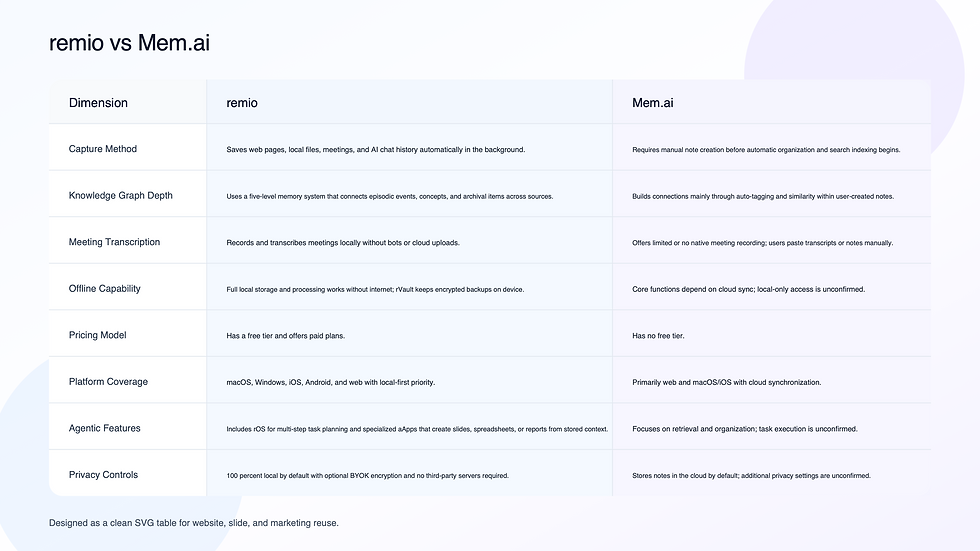
remio and Mem.ai both aim to reduce manual note work with AI. remio captures activity across apps and local files without user input. Mem.ai requires creating notes first then applies automatic tags and search. Knowledge workers who want to compare passive capture against active note creation face this choice.
Capture Method
remio: Saves web pages, local files, meetings, and AI chat history automatically in the background.
Mem.ai: Requires manual note creation before automatic organization and search indexing begins.
Knowledge Graph Depth
remio: Uses a five-level memory system that connects episodic events, concepts, and archival items across sources.
Mem.ai: Builds connections mainly through auto-tagging and similarity within user-created notes.
Meeting Transcription
remio: Records and transcribes meetings locally without bots or cloud uploads.
Mem.ai: Offers limited or no native meeting recording; users paste transcripts or notes manually.
Offline Capability
remio: Local-first storage and processing for captured context; some AI and sync workflows may require connectivity.
Mem.ai: Core functions depend on cloud sync; local-only access is unconfirmed.
Pricing Model
remio: Has a free tier and offers paid plans.
Mem.ai: Has no free tier.
Platform Coverage
remio: macOS, Windows, iOS, Android, and web with local-first priority.
Mem.ai: Primarily web and macOS/iOS with cloud synchronization.
Agentic Features
remio: Includes rOS for multi-step task planning and specialized aApps that create slides, spreadsheets, or reports from stored context.
Mem.ai: Focuses on retrieval and organization; task execution is unconfirmed.
Privacy Controls
remio: 100 percent local by default with optional BYOK encryption and no third-party servers required.
Mem.ai: Stores notes in the cloud by default; additional privacy settings are unconfirmed.
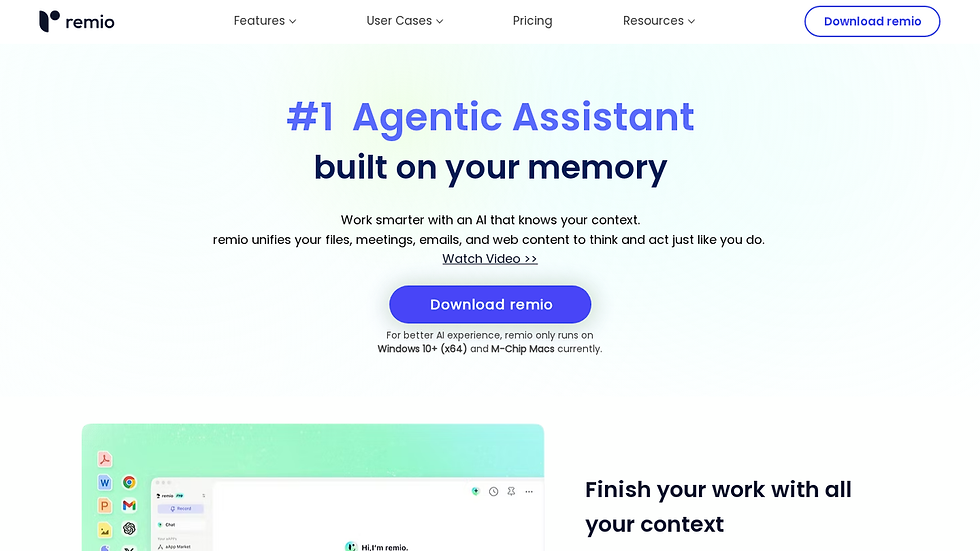
remio records browsing, documents, meetings, and external AI conversations without manual input. It turns captured content into a five-level memory system that keeps instant, working, episodic, semantic, and archival layers accessible. The rOS layer added in 2026 allows the system to plan and finish tasks such as building presentations or running research syntheses directly from stored data.
Key features include automatic web and file indexing, local meeting transcription with no bots, bidirectional sync with Notion and Linear, and an aApp marketplace for one-click outputs like PowerPoint files or Excel models.
✅ Pros
Passive capture works across browsers, local drives, and external AI chats without extra steps.
Five-level memory prevents context loss between sessions.
Local processing supports full offline use and enterprise privacy needs.
Skills agents create finished deliverables from existing notes and transcripts.
❌ Cons
New users must learn agent prompts before full task automation appears.
Mobile capture is narrower than desktop browsing and file indexing.
> Note: Export meeting transcripts to Notion with one click to keep action items in the same workspace.
Best For: Professionals who want knowledge to accumulate automatically and later produce slides, reports, or research summaries without retyping.
See how remio handles info capture and explore the ask remio feature for deeper retrieval examples.

Mem.ai prompts users to create notes first, then applies automatic tagging and search ranking. Its strength lies in turning typed or pasted text into a connected graph without manual folder work.
Key features include auto-tagging, daily note generation, internal link suggestions, and basic calendar integration.
✅ Pros
Rapid note creation with instant tagging reduces manual filing time.
Search surfaces related notes through similarity scoring without extra setup.
Daily summaries pull recent entries into one view.
❌ Cons
No native local meeting recorder; users must add transcripts manually.
Full features require constant cloud connection.
Mobile app lacks offline editing in reported reviews.
> Note: Paste meeting notes soon after a call so auto-tagging can connect them to prior entries.
Best For: Writers and researchers who prefer typing or dictating content then relying on AI to keep it organized.
remio vs Mem.ai: Head-to-Head on Capture, Meetings, and Offline Use
Capture Method
remio records web visits, local documents, and chat logs in the background. Mem.ai waits for notes to be created before indexing. Users who dislike manual entry gain more coverage from remio; those who want to control exactly what enters the system may prefer Mem.ai.
Meeting Transcription
remio transcribes calls locally and stores the text inside the same memory layers used for research and tasks. Mem.ai lacks a built-in recorder, so users import transcripts after the fact. Teams that run many calls keep meeting context automatically inside remio.
Offline and Privacy
remio is local-first for captured context and supports work with unreliable connections. Mem.ai depends on cloud servers for search and sync. Professionals in regulated fields should compare each product's current privacy and connectivity details before choosing.
Which Tool Is Right for You?
If you want knowledge to build without typing or uploading files, remio fits the workflow. If you create notes by hand and want tags added automatically, Mem.ai handles that process well. Users who need meeting recordings inside the same searchable context should start with remio. Writers who already type daily notes and value quick tagging may find Mem.ai sufficient.
Common Questions About remio vs Mem.ai
Is remio free?
remio has a free tier and offers paid plans.
Can remio replace Mem.ai?
remio can import existing notes and continue capturing new content automatically; users who rely on Mem.ai auto-tagging alone can switch without data loss.
How does remio handle privacy compared to Mem.ai?
remio keeps all processing on the device by default while Mem.ai sends notes to cloud servers for indexing Bloomberg.
Which is better for meeting notes?
remio records and transcribes calls locally and links results to other captured data; Mem.ai requires manual import of transcripts.
What local-first workflows does remio support?
remio is local-first for captured notes, files, meetings, and research context. Some AI, sync, and connector workflows may still require connectivity.