SteamOS vs Windows: Why Microsoft’s New Gaming Features Are Too Little, Too Late


For decades, the concept of "PC gaming" was synonymous with Windows. If you wanted to play games, you used Microsoft’s OS. There wasn’t a debate. But the landscape changed with Valve's introduction of the Steam Deck and the maturation of Linux gaming. We are seeing a genuine fragmentation in the market where user preference is shifting away from general-purpose computing toward specialized gaming environments.
The conversation around SteamOS vs Windows is no longer just about open-source philosophy. It is about usability, performance, and respect for the user’s time. Microsoft has finally acknowledged this threat, outlining plans for a new "Full Screen Experience" and faster game launching features. But for many gamers who have already tasted the efficiency of a focused gaming OS, these promises feel like a desperate attempt to patch a sinking ship rather than a true innovation.
Real-World Experience: Switching from Windows to Linux Gaming

Before looking at market data or corporate roadmaps, we need to look at what it actually feels like to use these systems. The practical reality of the SteamOS vs Windows debate often comes down to the friction encountered between pressing the power button and playing a game.
The Migration Experience: Beyond the Terminal
A common misconception is that leaving Windows requires a computer science degree. While SteamOS is the default on Valve's hardware, the broader community has rallied around user-friendly distributions like Bazzite and Linux Mint.
Users migrating from Windows 11 to Bazzite often report a sense of relief. Bazzite is designed to replicate the Steam Deck interface on other hardware, providing that coveted "console-like" feel. The experience is starkly different from a fresh Windows installation. You aren't bombarded with prompts to sign up for a cloud account, buy storage, or try an AI assistant. You boot up, log into Steam, and the library is there.
The "out of the box" experience on Linux has matured. The driver situation, historically a nightmare, has stabilized significantly. Unless you are using brand new, edge-case hardware, the installation process for a gaming-focused Linux distro is often faster than debloating a fresh Windows 11 install.
Solving the Compatibility Puzzle
The magic behind this shift is Proton. This compatibility layer has reached a point where thousands of Windows-native games run flawlessly on Linux. In many cases—specifically with older titles—games run better on Linux than they do on modern Windows 11, which often struggles with legacy dependencies.
However, the experience isn't perfect. The biggest point of friction in the SteamOS vs Windows comparison remains anti-cheat support.
This is the hard line for many competitive gamers. Systems like Easy Anti-Cheat (EAC) and BattlEye support Linux, but support is "opt-in" for developers. If a studio behind a massive title like Fortnite or Call of Duty decides not to toggle that support, the game won't run. This isn't a technical limitation of the OS; it is a policy decision by publishers. For single-player gamers or those who play indie titles, this is a non-issue. For competitive FPS players, Windows remains a forced requirement.
Day-to-Day Usability
In daily use, the difference becomes clear. Windows users dealing with handhelds like the ROG Ally often cite the frustration of "desktop" elements invading a gaming space. Tiny close buttons, pop-over windows, and driver updates that require multiple reboots kill the immersion.
In contrast, the Linux gaming experience on handhelds utilizes tools like Gamescope. This allows for a seamless, compositor-level control over resolution and scaling that Windows currently cannot match natively. When you suspend a game on SteamOS, it sleeps. When you try to sleep a Windows handheld mid-game, you are often rolling the dice on whether it crashes or drains the battery.
The Technical Divide in SteamOS vs Windows
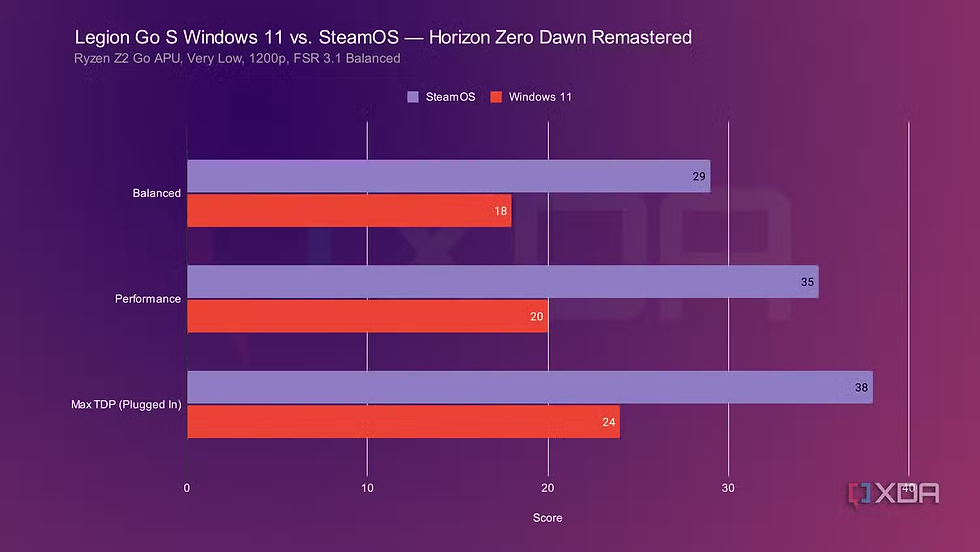
The fundamental issue Microsoft faces isn't just features; it's architecture. Windows 11 is a general-purpose operating system designed to run spreadsheets, enterprise servers, web browsers, and games simultaneously. SteamOS is a gaming appliance OS.
Bloatware vs. Focus
The SteamOS vs Windows performance discussion often centers on "bloat." Windows 11 has become increasingly aggressive with its feature set. The integration of Copilot, the forcing of Edge, and the injection of ads into the Start menu and File Explorer consume system resources.
On a high-end desktop with an RTX 4090, this background noise is negligible. On a handheld or a budget gaming laptop, it is parasitic. Every cycle the CPU spends managing an update service or telemetry data is a cycle not used for frame generation.
Users are demanding ownership of their hardware. The frustration stems from the feeling that Windows is no longer a tool you own, but a service you are renting. Forced updates that restart systems in the middle of a session or reset custom driver configurations are user-hostile behaviors that simply don't exist in the SteamOS ecosystem.
Control and Ownership
Privacy and control act as major drivers for the Linux migration. In the Linux environment, if you don't want a feature, you remove it. If you want to freeze your system version to ensure stability for a specific game, you can. Windows 11 has moved in the opposite direction, making it increasingly difficult to use the OS without a Microsoft account and constant internet connectivity.
Microsoft’s Response: The Full Screen Experience (FSE)
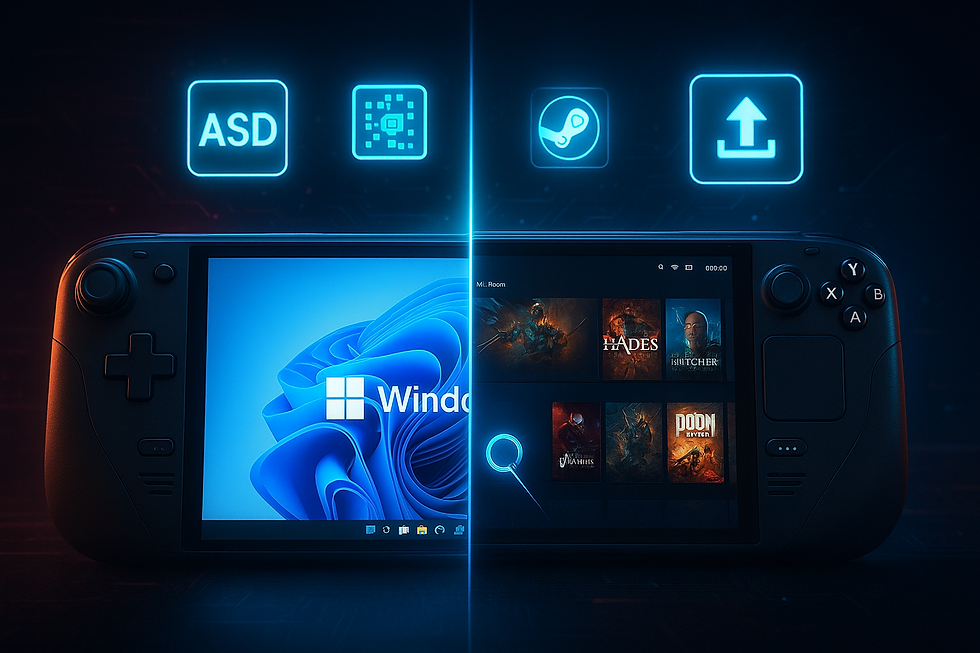
Microsoft is not blind. They see the metrics. They know that while they hold 95% of the desktop market, the sentiment is turning. In response, they are developing features for 2025 and 2026, specifically the Xbox Full Screen Experience (FSE) and the Game Bar Compact Mode.
What is FSE?
The Full Screen Experience is intended to be a launcher interface that sits on top of Windows, theoretically offering that seamless controller navigation that Steam Big Picture and SteamOS currently provide. They are also promising "Advanced Shader Delivery" to reduce the shader compilation stutter that plagues many PC ports, and "Auto SR," a system-level super-resolution feature similar to DLSS but integrated into the OS.
Is It Enough?
The skepticism around FSE in the SteamOS vs Windows analysis is high. The problem is that FSE appears to be just an app—a layer of paint over the existing crumbling drywall.
Launching a "gaming mode" interface doesn't solve the underlying kernel-level issues. If FSE is running, but Windows Update still decides to minimize your game to tell you about a feature update, the immersion is broken. If the OS still consumes 4GB of RAM just to idle because of background telemetry, a new UI skin won't recover that performance.
Microsoft tried this before with "Games for Windows Live," which was a catastrophic failure due to its intrusive nature. The fear is that FSE will just be another launcher that users have to fight against, rather than an integrated part of the workflow.
The "Too Little, Too Late" Argument
By the time these features roll out to the broader public in late 2025 or 2026, the Linux gaming market will have evolved further. Valve is iterating fast. The community drivers for Nvidia hardware on Linux (NVK) are improving rapidly.
Microsoft is playing catch-up to a standard Valve set years ago. The promise of "Advanced Shader Delivery" is something the Steam Deck has arguably already solved through its pre-cached shader downloads. Microsoft is trying to invent solutions for problems that their competitors solved in the last generation.
Hardware Reality: Handhelds Driving the Shift

The battlefield for SteamOS vs Windows isn't the desktop tower; it's the handheld. The explosion of the handheld PC market has put Windows under a microscope.
The Handheld Friction points
Devices like the Lenovo Legion Go or ASUS ROG Ally ship with Windows. The hardware is brilliant, but the software reviews are almost universally critical of the Windows experience. Navigating a desktop OS on a 7-inch touchscreen is miserable.
Microsoft's lack of a native "handheld mode" has forced manufacturers to create their own clunky overlay software (Armoury Crate, Legion Space) to hide Windows. These layers add more overhead and often conflict with the OS itself.
Why Steam Deck Users Stick to Linux
Steam Deck users generally stay on SteamOS not because they can't install Windows (they can), but because the user experience is superior. The "resume game" function works instantly. The power management is tuned perfectly for the hardware.
The success of the Steam Deck has proven that gamers don't actually care about "Windows." They care about playing games. If the games work, they don't care what kernel is running underneath. This realization is the greatest threat to Microsoft’s dominance. If the "default" operating system for the next generation of gamers is a SteamOS-derivative, the Windows lock-in effect evaporates.
The Verdict
The SteamOS vs Windows dynamic has shifted from a David and Goliath story to a serious market correction. Microsoft’s upcoming features like FSE and Auto SR are necessary steps, but they address the symptoms, not the disease.
Gamers are asking for a lightweight, privacy-focused, ad-free operating system dedicated to performance. Microsoft is offering a bloated, ad-supported, AI-integrated general-purpose OS with a "gaming skin" on top. Until Microsoft is willing to strip Windows down to its bare essentials for a dedicated "Windows Gaming Edition"—something they have historically refused to do—SteamOS and Linux will continue to offer the superior pure gaming experience.
For the user, the choice is becoming clearer. If you play competitive shooters with aggressive anti-cheat, you are stuck with Windows. For everyone else, the exit door is wide open, and the grass on the Linux side is getting greener every day.
FAQ
Q: Can I play all my Windows games if I switch to SteamOS or Linux?
A: Most single-player games work perfectly via the Proton compatibility layer. However, games relying on kernel-level anti-cheat (like Call of Duty or Valorant) may not run unless the developers have explicitly enabled Linux support.
Q: Is Bazzite better than SteamOS for a handheld PC?
A: Bazzite is an excellent alternative that brings the SteamOS experience to non-Valve hardware like the ROG Ally or Legion Go. It offers similar features, including Gamescope and console-like interfaces, which are currently difficult to get on a standard Windows install.
Q: Will Microsoft’s Full Screen Experience improve game performance?
A: It is unlikely to improve raw performance (FPS) directly, as it is primarily a user interface update. However, features like Auto SR (Super Resolution) could help boost frame rates on supported hardware, provided the underlying Windows bloat doesn't bottle-neck the system.
Q: Why do users say Windows 11 is bad for gaming handhelds?
A: Windows 11 is designed for mouse and keyboard, making it difficult to navigate on small touchscreens. Additionally, background processes, forced updates, and lack of proper sleep/resume functionality clash with the quick-access nature of handheld gaming.
Q: Does SteamOS vs Windows affect battery life on laptops and handhelds?
A: Generally, SteamOS and optimized Linux distros offer better battery management for gaming because they have less background overhead. They also utilize system-level feature controls (like TDP limits and refresh rate caps) more effectively than standard Windows.


