2026 年研究人员的 10 大 Zotero 替代工具

If you want to try new Zotero alternatives in 2026, you have lots of options. Researchers often want tools for managing references that are easy to use. They also want better teamwork and smart AI features. Some top tools are remio, Anara, Obsidian + Zotero, ResearchRabbit, Bookends, Mendeley, EndNote, Otio, Sciwheel, and Papers. Many of these reference managers are free or open-source. You can find AI tools for researchers that help with citations, summaries, or smart reading lists. The table below shows how each tool is special with its own AI features:
Tool Name | Unique AI Features |
remio AI | AI auto capture all the content while browsing, including websites and online PDF, local files index with Powerful AI supporting PDF, PPT, Word |
Zotero AI | Smart citation suggestions, automatic PDF metadata extraction, collaborative libraries, reading list summaries |
EndNote AI | Smart Style Engine, AI reference checks, research templates, version control, journal suggestions |
GrammarlyGO | Academic style, field-specific tips, citation checks, clarity improvements, platform integration |
Scite Assistant | Citation context analysis, evidence tracking, reference linking, citation network mapping, paper recommendations |
NLP for research texts, domain knowledge, extraction techniques, strong data security | |
DeepL Write | Real-time rewriting, terminology management, style guides, citation support, collaboration features |
Scholarcy | Automated summaries, key point extraction, visual reference mapping, flashcard generation |
Quetext AI | Plagiarism detection, context analysis, citation checking, integration with processors and reference tools |
DataRobot | Predictive model building, data preparation, model explainability, collaboration, academic data integrations |
Many researchers want free and open-source zotero alternatives for a better research experience. These choices give you more control and help you find what works best for your research.
Key Takeaways
Many researchers look for Zotero alternatives that are easier to use. They want better ways to organize work and work together. Smart AI features help save time and make research better.
Since 2020, research needs have changed a lot. People now want to work together in real time. They also want AI tools, cloud access, and support for many content types.
The best Zotero alternatives can be free, open-source, or paid tools. These tools work with different workflows, devices, and research styles.
Picking the right reference manager is important. You should think about how easy it is to use. Look for AI support and ways to work with others. Make sure it works on your device and check the price.
Moving from Zotero is easy because of common import and export formats. But you should always back up your data first. Also, check privacy and integration options.
Why Researchers Look for Zotero Alternatives
Common Problems
Zotero helps with many research tasks, but it has some problems. Many researchers think the folder system is too strict. If you study more than one subject, it can be hard to keep things organized. Exporting citations takes extra steps and slows you down. Zotero does not always work well with popular writing tools. This makes it harder to manage your research and citations at the same time.
Zotero’s tagging rules make it tough to organize your references. You cannot always set up flexible systems for your work. Zotero’s teamwork features do not let you share or work together in real time like some new tools. When you add PDFs or citations, you often have to clean up your library, especially if it is big. Zotero does not show how papers connect, so it is hard to see links in your research.
Reasons you want Zotero alternatives:
Need to organize without folders
Want AI to suggest metadata and papers
Need easy use with writing and AI tools
Want better teamwork and sharing
Need simple PDF import and management
Like smart tagging and dynamic collections
Want free tools that work everywhere
Changing Needs
Since 2020, what you need as a researcher has changed. You want tools that do more than just manage citations. You now save slides, blog posts, and web links for your research. You look for free and open-source Zotero alternatives that support open science and let you move your data. Real-time teamwork is important for your group.
You want tools that work with writing and knowledge apps. AI helps you manage citations and research faster. Many researchers use more than one tool because no single tool fits their workflow. New tools try to put all these features together for a smoother experience.
Aspect | How Your Needs Have Changed Since 2020 |
You need faster ways to manage more research | |
Collaboration | You want to share notes and libraries in real time |
AI Integration | You use AI to do less manual citation work |
Cloud & Cross-Platform Sync | You want free access on all your devices |
Mobile Accessibility | You use mobile apps to do research anywhere |
Open Science & Portability | You want open-source and free tools for all your work |
Customization | You want tools that fit how you do research |
Now, you want Zotero alternatives that are free, open-source, and have better AI, teamwork, and integration. These new needs help create better tools for managing references and bibliographies.
Top Zotero Alternatives
Reference Management Tools Overview
In 2026, you can pick from many Zotero alternatives. These tools help you keep your research and citations in order. They also help you make a bibliography for your work. Some tools are for regular citation tasks. Others use AI to make things easier. There are free and open-source choices for students and researchers.
Reference management tools fit into three main groups:
Category | Examples | Key Features and Focus |
Traditional Reference Managers | Zotero, EndNote, Mendeley | Organize citations, create bibliographies, and work with word processors. No AI features. |
AI-Powered Reference Managers | remio,Anara | Use AI for document analysis, source checks, multimedia support, and teamwork. |
Institutional/Enterprise Tools | EndNote | Offer IT support, site licenses, and meet university needs. |
You should choose a tool that matches your research style. Some are best for working alone. Others are better for group projects. Many free and open-source zotero alternatives let you move your data. You can keep control of your research this way.
Quick Comparison Table
Here is a simple table of the top 10 zotero alternatives for 2026. It shows important features, prices, and where you can use each tool. This can help you pick the right one for your needs.
Alternative | Standout Features | Starting Price | Platform Compatibility |
AI-powered assistant, web content capture, natural language search, Local files Q&A | Free tier available | Desktop, browser | |
Anara | AI document analysis, source verification, multimedia support, collaboration | Free & premium plans | Web, desktop, mobile |
Obsidian + Zotero | Markdown notes, plugin support, citation integration, open-source | Free | Windows, Mac, Linux |
ResearchRabbit | Visual citation networks, AI recommendations, collaboration | Free | Web-based |
Bookends | PDF annotation, smart groups, bibliography management | $59.99 one-time | Mac |
Mendeley | Browser import, cross-platform, citation add-in for Word | Free | Windows, Mac, Linux, web, mobile |
EndNote | Advanced integration, PDF annotation, journal suggestions | $110.53 one-time | Windows, Mac, iOS |
Otio | AI-powered summaries, smart tagging, open-source | Free | Web, desktop |
Sciwheel | Web import, smart citation suggestions, team comments | $9.95/month | Web, mobile, desktop |
Papers | Smart folders, annotation, publisher-focused, cloud-based reference manager | $5/month | Web, iOS, Android |
Tip: Lots of zotero alternatives have free or open-source versions. Try a few before you pick the one you like best.
Each tool has something special. Some are great for AI and teamwork. Others are simple and free to use. If you want a cloud tool, Papers and Mendeley are good picks. If you want free and open-source, try Obsidian + Zotero or Otio. These tools help you save time and keep your research neat.
1.remio.ai
Key Features
remio gives you a smart way to manage your research and notes. You can save web content with one click. You do not need to use a web clipper. remio captures information as you browse and stores it as a resource.
You can use the AI copilot to ask questions while you write or read. This tool helps you find answers fast. Remio supports natural language search, so you can look for notes or references using your own words.
The personal assistant in remio learns from your daily habits and context. It can help you write reports or reply to emails. remio also lets you ask questions about your local files, such as PDFs, Word documents, or slides. This makes pdf management easy and quick. You can use annotation tools to highlight and comment on important parts of your research.
remio stands out as an AI-powered note-taking and knowledge management platform. It helps you turn messy information into clear insights. You also get strong privacy protection for your data.
Pros and Cons
remio automatically unifies all your knowledge—notes, files, emails, and web content, to create an AI that understands your context and replicates your unique way of working.
Pros:
AI copilot answers your questions in real time.
Automatic web content capture saves you time.
Natural language search makes finding notes simple.
Personal assistant adapts to your workflow.
Loacal files Q&A supports many formats.
Cons:
Some advanced features may require a subscription.
Pricing
remio offers a free version for new users. If you want more features, you can choose a monthly subscription. The price is $19.90 per month. You can also subscribe the yearly plan to reduce the month fee, to get the advanced AI features and strong support.
2.Anara
Key Features
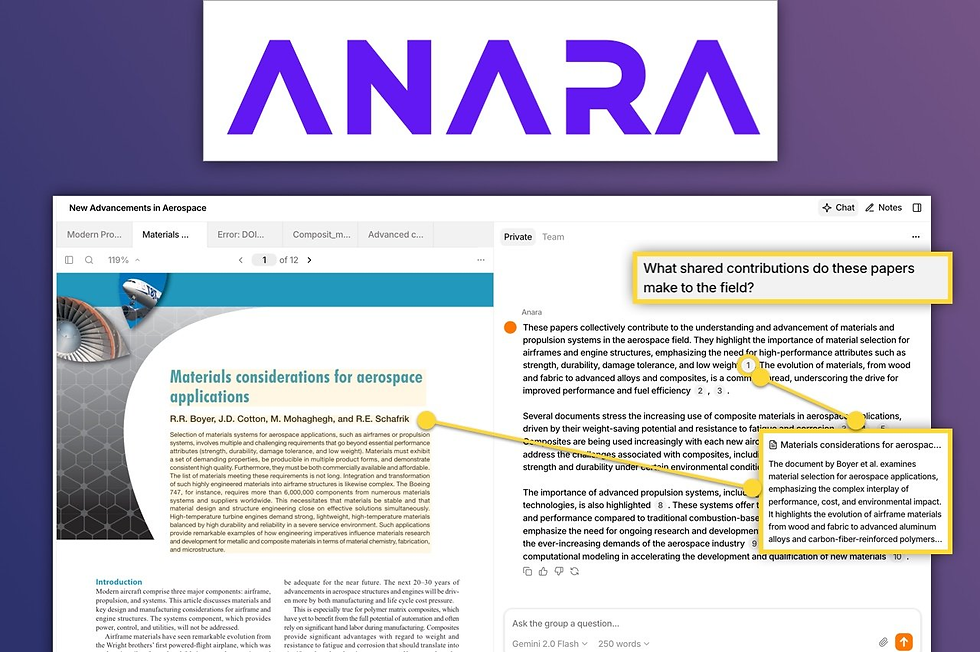
Anara helps you do research in a smart way. You can ask hard questions and get answers right away. The source is shown, so you know where the info comes from. You search your library, databases, and the web at the same time. This saves time and helps you find new papers. You do not just organize what you have.
Anara gives you citations fast and in the right format. You do not need to make them yourself. You connect ideas from many papers with cross-document synthesis. You work with your team at the same time. You share libraries and set who can see or change things. Anara puts library management, AI analysis, and writing tools together. You do not need to switch between apps.
You use study tools like flashcards and quizzes from your research chats. These help you remember important points. Every AI insight links to the source, so you can trust it. You keep your research going with searchable chat history. You work with PDFs, videos, audio, and web pages. This makes pdf management easy and flexible.
Pros and Cons
Anara helps you work faster and smarter. You get answers quickly and see where they come from. You work with your team and share research easily. You use study tools to remember what you learn. You manage many types of content, not just text.
Pros:
Instant answers with source verification
All-in-one workflow for research and writing
Real-time collaboration and sharing
Support for many content types
Study tools for better learning
Cons:
Some features need a paid plan
Pricing
You start with a free version with limits on messages and uploads. If you want more, you can get the Pro plan for $12 each month. Teams can use the Team plan for $18 per seat each month. This plan adds teamwork and management tools. Anara costs less than many other tools, especially for teams.
3.Obsidian + Zotero
Key Features
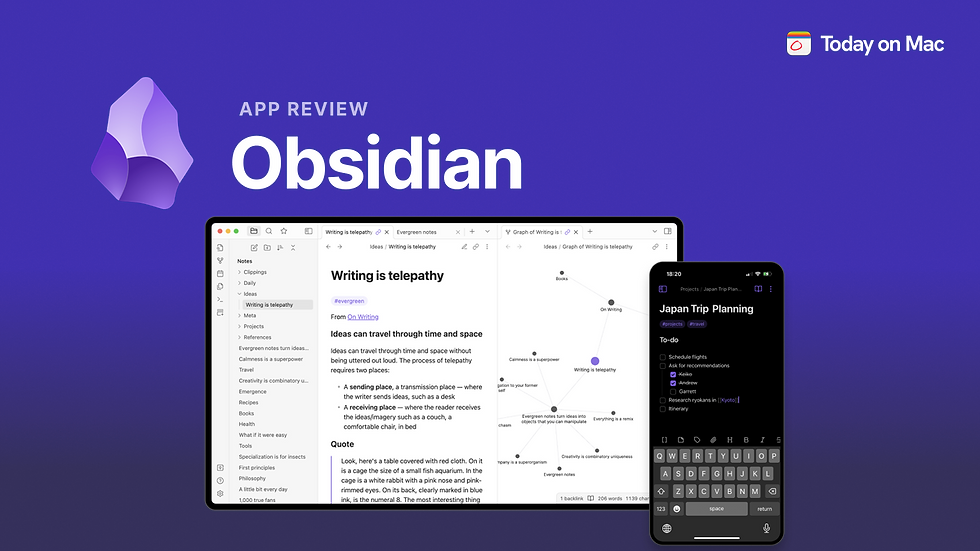
Obsidian and zotero work well together for research. Zotero helps you save references from websites and gets details for you. You can highlight and add notes to PDFs in zotero. Obsidian lets you take notes using markdown. You can see how your notes connect with links and a graph. First, you collect and mark up references in zotero. Then, you move your notes into Obsidian and link them.
Zotero keeps your references, details, and PDF notes in one place.
Obsidian is a flexible space for notes and has a graph view.
You add Better BibTeX to zotero to make citation keys.
Obsidian plugins like Citations help you bring in notes and link them.
You can export your zotero library and add citations to your writing.
Obsidian lets you use templates and shortcuts to work faster.
This setup gives you a connected and searchable knowledge base on your computer.
您可以轻松地从在 Zotero 中保存参考文献过渡到在 Obsidian 中撰写和整理笔记。这能加快写作速度,并帮助您更好地理解研究内容。
Pros and Cons
Obsidian + zotero 比大多数其他工具提供更多控制权。您需要花时间学习和设置,但能获得专为您打造的研究空间。
Pros
• 笔记通过插件支持参考文献链接
• 本地数据存储;支持链接和众多插件
• Zotero 在参考文献收集方面表现出色
• 工作流可通过插件和模板进行调整Cons
• 插件设置和新操作步骤需要投入精力
• Zotero 更新后笔记需要重新导出;设置较为复杂
• 学习曲线陡峭且界面偏技术化
• 免费版云同步功能有限
Pricing
Zotero 可免费使用. Obsidian 也有免费版本。如果您想要更多功能(如同步或发布),Obsidian 的付费计划起价为每月 $8。zotero 和 Obsidian 的大多数插件都是免费的。您只需为额外存储或特殊功能付费。如果您希望节省开支并获得控制权,Obsidian + zotero 是个不错的选择。
4.ResearchRabbit

Key Features
ResearchRabbit 以全新方式帮助您查找和整理研究论文。您只需添加一篇论文或关键词。该工具会显示论文与作者之间关联的map of how papers and authors connect。此地图让您看到主题的全貌。您可以通过交互式可视化查看论文、作者和研究趋势。columns help you move from one paper to another fast。您可以为每一步打开新列,从而轻松追踪引用链。
ResearchRabbit 会从您的收藏中学习并给出建议。
您可以通过 DOI、PMID、标题添加论文,或导入 BibTeX 或 RIS 等文件。
您可以使用 Lens.org 和 PubMed 进行搜索。
您可以共享收藏并添加评论以便团队协作。
ResearchRabbit 与 Zotero 集成,因此您可以轻松管理引用。
该平台会发送与您兴趣匹配的alerts about new papers。
ResearchRabbit 的特别之处在于帮助您看到论文与作者之间的联系。您可以清晰地查看研究网络并发现趋势。
Pros and Cons
许多用户表示 ResearchRabbit 节省时间并帮助找到重要论文。可视化地图让研究之间的关联一目了然。
Pros:
• 所有功能免费使用
• 可视化地图显示引用和共同作者网络
• 持续使用后建议会不断改进
• 与 Zotero 无缝集成以管理引用
• 通过共享和评论支持协作
• 查找研究论文快速高效
Cons:
• 部分用户可能觉得界面有些杂乱
• 建议主题可能忽略较小的子领域
• 对写作或笔记功能的支持有限
Pricing
ResearchRabbit 提供all features for free。您无需支付升级或订阅费用。这在 AI 驱动的参考文献管理工具中较为少见。大多数其他工具会收取月费或限制免费计划。
如果您想要一款免费且强大的研究论文查找工具,ResearchRabbit 是个不错的选择。您无需付费即可获得高级功能。
5.Bookends
Key Features
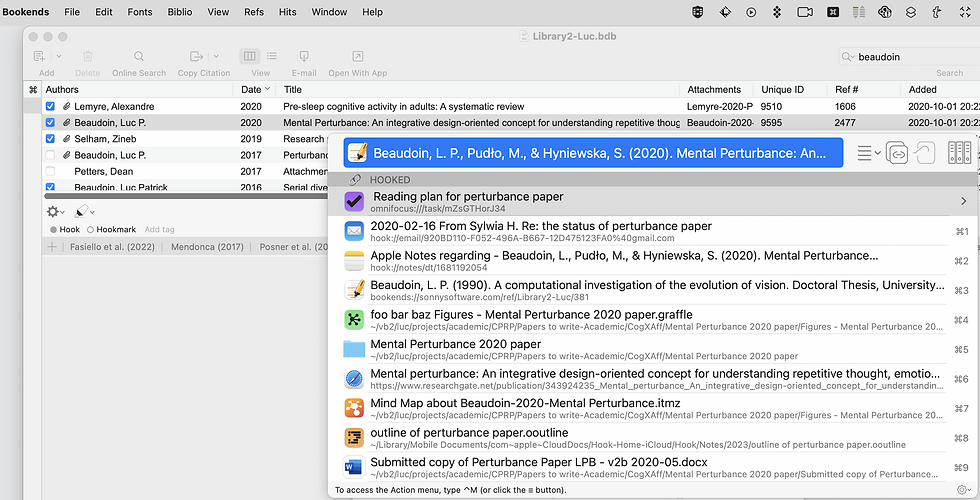
Bookends 帮助 Mac 用户管理参考文献。您可以轻松地将笔记与参考文献关联。该软件允许您在库中连接想法。许多人喜欢其自动化工具(如 AppleScript)。这些工具可帮助您创建自定义工作流并节省时间。
您可以将库与 iCloud 或其他方式同步。这意味着您无需使用外部云服务来存储 PDF。Bookends 即使面对大型库也能良好运行。您可以保留数百条参考文献且保持流畅。开发者确保 Bookends 与其他应用兼容。这有助于您keep your research neat并保持关联。
Hookmark 群组中的许多人都喜欢 Bookends。他们喜欢能够掌控自己的文件,而不必将 PDF 放在公司服务器上。如果您需要专为 Apple 设备打造的工具,Bookends 是个不错的选择。
Easy to link notes and references
Sync with iCloud or other options for privacy
Works well with big libraries
Made for Mac users
No need to store files on outside servers
Pros and Cons
如果您使用 Apple 设备,Bookends 表现良好。您能获得强大的自动化和隐私保护。处理大型库时也不会出现问题。该软件不会强制您将文件存储在外部服务器上。如果您不使用 Mac,部分人可能不太喜欢。
Pros:
Great for Mac users
Strong automation and linking
Flexible sync and storage
Handles big libraries well
Cons:
Only for macOS
You pay to upgrade to new versions
Pricing
Bookends 采用一次性付费。您首次购买需支付$59.99 for one user。如果以后要升级到新版本,需支付 $39.99。如果您不想按月付费,这是个不错的选择。其他工具采用订阅制或提供有限免费版。
您只需为 Bookends 支付一次,即可使用多年。如果长期使用,这能帮助您节省开支。
6.Mendeley Reference Manager

Key Features
Mendeley Reference Manager 帮助您整理研究。您可以保存论文并高亮重要部分。它允许您在文档中添加笔记。您可以创建共享库以便团队协作。这对与同学或团队合作很有帮助。引用插件可帮助您在 Word 中添加参考文献。Mendeley 支持 Windows、Mac、Linux 和移动设备。您可以在所有设备上同步库。这意味着您的研究始终随身携带。该平台支持 pdf management,因此存储和阅读文件都很方便。
Mendeley 让收集、整理和分享研究变得简单。您可以将其用于团队项目或个人使用。
Pros and Cons
您可能想在选择前查看其他 mendeley alternatives。以下是a table that compares Mendeley with other popular tools。它展示了这些工具在团队协作和 AI 功能方面的表现:
Mendeley 提供良好的协作工具。但它没有智能 AI 功能。一些 mendeley alternatives(如 Sourcely)同时具备协作和 AI 工具。如果您需要共享库并使用 Word,Mendeley 是个不错的选择。
Pros:
Easy to organize and share references
Good integration with Word
Works on many platforms
Supports group libraries
Cons:
Lacks AI-powered features
Limited real-time editing
Pricing
Mendeley 提供免费版本,包含大部分功能。您可以免费存储最多 2GB 数据。如果需要更多空间,可以付费购买额外存储。许多学生和研究人员使用免费版本。付费计划提供更多空间,但主要功能保持不变。
您可以从免费版本开始,仅在需要更多空间时付费。
7.EndNote for Researchers

Key Features
EndNote 为研究提供大量工具。您可以使用AI-powered summaries快速了解论文。Key Takeaway 工具可在几秒钟内找到主要观点。Find a Journal tool帮助您选择最佳发表地点。如果阅读 PDF,您可以一键高亮引用并添加引用。Summary Panel 清晰显示细节,让您看到最重要的内容。EndNote 与 Web of Science 连接,因此您可以查看引用文章和相关记录。您可以通过改进的 Find Full Text 和参考文献更新功能保持参考库最新。EndNote 计划添加生成式 AI 助手,以便您与文档聊天并快速获得帮助。您还会在参考文献更改时收到通知,从而保持工作准确。
EndNote 借助智能 AI 工具和与其他平台的强大连接,帮助您整理、引用和发布研究。
Pros and Cons
EndNote 有许多优点。AI-powered summaries 为您节省时间。Find a Journal tool 帮助您更快发表。您可以一键从 PDF 引用。EndNote 与 Web of Science 配合良好,因此您可以构建强大的参考库。您会收到更新通知,这能保持工作最新。
Pros:
Fast AI summaries and key ideas
Easy citation from PDFs
Strong journal selection tool
Good connection with Web of Science
Helpful notifications for updates
Cons:
You pay a one-time fee for the license
No free version for all features
Some advanced features need updates
Pricing
EndNote 采用一次性付费。首次购买完整许可需支付$275 for a full license。如果从旧版本升级,需支付 $125。学生凭证明可享受 $150 的折扣。团体或学校可联系销售获取特殊价格。您的许可包含无限存储空间。EndNote 支持 Windows、MacOS 和 iOS。
您无法获得 EndNote 的免费版本,但您将永久拥有许可。如果您需要高级功能和长期价值,EndNote 是个不错的选择。
8.Otio
Key Features
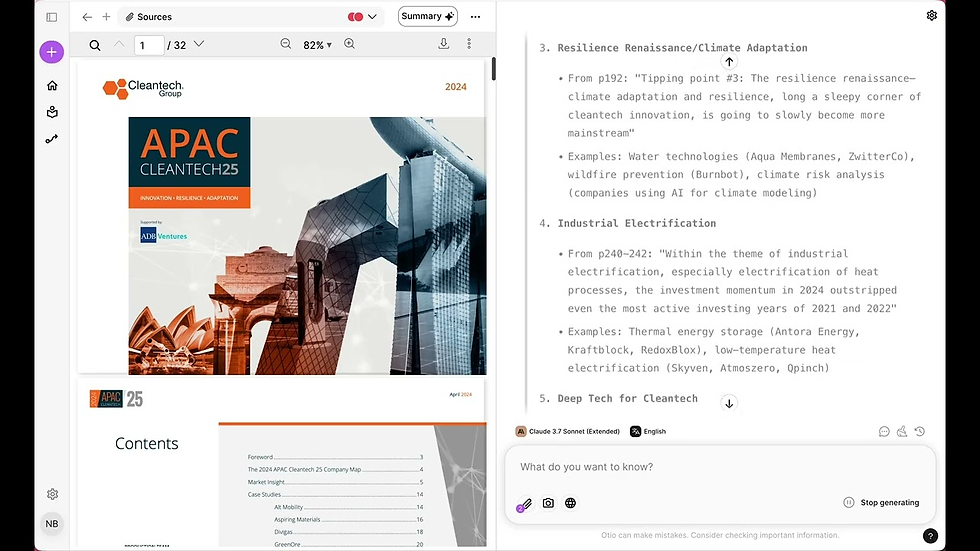
Otio 为您提供一种智能方式,将所有研究集中在一个地方管理。您可以从多种来源收集信息,例如 PDF、文章、YouTube 视频、推文甚至长篇书籍。Otio 使用AI-powered summarization帮助您快速理解要点。您无需阅读全部内容。该平台会从您的书签和内容中创建笔记,因此您始终能看到关键要点。
Otio 提供高级文本编辑器,通过提供建议帮助用户撰写和完善草稿,使写作更清晰有序。它还支持与研究材料直接交互,让您即时提问并获得答案。集成工作区将所有研究集中在一处,消除了在多个应用间切换或丢失笔记的风险。
Otio 进一步简化从阅读到写作的过渡,将收集的来源转化为初稿,节省时间和精力。其直观界面确保所有内容都易于导航,让您轻松找到所需信息而不会分心。Otio 的突出之处在于减少处理过多信息带来的压力。您可以专注于学习和写作,而非搜索笔记。
Pros and Cons
Pros:
Centralizes all your research materials in one workspace.
AI-generated notes and summaries save you time.
Supports many content types, including videos and social media.
Interactive chat lets you engage with your sources.
Helps you go from research to writing quickly.
Cons:
Some advanced features may require payment.
Pricing
Otio 采用 freemium 模式。您可以从免费版本开始,获得用于研究和写作的基本工具。如果需要更多高级 AI 功能或额外存储,可以升级到付费计划。许多用户发现免费版本足以满足日常研究需求,但随着项目增长,您可以选择付费以获取更多选项。
9.Sciwheel
Key Features
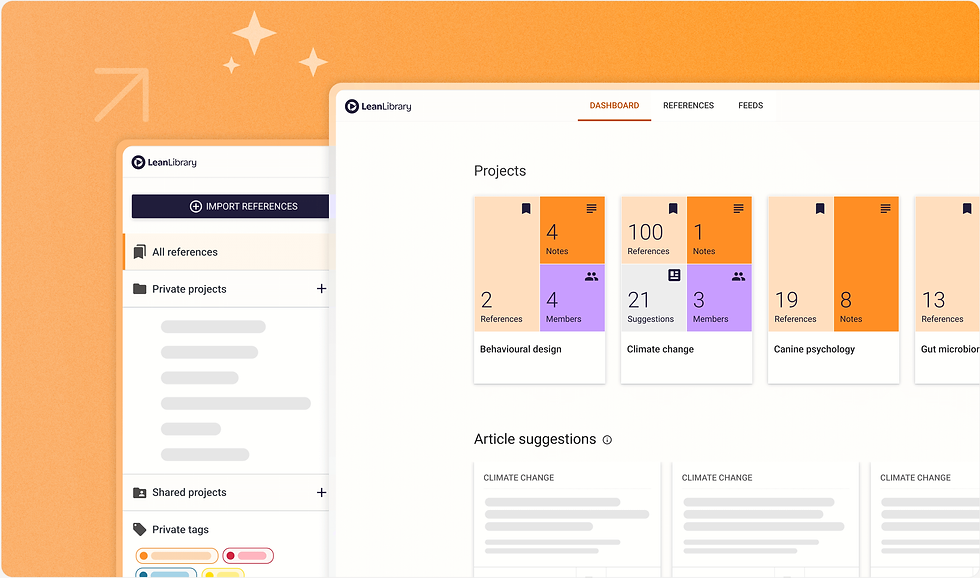
您可以使用 Sciwheel 在线整理研究。该工具允许您save as many references and projects as you want。您可以使用浏览器扩展从文献数据库导入参考文献。您可以立即保存文章并添加笔记。Sciwheel 帮助您为 Word 和演示文稿创建数千种样式的引用。您可以从任何设备访问参考文献和 PDF。该平台让与合作者协作变得容易,即使他们不在您的学校。您可以在 Microsoft Word 和 Google Docs 中获得智能引用建议。Sciwheel 会推荐与您兴趣匹配的文章。您可以使用项目、子项目和标签来组织工作。由于它是基于网页的,您可以随时随地使用并轻松分享工作。
Save unlimited references and projects
Bring in references with a browser extension
Add notes to articles right away
Make citations in many styles
Get to your references and PDFs from any device
Work with co-authors outside your school
Get smart citation suggestions in Word and Google Docs
See article recommendations based on your interests
Organize with projects, subprojects, and tags
Use annotation tools to take better notes
Sciwheel 为您提供一种简单的方式,让研究保持整洁且易于查找。您可以将更多时间用于工作,而非整理论文。
Pros and Cons
Pros:
You get unlimited storage for references and projects
It is easy to import and export with other reference managers
You can work with co-authors in real time
Smart citation suggestions help you save time
You can use Sciwheel from any device because it is web-based
Cons:
Some features need a paid plan to use everything
You cannot use all features offline like desktop apps
Pricing
Sciwheel 为用户提供合理的价格。如果您是 Pitt 的附属人员或员工,可以免费使用 Sciwheel。其他用户可能需要查看费用,但 Sciwheel 通常与 Zotero 等工具的免费层级相当。Sciwheel 的网页访问意味着您无需为同步或存储支付额外费用。下表展示了 Sciwheel 与其他参考文献管理器的比较:
如果您想要便捷访问和高性价比,Sciwheel 是个不错的选择。它非常适合基于云的 pdf management。
10.Papers Reference Management

Key Features
Papers Reference Management 帮助您整理研究。您可以快速从电脑、期刊或其他工具添加参考文献。该平台会为您的文章填充缺失的详细信息,因此您的引用是完整的。您可以使用标签、标签、列表、评分和智能集合来整理库。Watch 文件夹帮助您保持一切整洁。
您可以使用 Papers 查找超过 1.5 亿篇文章。AI-powered tool suggests new papers供您阅读。您可以通过链接引用和 Altmetrics 查看研究进展。Retraction Watch 帮助您了解论文是否存在问题。您可以在文档中高亮、下划线、绘制并添加笔记。便签和删除线工具帮助您标记工作。AI Assistant帮助您理解 PDF。您可以在文件中提问并获得答案。
您可以与团队实时协作。共享库和同步让每个人都保持更新。Papers 支持最多 25 人的团队。座位管理使用方便。您可以使用 SmartCite 创建参考书目,它支持超过 10,000 种样式。云同步让您可以在任何设备上随时访问研究。
Papers Reference Management 为 pdf management 和团队协作提供强大工具。
Pros and Cons
Pros:
You can add references from many places fast.
AI suggestions help you find new research.
Annotation tools let you mark up your documents.
You can work with your team and sync devices.
SmartCite has thousands of citation styles.
Cons:
You need to pay for unlimited cloud storage.
Some features need a subscription.
Pricing
开始使用 Papers 时,您可以获得 30 天免费试用。Pro 计划每年收费 $130,并提供无限云存储。您可以在 iOS 和 Android 上使用移动应用。Papers 支持桌面、浏览器和移动设备。还有 Google Docs 附加组件。下表展示了 Papers 和 Mendeley 的比较:
您可以免费试用 Papers,看看 Pro 计划是否适合您。
Choosing Reference Managers
选择合适的参考文献管理器能让研究更轻松。您需要一款符合您工作方式的工具。它应该帮助您保持研究整洁。以下是查看 zotero alternatives 时需要考虑的一些事项。
Collaboration
与团队合作意味着您需要分享工作。寻找能创建共享库的 zotero alternatives。这些工具帮助您的团队共同添加和整理研究。共享库避免重复工作。一些工具允许您分配任务或为团队留下备注。实时协作意味着每个人都能立即看到更改。这对团队项目和实验室很有帮助。
AI Integration
AI 可以帮助您节省研究时间。许多 zotero 替代工具使用 AI 进行引用和整理。AI 可以找到新论文并填补缺失信息。它可以回答有关您研究的问题。有些工具使用 AI 来制作文章摘要或帮助 pdf 管理。如果您想更快地工作,请选择具有强大 AI 功能。
平台兼容性
您想要一个 在所有设备上运行的工具。检查 zotero 替代工具是否支持 Windows、Mac、Linux 和移动设备。基于云的工具可让您随时随地访问研究内容。如果您使用 Google Docs 写作,Google Docs 集成会很有用。有些工具还支持 Microsoft Word 或其他写作应用。确保您的工具适合您最喜欢的平台。
可用性
简洁的设计可帮助您快速开始使用该工具。您想要一个易于使用的 zotero 替代工具。寻找能简化添加和整理参考文献的工具。良好的可用性意味着您花更少时间学习,更多时间进行研究。
定价
许多 zotero 替代工具提供免费版本。免费工具适合学生和预算有限的人。有些工具需要付费才能使用额外功能。比较价格,看看免费版本是否足够。开源工具可让您获得更多控制权,通常是免费的。基于云的工具可能会对更多存储空间或特殊功能收费。
提示:选择 zotero 替代工具时,请考虑您的工作流程。看看是否可以导入旧库。寻找 google docs 集成、共享库和开源选项,以获得更多选择。
选择易于使用且简单易学的工具。
确保它支持多种样式的正确引用。
寻找 google docs 集成以及对其他写作应用的支持。
检查是否可以轻松导入来源并获取正确细节。
选择具有强大团队协作和共享库功能的工具。
使用基于云的工具,以便在所有设备上访问您的研究内容。
考虑开源和免费工具以获得更多控制权。
迁移与集成
数据导入/导出
如果您从 zotero 迁移到新工具,您希望过程简单。大多数 zotero 替代工具允许您导入和导出库。您可以使用 RIS、BibTeX 或 EndNote XML 格式。这些格式可帮助您保留笔记、标签和文件。有些工具提供逐步迁移 zotero 数据的指南。您可以拖放文件或使用专用导入按钮。如果您的 zotero 库很大,请检查新工具是否能一次性处理大量文件。这可节省时间并保持研究整洁。
提示:在开始迁移前,请务必备份您的 zotero 库。这可在出现问题时保护您的工作。
隐私
在进行研究时,隐私非常重要。许多 zotero 替代工具努力保护您的数据安全。它们使用加密来保护文件。有些工具将您的数据保留在自己的设备上。其他工具使用具有强大安全性的云存储。您应该阅读每个工具的隐私政策。确保您的 zotero 数据保持私密。如果您的研究敏感,请选择能安全保存数据的工具。
工具 | 本地存储 | 云加密 | 隐私政策可用 |
zotero | ✔️ | ✔️ | ✔️ |
Remio | ✔️ | ✔️ | ✔️ |
Mendeley | ❌ | ✔️ | ✔️ |
EndNote | ✔️ | ✔️ | ✔️ |
工作流集成
您希望参考文献管理器与您的学校任务配合。许多 zotero 替代工具可与 Word 或 Google Docs 连接。有些工具具有浏览器插件以便快速保存。您可以使用插件将 zotero 与笔记应用关联。这有助于将研究和写作结合在一起。如果您使用多个设备,请寻找支持云同步的工具。这样,您的 zotero 数据始终可用。良好的集成意味着您花更少时间切换应用,更多时间工作。
注意:在选择前请尝试集成功能。这有助于您了解 zotero 替代工具是否适合您的工作方式。
在寻找帮助研究的新工具时,您有很多选择。每个 zotero 选项都为您的研究需求提供不同功能。您应该考虑自己的研究方式以及对 zotero 的期望。尝试几种工具,看看哪种适合您的研究风格。询问朋友或团队关于他们 zotero 体验的意见。好的研究工具可帮助您节省时间并保持工作整洁。探索这些替代工具并分享反馈,以帮助其他人的研究。
常见问题
什么让参考文献管理器比 Zotero 更好?
有些工具可让您更轻松地与团队协作。它们具有更智能的 AI 功能来帮助您整理研究。您可以更快找到论文并同时与团队交流。这些工具让保持研究整洁变得简单。
提示:尝试几种工具,看看哪种最适合您。
可以将 Zotero 库迁移到其他工具吗?
是的,您可以将 Zotero 库迁移到新工具。您可以使用 RIS 或 BibTeX 文件导出库。大多数其他工具允许导入这些文件。这可在切换时保护您的笔记和参考文献。
格式 | 大多数工具支持 |
RIS | ✔️ |
BibTeX | ✔️ |
EndNote | ✔️ |
Zotero 替代工具是否使用 AI 帮助研究?
许多其他工具使用 AI 帮助您进行研究。AI 可以推荐新论文并帮助您整理笔记。它可以回答您的问题并节省时间。AI 还可帮助您撰写摘要和管理引用。
AI 找出文章中的要点。
AI 为新研究论文提供想法。
是否有适合学生的免费 Zotero 替代工具?
是的,有许多 适合学生的免费工具。您可以免费使用 Obsidian + Zotero、Otio 或 ResearchRabbit。这些工具提供基本功能,无需付费。有些工具如果您需要更多功能或存储空间,则有付费计划。


