Write Excel Formulas with AI
Explain the rule in plain language and have remio write editable formulas in your workbook. Check the cell references and test the results before using them.
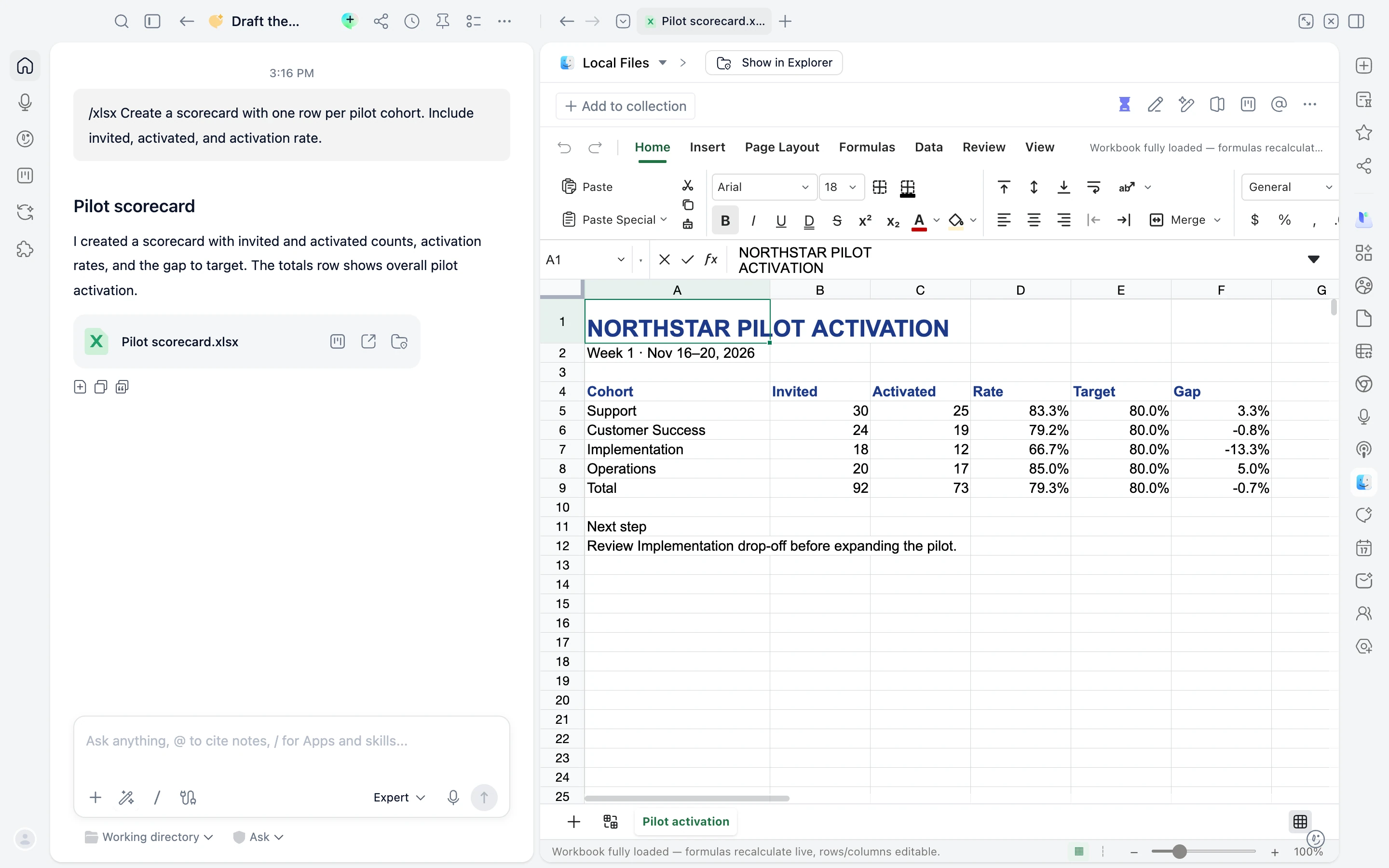
Calculate a rate and test its edge cases
For an activation report, ask remio to calculate activations divided by invitations for each team. Define what should appear when the invitation count is zero and specify the desired percentage format.
Check a typical row, a zero-denominator row, and the total. If teams have different cohort sizes, calculate the overall rate from total activations and total invitations.
Put the calculation in your workbook
- Attach your XLSX and label the columns, units, and rows that should change.
- Describe the formula and the edge cases. Ask remio to write it into the destination cells in a separate copy.
- Open the result and inspect formulas, sample values, and totals. Change a sample input to verify the formula reacts as expected.
Excel formula questions
Can I ask remio to explain an existing formula?
Yes. Identify the cell and its expected result. Ask remio to explain each part and test cases where the result differs from what you expect.
Can I keep the original workbook?
Yes. Request a separate XLSX copy and check that the source workbook is intact.
See the AI Excel assistant or Excel data analysis.