Microsoft Copilot's Current State: Navigating User Experience and Integration Challenges


When Microsoft first announced Copilot, the vision was clear: an AI-powered assistant seamlessly integrated into our daily workflows, promising a revolution in productivity. The idea of an intelligent partner anticipating needs, summarizing documents, and drafting content was compelling. Yet, as Copilot finds its way into more user environments, a gap often emerges between this grand vision and the ground-level experience. This isn't just about teething problems; it points to fundamental Microsoft Copilot Challenges that touch upon integration, practical utility, and user satisfaction.
Initial excitement around AI integration often confronts the complexities of real-world use. Users logging into their familiar Office portals increasingly report being rerouted to a Copilot landing page rather than their intended applications. This isn't a minor annoyance; it’s a disruption that forces an extra step into established routines. Imagine needing to quickly access a specific tool or ticket system, only to be shunted to an interface you didn't ask for, potentially delaying critical tasks. This type of forced redirect has become a significant hurdle for many, indicating a broader issue with the current Copilot User Experience.
Beyond browser behaviors, Copilot's presence has extended directly to the desktop. Following a Windows 11 installation, one of the first actions for many users has become removing the Copilot icon from their taskbar. This isn't out of disinterest in AI, but rather a reflection of its perceived intrusion or lack of immediate, compelling utility in their daily desktop interaction. When a new feature is proactively removed by a user, it signals a mismatch between intent and practical value.
The financial implications also factor into these Microsoft Copilot Challenges. With discussions around subscription costs, sometimes quoted as high as $299 for enterprise or annual plans, users expect tangible, demonstrable returns. If an AI tool is positioned as a premium service, its performance must unequivocally justify that cost. The reality, however, often falls short. Finance professionals, for instance, note they haven't found Copilot to streamline their tasks any more effectively than traditional methods. AI-generated summaries sometimes miss critical details, requiring manual verification, effectively adding a step rather than eliminating one. Similarly, attempts to generate presentations often result in bland, unusable outputs, prompting users to revert to manual creation.
Understanding how Copilot interacts with organizational data is also crucial for its perceived utility and security. It leverages an organization’s existing M365 tenant, crawling and indexing information from SharePoint, OneDrive, and even file print servers. This isn't a raw data dump but an analysis within established permissions. However, even with this explanation, questions remain about how effectively this data is synthesized into genuinely intelligent and contextually relevant outputs, especially when Nadella himself acknowledged that Copilot's connections to critical tools like Gmail and Outlook "don't really work" and aren't "smart" enough.
User-Driven Solutions and Current Workarounds: Navigating Your Copilot Experience
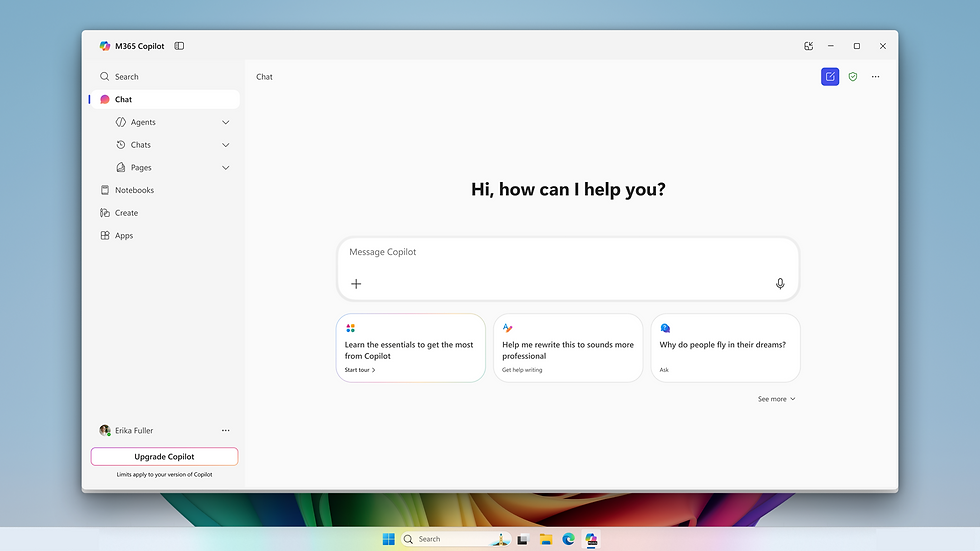
Given the prevailing Microsoft Copilot Challenges, users have often been left to devise their own strategies for managing the tool's integration. This collective experience offers valuable insights into the immediate practicalities of Copilot adoption and provides a blueprint for what improved functionality might look like. Rather than waiting for official updates, many have taken a proactive approach to tailor their own Copilot User Experience.
One of the most immediate and widespread responses to Copilot's default presence has been the search for how to disable it. Faced with automatic taskbar integration on Windows 11 or persistent redirects within Office portals, users frequently turn to search engines for guidance on "how to disable Copilot." This isn't an act of rebellion against AI itself, but a desire for control over their computing environment. They seek straightforward methods to remove features that interfere with established workflows or offer no perceived benefit. This indicates a strong user need for clearer, more accessible options to manage, or even uninstall, Copilot's components. The current situation often demands a tutorial-following approach rather than a simple toggle.
Beyond disabling visual elements, users are also grappling with the subtle impacts of Copilot on their workflow efficiency. The promise of AI generating insightful summaries or drafts often clashes with the reality of needing to extensively fact-check or rewrite AI-produced content. For many, this has transformed AI assistance from a shortcut into an additional validation step. The consequence is that time saved by AI generation is often consumed by verification, diminishing the overall productivity gain. This firsthand experience highlights the critical need for AI outputs to be not just present, but consistently accurate and relevant to specific contexts. The community feedback consistently points to the idea that if AI's output isn't reliably superior or at least equivalent to manual effort, it becomes a hurdle rather than a help.
The data underpinning Copilot’s capabilities—its access to an organization’s M365 tenant, including SharePoint and OneDrive—is fundamental to its operation. Users often express concerns or questions about this data interaction. Community discussions reveal an understanding that Copilot isn't importing new data, but rather indexing and utilizing existing organizational information. This clarification, though sometimes obscured by initial privacy fears, helps to frame Copilot's role as an assistant working within pre-defined data environments rather than an external data vacuum. However, the mechanism of accessing this data does not automatically guarantee insightful outputs, which circles back to the core Microsoft Copilot Challenges of processing and relevance.
Ultimately, the user community is expressing a clear desire for choice and utility. They want products that are genuinely useful, not merely present. The current workarounds and common disabling practices underscore a critical insight: when an innovative feature becomes an impediment, users will find ways to navigate around it. For Microsoft, these user-driven solutions represent a clear signal for refining Copilot's deployment strategy, offering more control, and prioritizing a frictionless, value-driven Copilot User Experience.
Nadella's Pressure: Addressing Core Microsoft Copilot Challenges for AI Utility

The Microsoft Copilot Challenges aren't just a matter of user perception; they're a topic of intense internal scrutiny at the highest levels of the company. Microsoft CEO Satya Nadella himself has reportedly become deeply involved, exerting pressure on his deputies and engineering teams to accelerate Copilot’s improvement. His engagement has transformed him into something akin to a "chief product manager," directly joining internal Teams channels with top engineers to provide frequent and pointed feedback on the product’s shortcomings.
Nadella's direct intervention stems from a clear-eyed assessment of Copilot's current state: a powerful concept still grappling with fundamental implementation issues. Internal communications highlight his critical view that Copilot's connectivity with vital communication platforms like Gmail and Outlook is often dysfunctional, failing to deliver genuinely intelligent or contextually aware assistance. This isn't just about minor bugs; it's about the core functionality of Copilot as a unified AI layer for enterprise productivity tools. If the basic integrations with primary work platforms are unreliable, the entire value proposition of Copilot is undermined. This puts the spotlight squarely on Microsoft Copilot Challenges in core integration.
This intensified focus signals a strategic shift within Microsoft. The company is actively moving away from what might be characterized as a "software factory" model—one focused on producing a high volume of diverse applications—towards an AI-centric development paradigm. In this new era, AI is not merely an add-on feature but the foundational layer around which all new products and services are expected to coalesce. This pivot is ambitious, reflecting a corporate imperative to lead the AI revolution rather than simply participating in it.
The strategic importance of Copilot for Microsoft cannot be overstated. It's positioned as the company's answer to a rapidly evolving competitive landscape. Competitors like Google are aggressively integrating their own AI models, such as Gemini, directly into their cloud services and productivity suites like Drive and GSuite. This direct competition raises the stakes for Microsoft, creating a race for superior user experience and undeniable utility. If Copilot doesn't deliver a seamless, intuitive, and genuinely helpful experience, Microsoft risks falling behind in a crucial technological battleground. The challenge lies in ensuring Copilot User Experience is not just competitive but truly exceptional.
Nadella’s drive is underpinned by a broader vision: AI must transition from being a novel, interesting technology to an indispensable tool for knowledge workers. For Copilot to justify the enormous investment Microsoft has poured into AI (including its partnership with OpenAI), it must offer a clear, measurable return on investment (ROI). This means moving beyond pilot programs and early adoption to achieving widespread, sticky usage where professionals cannot imagine their workday without it. Reports of low overall adoption rates despite significant marketing efforts only underscore the urgency of these internal demands for accelerated improvement. The imperative is clear: solve the Microsoft Copilot Challenges to unlock its full potential.
Charting a Path for Copilot's Future: Overcoming Microsoft Copilot Challenges

To overcome the existing Microsoft Copilot Challenges and fulfill its potential, Copilot needs to evolve significantly, focusing on practical utility, robust integration, and enhanced user control. The feedback from users and internal directives from leadership converge on several key areas for improvement, aiming to refine the overall Copilot User Experience.
One crucial aspect is accelerating the product iteration cycle. The current pace of development needs to match the rapid advancements in AI and the dynamic needs of users. Faster feedback loops, where user insights translate into rapid product updates, are essential. This agile approach can address emerging issues swiftly, ensuring that Copilot remains responsive to its audience rather than perceived as a static, imposed tool.
Improved, more seamless integration with core productivity tools is paramount. Nadella's critique of Copilot's connectivity with Outlook and Gmail highlights a foundational weakness. Users expect AI to understand context across their applications, not just within isolated silos. This requires not merely linking applications but creating a truly unified AI layer that intuitively grasps user intent and provides relevant assistance regardless of the application currently in use. Achieving this deeper integration will be central to resolving existing Microsoft Copilot Challenges.
Moreover, future developments must focus on demonstrable productivity gains and a clear return on investment. The AI's value cannot be abstract; it must manifest in tangible benefits such as saved time, improved accuracy, or enhanced creativity. This means moving beyond raw feature counts and concentrating on user outcomes. If Copilot can consistently deliver verifiable ROI, it will naturally become "sticky"—an indispensable part of daily work, rather than a feature users tolerate or actively seek to disable.
Perhaps one of the most critical elements for future success lies in offering greater user control. The current lack of straightforward options to disable or uninstall Copilot, coupled with forced redirects, creates friction. Providing easier, more intuitive ways for users to manage Copilot's presence and functionality would empower them. This includes allowing direct access to core applications without intervention and giving users genuine choices about when and how AI assists them. Empowering users can transform a mandatory feature into a valued assistant, fostering a positive Copilot User Experience.
Ultimately, Copilot's journey involves moving from a compelling concept to an essential, loved tool. This requires sustained effort in refining its accuracy, ensuring consistent and relevant contextual understanding, and making it truly responsive to user needs. By addressing these foundational Microsoft Copilot Challenges, Microsoft can position Copilot not just as an innovative technology, but as an indispensable partner that genuinely elevates the productivity and satisfaction of its users, fulfilling the initial promise of AI in the workplace.
Adaptive FAQ Section
Why do users report difficulty with Copilot productivity?
Users often find Copilot's AI-generated summaries inaccurate or its PPT suggestions unengaging. This necessitates manual verification, negating promised efficiency gains and leading to frustration. The current Copilot productivity issues often add steps rather than removing them.
How is Microsoft addressing the current Microsoft Copilot Challenges?
CEO Satya Nadella is personally pressuring teams to accelerate improvements. He emphasizes solving integration flaws with tools like Outlook and ensuring Copilot evolves from a novelty into an essential productivity asset, directly confronting the Nadella Copilot pressure.
What are common user complaints regarding Copilot integration?
Many users dislike being forcibly redirected to Copilot after logging into Office portals, interrupting their workflow. The automatic placement of Copilot on the Windows 11 taskbar also leads to frequent user removal, highlighting forced Copilot redirect problems.
Is there a way to disable Copilot for Windows 11 users?
While a straightforward uninstall isn't always available, users commonly search for and follow online guides to remove the Copilot icon from their Windows 11 taskbar and adjust related settings, managing the disabling Copilot Windows 11 process.
What is the perceived value and ROI of Copilot currently?
Despite significant investment, internal feedback and external reports indicate that many users aren't finding substantial, verifiable productivity improvements. This raises concerns about the Copilot ROI concerns for enterprise adoption.
How does Copilot access organizational data for its features?
Copilot primarily leverages existing data within an organization's M365 tenant. It indexes and crawls content from sources like SharePoint, OneDrive, and file servers, operating within pre-established access permissions to improve context.
What improvements do users wish to see in future Copilot versions?
Users desire direct access to their core applications without being rerouted to Copilot. They also want more reliable AI outputs, easier options for disabling or uninstalling the feature, and a focus on genuinely useful functionalities to enhance their Copilot User Experience.


