2026年の忙しいプロフェッショナル向けベスト10 AIミーティングノートテイカー


忙しいスケジュールに対応できる最高のAI meeting note takerをお探しなら、2026年のトップ10 AI meeting note takerツールにはremio、Tactiq、Otter.ai、Fireflies.ai、Bluedot、Avoma、Granola、Lindy、Sembly AI、Supernormalが含まれます。各AI meeting note takerは、会議メモを素早くキャプチャし、すぐに簡潔な会議サマリーを生成するのに役立つように設計されています。AI meeting note takerソリューションの市場は、2024年の95.4億ドルから2026年には111.1億ドルに成長すると予測されています。AI meeting note takerを使用することで、これらのアプリがメモとアクションアイテムを自動的に処理するため、貴重な時間を節約でき、会話に集中できます。ニーズに最適なAI meeting note takerを選ぶには、比較表を確認し、精度、統合、プライバシー、価格、使いやすさなどの要素を考慮してください。
Key Takeaways
AI meeting note takerは時間を節約するのに役立ちます。メモとアクションアイテムを代わりに書いてくれます。これにより、会話に集中できます。
ツールを選ぶ際は、音声の認識精度を考えてください。他のアプリとの連携を確認してください。情報が安全に保たれることを確認してください。これにより、あなたの作業スタイルに合います。
リアルタイムで音声をテキスト化するツールを探してください。アクションアイテムも追跡するものを探してください。これらの機能は整理を助け、会議でより多くの成果を上げられます。
Many AI note takers have free plans or trials. まずはこれらを試して、自分に合うものを見つけてください。最初は支払わずに利用できます。
プライバシーとセキュリティは非常に重要です。暗号化やローカル処理を使用するツールを選んでください。これにより、プライベートな情報が安全に保たれます。
Top 10 AI Meeting Note Taker Tools
Quick Comparison Table
あなたの仕事に最適なbest ai meeting notetakerを選びたいはずです。以下の表では、2026年のトップ10 ai note takerを比較できます。最適な用途、対応デバイス、価格、プライバシー、独自機能をチェックしてください。この表は、適切なai meeting assistantを選ぶのに役立ちます。
Notetaker | Best Use Case | Supported Platforms | Pricing | Privacy & Security | Unique Features |
1.remio | Personal knowledge management | Windows, Mac, Web | Free unlimited | Local ASR, user data | Unlimited free transcription, local processing, multi-source capture |
2.Tactiq | Chrome, Google Meet | Free/Paid | GDPR compliant | Speaker-specific transcription, OpenAI integration | |
Meeting autopilot | Zoom, Teams, Google Meet | Free/Paid | Team controls | AI Chat, slide capture, collaborative notes | |
Accuracy powerhouse | Web, Chrome, Zoom, Teams | Free/Paid | Secure cloud storage | 95% accuracy, 100+ languages, analytics | |
5.Bluedot | Fast summaries | Web, Mobile | Free/Paid | End-to-end encryption | Quick summaries, action item tracking |
6.Avoma | Sales & customer meetings | Web, Zoom, Teams | Free/Paid | SOC2, GDPR | Conversation intelligence, CRM integration |
7.Granola | Note enhancement | Windows, Mac, Web | Free | Local device audio | Bot-free, manual note enhancement |
8.Lindy | AI assistant integration | Web, Slack, Email | Free/Paid | User-controlled | Multi-source, AI copilot, workflow automation |
9.Sembly AI | Team collaboration | Web, Zoom, Teams | Free/Paid | GDPR compliant | Action item tracking, team summaries |
10.Supernormal | Automated summaries | Google Meet, Zoom, Teams | Free/Paid | SOC2, GDPR | Instant summaries, CRM updates |
Key Features Compared
各AI note takerの特徴を知っておくべきです。最高のAI meeting assistantはリアルタイムの文字起こしを提供し、アクションアイテムを追跡します。また、お気に入りのツールと連携します。プライバシーは重要なので、多くのnotetakerがローカル処理や強力な暗号化を使用します。これらのツールは使いやすいので、すぐに始められ、トレーニングなしで助けを得られます。一部のai meeting note takerは整理されたデータをワークフローに送信します。これにより時間を節約できます。他のものはワンクリックでメモを取ったりサマリーを作成したりできます。あなたの仕事に合い、メモを安全に保つnotetakerを選べます。
Tip: あなたのデバイスで動作し、話者識別、変更可能なテンプレート、多言語サポートなどの機能を備えたAI note takerを探してみてください。これらの機能は会議メモをより活用するのに役立ちます。
How We Chose the Best AI Meeting Notetakers
Evaluation Process
ニーズに合ったAI meeting note takerを求めています。私たちのチームは各ツールを実践的な会議でテストしました。各アプリが話し言葉をどれだけ正確にキャプチャし、メモに変換するかを調べました。ai meeting assistantがさまざまなアクセントや騒がしい背景に対応できるかをチェックしました。ノートパソコンや携帯電話など、さまざまなデバイスでツールを試しました。また、各アプリの使い始めやすさも探りました。新しいツールを学ぶのに時間を無駄にしたくはありません。セットアップがシンプルでインターフェースが明確であることを確認しました。
Tip: すぐに始められ、ほとんどトレーニングを必要としないツールを探してください。使いやすさは時間を節約し、仕事に集中するのに役立ちます。
各ツールが他のアプリとどのように連携するかもチェックしました。日常的にSlack、Gmail、Google Docsを使用するかもしれません。統合により、追加の手順なしでメモをワークフローに移動できます。プライバシーにも細心の注意を払いました。一部のツールはローカル処理を使用し、データをデバイス上で安全に保ちます。他のツールは強力な暗号化を使用して情報を保護します。
Criteria for Professionals
ai meeting note takerを選ぶ際は、これらの重要なポイントを考えてください:
文字起こしの精度が最も重要です。法務やコンプライアンスの会議では、ほぼ完璧なメモが必要です。一部のツールはup to 95% precisionに達します。
統合により時間を節約できます。CRMやメールにメモを送信するツールは作業を迅速にします。
プライバシーはデータを安全に保ちます。Local ASRと暗号化は機密情報を保護します。
使いやすさは日常を楽にします。シンプルで使いやすいツールが理想です。
価格は選択に影響します。無料オプションは小規模チームに役立ちます。有料プランは大企業向けのより多くの機能を提供します。
Unique features real-time transcription、action item tracking、bot-free note takingなどの独自機能はさらなる価値を追加します。
これらの基準を日常のワークフローに合わせてください。最高のai meeting assistantは整理と生産性を保つのに役立ちます。
AI Note Takers: In-Depth Reviews

1. remio
Overview
remio is an AI meeting note taker シンプルなメモ以上のものを求める人向けです。RemioはローカルASRモデルを使用するため、無制限の無料文字起こしが可能です。これにより、好きなだけ会議を録音できます。追加料金を心配する必要はありません。Remioは録音を1つの大きな情報源として扱います。すべてのメモから検索、質問、詳細の検索が可能です。会議ごとにコンテンツを分割する必要はありません。また、弱い検索ツールに対処する必要もありません。Remioはウェブコンテンツをキャプチャし、ファイルを追加し、さまざまな場所からの知識を組み合わせることができます。Remioを使用して、会議コンテンツを整理、要約、新しい方法で作業できます。
Feature | Description |
Quietly grabs web content and adds files, so you can focus on learning. | |
AI Search | Lets you search your notes with exact source links. |
Smart Organization | Suggests groups for related information to make finding things easy. |
AI Summarization | Shortens long articles into main ideas, saving you time. |
Multi-Session Optimization | Makes Remio a good helper for long projects. |
Adds new information to your old notes in a smart way. | |
Smart Write | Helps you make content with AI. |
Pros
You get unlimited free meeting transcription with local processing.
Remio can capture notes from Slack, Gmail, and Google Docs.
You can search and talk to your notes using natural language.
Remio has advanced tools for summaries and organizing.
The tool works on Windows, Mac, and Web, so you can use it anywhere.
You can use plugins to summarize web pages and YouTube videos.
Cons
Not designed for sharing or teamwork.
Mobile app features might not be the same as desktop.
Pricing
Tool | Pricing | Free Version | Free Trial |
Remio | $19.90 per month | Yes | Yes |
Remio gives you a free version with unlimited recordings. The paid plan lets you use longer files, faster processing, and more storage.

2. Tactiq
Overview
Tactiq is a top AI meeting notetaker for real-time transcription. You can use it as a Chrome extension with Google Meet. Tactiq highlights important points and makes meeting summaries while you talk. You can ask Tactiq to write follow-up emails or Jira tickets. If you use the same prompts often, you can save them as actions. This makes your work faster. You can share transcripts with your team easily.
Feature | Description |
Real-time Transcription | Writes down meetings as they happen, marks key points, and makes summaries. |
Personalized Actions | Writes follow-up items like Jira tickets or emails. |
Reusable Actions | Turns common prompts into actions you can use again. |
Easy Sharing | Shares meeting transcripts with others. |
Pros
You can write down meetings as they happen.
Tactiq shows who is talking and adds timestamps.
You can make AI workflows to share notes and summaries.
The free plan is good for small businesses.
Labels and tags help you sort meeting notes.
Tactiq is very secure and SOC II compliant.
Cons
The web interface can be slow.
Speaker recognition is not always correct.
Pricing
Feature | Tactiq | MeetGeek |
Price (Business Plan) | N/A | |
Price (Enterprise Plan) | Custom pricing | N/A |
AI Credits | Limited on lower tiers | Unlimited on all plans |
Transcripts | Unlimited from Pro upward | Hours per plan; summaries unlimited |
Meeting Recordings | Depends on meeting platform | Built-in across all methods |
Security Features | SAML SSO on Business/Enterprise | Public SOC 2 Type II, GDPR/CCPA/HIPAA posture |
Best for | Browser-first workflows | Mixed capture needs and high-volume AI summaries |

3. Otter.ai
Overview
Otter.ai は、会議のメモと要約を作成するためのよく知られたAIノートテイカーです。リアルタイムの文字起こしを取得でき、チームとメモを整理して共有できます。Otter.aiはアクションアイテムの設定を支援し、ストレージプラットフォームと連携します。Otter.aiを使用して、会議への参加を全員に促すことができます。
主な機能 | プライバシー対策 |
リアルタイムの文字起こし | 録音する前に参加者に伝えてください。 |
会議メモの整理と共有 | エンドツーエンド暗号化など、強力なデータセキュリティを備えたプラットフォームを使用してください。 |
参加者のアクセシビリティを向上 | 会話の録音に関するルールに従ってください。 |
ストレージプラットフォームとの連携 | トランスクリプトと録音の閲覧、編集、共有を制御できるようにしてください。 |
アクションアイテムの自動化 | トランスクリプトを安全に保存し、不要なデータは削除してください。 |
使いやすいインターフェース |
メリット
シンプルで使いやすいインターフェースです。
OtterPilotとAI Chat Assistantが会議メモをサポートします。
メモのエクスポートと共有が簡単です。
無料プランは軽い用途に適しています。
Otter.ai はカレンダーアプリと連携します。
デメリット
文字起こしの精度が一定ではありません。
メモの変更や編集の方法が限られています。
他のツールに比べて連携機能が強くありません。
無料プランでは長い会議に制限があります。
ビデオ録画はありません。
料金プラン
無料プラン:月300分、1回の会議につき30分まで。
Proプラン:$8.33 per user per month(年額)または$16.99(月額)。
Businessプラン:$20 per user per month(年額)または$30(月額)。

4. Fireflies.ai
概要
Fireflies.ai は、正確な文字起こしとワークフローの自動化に特化したAI会議アシスタントです。Fireflies.aiは主要なビデオプラットフォーム、CRM、プロジェクトツールと連携できます。AskFred機能で会議中に質問をして回答を得られます。AIが会議に参加するタイミングを制御できるため、プライバシーにも配慮されています。Fireflies.aiはZoom、Meet、Teamsなどと連携します。
機能 | Fireflies.ai の独自の特徴 | 他のAIノートテイカーの特徴 |
スムーズなワークフローのために主要なプラットフォームと連携 | ツールによって異なる場合があり、一部のツールのみ対応 | |
リアルタイム支援 | AskFredが会議中に回答を提供 | 通常この機能はありません |
自動化とセキュリティ | AIが会議に参加するタイミングをユーザーが決定 | ユーザーの制御なしで自動参加することが多い |
クロスプラットフォーム機能 | Zoom、Meet、Teamsなどと連携 | 一部のプラットフォームのみ対応する場合あり |
事前構築済みAIアプリ | タスクを自動化する200以上の既製ワークフロー | 既製オプションが少ない、またはなし |
メリット
カスタム単語で非常に正確な文字起こし。
高度な会話インテリジェンス。
強力な連携とワークフローの同期。
スマート検索とアーカイブツール。
Proプランの価格が手頃。
デメリット
話者ラベルが常に正しいとは限りません。
要約が遅れる場合があります。
デフォルト設定が強すぎる場合があります。
インターフェースの習得に時間がかかります。
料金プラン
無料プランあり。
Proプラン:$10 per user/month(年額)。
Businessプラン:$19 per user/month(年額)。
Enterprise:大規模チーム向けのカスタム料金。

5. Bluedot
概要
Bluedotは、プライバシーを重視し、使いやすいボット不要のAIノートテイカーです。会議にボットを追加する必要がありません。Bluedotは100以上の言語でメモを作成でき、専門用語も理解します。自動で会議メモと要約を作成します。BluedotはCRMシステムと連携し、メモとアクションアイテムをワークフローに取り込みます。
ボット不要の体験:ボットが通話に参加しないため、会議が自然です。
高度な文字起こし:100以上の言語と専門用語に対応。
AI要約とメモ:メモ作成を自動化し、集中力を高めます。
CRM連携:メモとアクションアイテムをワークフローに取り込みます。
Google Meetのネイティブサポート:ボットなしでスムーズに動作。
generousな無料プラン:コストを抑えたいチームに最適。
プライバシー重視:ボットを好まない人向けに設計。
メリット
ボットなしの自然な録音
専門用語でも正確な文字起こし
多様なプラットフォームと言語に対応
更新のための簡単なCRM連携
カスタマイズ可能なメモとテンプレート
安全なデータ処理によるプライバシー重視
ボット不要の会議録音
強力なGoogle Meet連携
自動会議メモと要約
デメリット
無料プランは月5回の会議のみ
新規ユーザーには学習曲線あり
連携の設定に時間がかかる場合あり
モバイルアプリの機能が十分でない場合あり
対応プラットフォームが少ない
Chrome拡張機能が必要
市場に新しいツール
料金プラン
プラン | 価格(月額) |
無料 | 最大5回の会議(各1時間まで)の録音とメモ作成 |
Basicプラン | $14/month(年額)で無制限の録音と保存 |
Proプラン | $20/monthで長時間の録音とカスタムテンプレート。 |
6. Avoma
概要
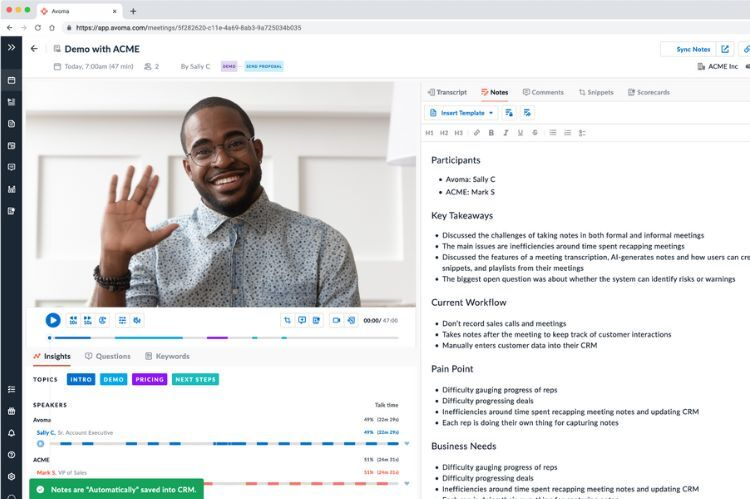
Avomaは営業や顧客会議向けのAIノートテイカーです。インスタントメモ、リスクアラート、Gmailの同期機能が充実しています。Avomaはスマートグループとカスタムテンプレートで会議メモを整理します。議題設定からフォローアップまで、会議の最初から最後まで管理できます。AvomaはSalesforceなどのツールと連携します。
クイックノート作成のためのインスタントメモ。
問題を早期発見するための内部リスクアラート。
メール活用を向上させるGmail Sync。
チームを最新情報で更新するMicrosoft Teams Alerts。
会話を通じたAI生成メモを箇条書きに変換。
自動ソートのためのスマートカテゴリ。
独自のグループのためのカスタムカテゴリ。
会議プロセス全体の支援。
会議管理のためのダッシュボード。
メリット
自動録音と文字起こし
整理された会議管理
Salesforceとの連携と優れたAIメモ。
メモだけでなく人との交流に集中可能。
使いやすくセットアップが速い。
デメリット
通話が切断されたり参加しない場合あり。
メモや話者名が間違っている場合あり。
非ネイティブスピーカーには良いメモが得にくい。
使用しない席の料金が発生する場合あり。
一部のAI機能が役立たない。
料金プラン
プランタイプ | 価格(ユーザー/月) | 主な機能 |
Avoma Startup | $29 | 有料席最大25席、無制限の無料閲覧専用席、自動ビデオ録画、無制限リアルタイム文字起こし、AIメールフォローアップ |
Avoma Organization | $39 | 有料席最大100席、カスタムAIトピックとテンプレート、グループスケジューリング、API連携 |
Avoma Enterprise | $39(最低10席) | サクセスマネージャー、コンシェルジュオンボーディング、HIPAA準拠 |
アドオン:Conversation Intelligence | $35 | AIコーチング、自動コールスコアリング、カスタムスコアカード |
アドオン:Revenue Intelligence | $35 | ディールリスクアラート、ネイティブCRM連携 |
アドオン:Lead Router | $25 | スケジューリングリンク、リアルタイムリード資格審査 |

7. Granola
概要
Granolaはプライバシー重視のAI会議ノートテイカーです。ボット不要の静かな録音で、会議が自然に感じられます。Granolaは音声録音を保存せず、トランスクリプトのみを保存するため、データの安全性が高まります。メモはデフォルトで非公開で、閲覧者を自分で選択できます。Granolaは生産性ツールと連携し、テック職に適しています。
メモはデフォルトで非公開。
音声やビデオの再生はなく、トランスクリプトのみ。
GranolaはGDPRルールに従います。
ボット不要の体験で会議が自然。
サードパーティによるAIトレーニングのためのデータ使用なし。
強力な暗号化でデータを保護。
MacOSとCalendarとの連携が良好。
正確なライブトランスクリプト。
メリット
MacOSとCalendarとの連携が良好
正確なライブトランスクリプト
他のツールとの良好な連携
デメリット
Google Workspaceアカウントのみ対応。
音声やビデオの再生なし。
話者名の追跡が難しい場合あり。
組み込みのトランスクリプト検索なし。
料金プラン
プランタイプ | 価格(月額) |
無料プラン | 25回の会議まで無料 |
Individual | $18/month |
Business | $14/user/month |
8. Lindy
概要
Lindyは仕事のAIヘルパーとして機能するAIノートテイカーです。LindyはSlack、メール、その他のツールと連携できます。Lindyはタスクの自動化と会議メモの整理を支援します。Lindyを使用して会議の要約を作成し、アクションアイテムを追跡できます。
Slack、メールなどと連携。
仕事の自動化のためのAIコパイロット。
会議メモとアクションアイテムを整理。
素早い確認のための会議要約を作成。
ウェブとモバイルで動作。
メリット
人気ツールとの簡単な連携。
退屈なタスクを自動化。
会議メモの整理と要約を支援。
ワークフロー自動化をサポート。
Cons
Some advanced features may need a paid plan.
Setting up integrations can take time.
Pricing
Plan Type | Price (per month) |
Free Plan | 0 |
Pro | $18 |

9. Sembly AI
Overview
Sembly AI is a team-focused ai meeting note taker. You can use Sembly AI to track action items and make meeting summaries. The tool works with Zoom, Teams, and other platforms. Sembly AI helps teams stay organized and get more done.
Tracks action items and meeting notes.
Makes ai-powered summaries for teams.
Works with popular meeting platforms.
Supports team sharing and working together.
Pros
Good for team work.
Tracks action items and meeting notes.
Works with Zoom and Teams.
Helps make full meeting summaries.
Cons
Some features may need a paid plan.
Setting up integrations can take time.
Pricing
Plan Type | Price (per month) |
Free Plan | 0 |
Pro | $10/user |
10. Supernormal
Overview
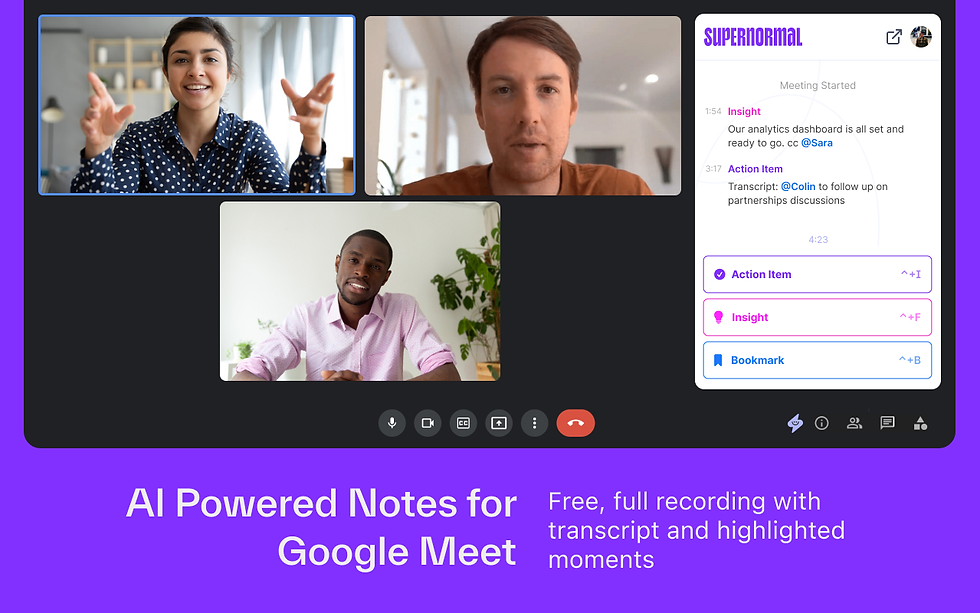
Supernormal is an ai meeting note taker that makes instant summaries and updates your CRM. You can use Supernormal with Google Meet, Zoom, and Teams. The tool helps you automate meeting notes and track action items.
Instant meeting summaries.
CRM updates for sales and project teams.
Works with Google Meet, Zoom, and Teams.
Automates note-taking and action items.
Pros
Makes instant meeting summaries.
Updates CRM automatically.
Works with popular meeting platforms.
Automates note-taking and action items.
Cons
Some advanced features may need a paid plan.
Setting up integrations can take time.
Pricing
Plan Type | Price (per month) |
Free Plan | 0 |
Pro | $18/user |
Key Features in AI Meeting Note Taker Tools
Real-Time Transcription
You want your AI meeting note taker to write down words as people talk. Real-time transcription lets you see notes appear right away. This helps you keep up with the meeting and remember what was said. Many ai note takers use automatic transcription for better accuracy. You can trust these tools to make good meeting summaries. Real-time transcription also helps find action items and makes your work easier.
Action Item Tracking
Action item tracking helps meetings stay on track. With automatic action item extraction, you will not forget tasks. AI note-taking tools show decisions and tasks, so you can check what is done. You get ai-made notes that point out what needs work. This keeps you organized and makes sure nothing is missed.
Integrations
Integrations let your ai note taker work with other apps you use. You can send meeting notes to your calendar, email, or project tools. It is easier to work together when your notetaker connects with Slack, Gmail, and Google Docs. This saves time and helps you manage notes everywhere. You do not have to switch between lots of apps.
Multilingual Support
Ai note-taking tools often work with many languages. You can record meetings in English, Spanish, or other languages. This helps teams from different places work together. Everyone can get good meeting summaries, no matter what language they speak.
Privacy and Security
Privacy and security are important when you share private information. Some ai meeting assistants use local processing to keep your data safe. Others use strong encryption or store data in safe places. You should pick tools that limit outside access and follow rules like GDPR.
Tool | Limitations | |
Local device transcription, unlimited free, no bot. | Not good for sharing and teamwork | |
Searchable notes, custom retention | Uses bots, privacy concerns, external data handling | |
Collaborative agendas, action item tracking | Recording bots, external storage, privacy concerns | |
Decisions | Secure data within tenant, AI note taker | Only for Microsoft users |
Keep meeting data safe and secure.
Stay away from risks caused by outside bots.
Follow rules like GDPR to protect your group.
User Experience
Easy-to-use ai note takers help everyone. You want a notetaker that is simple to start and easy to use. Mobile app support lets you take notes anywhere you go. High accuracy and automatic transcription help you trust your notes. Summaries and meeting insights should be clear and simple to find.
Tip: Pick ai note-taking tools with real-time transcription, integrations, and privacy features. These things help you get more from your meeting notes.
Choosing the Right AI Meeting Note Taker
Matching to Your Workflow
You need to pick a notetaker that fits your daily routine. Start by thinking about how you use meeting notes. Do you want transcripts, comprehensive meeting summaries, or quick sharing? Some ai note takers focus on summarizing, while others help you search and organize notes. Make sure your notetaker works with your meeting setup, like Zoom or Google Meet. If you use a mobile app, check if the tool supports it. Ease of use matters. You want a notetaker that lets you start fast and find notes without trouble. High-quality summaries and meeting insights help you stay organized. You should look for action item recognition, so you never miss a task.
Tip: Choose ai note takers that match your workflow, not just the feature list. Good tools make your day easier and help you get more from your meetings.
Privacy and Compliance
Privacy is important when you handle meeting notes. You should check if your notetaker uses local processing or strong encryption. If you work in the UK or EU, make GDPR compliance a must. Data security keeps your notes safe from outside access. Some ai meeting assistants offer extra privacy by storing data only on your device. You need to watch for bias in summaries, especially if your team is global. Always review privacy policies before you start using a new tool.
Make sure your notetaker protects your notes.
Pick tools that follow privacy rules and keep your data secure.
Integration with Existing Tools
Your notetaker should work with the apps you use every day. Look for ai note takers that connect with Slack, Gmail, or Google Docs. Integrations help you move meeting notes into your workflow. You save time when your notes go straight to your calendar or project tools. Ease of use improves when you do not have to switch between apps. High accuracy in transcription means you get reliable notes for sharing and searching. You should provide training and support to help your team use new ai note takers. Promote adoption and gather feedback to improve performance.
What You Should Do | |
Provide training | Teach your team how to use the tool |
Show the benefits of ai note takers | |
Monitor performance | Check if notes are accurate |
Collect feedback | Ask users for ideas and problems |
Note: Integrating AI note takers with your workflow helps you get high-quality summaries and makes meetings more productive.
You now know about the top AI meeting notetakers for busy people. Each tool has its own special strengths, like making accurate notes and finding action items. Think about how you work and what privacy you need before picking one. You can try a free trial or ask your team for ideas to help choose. These tools help you stay organized and get more done in 2026.
FAQ
What is an AI meeting note taker?
An AI meeting note taker records and transcribes your meetings. You get automatic summaries and action items. These tools help you stay organized and save time.
How do AI note takers protect my privacy?
Most AI note takers use encryption or local processing. You control who can see your notes. Some tools follow privacy rules like GDPR.
Can I use AI note takers with my favorite apps?
You can connect many AI note takers with Slack, Gmail, Google Docs, and more. Integrations help you move notes into your workflow.
Do AI meeting note takers support different languages?
Many AI note takers work with multiple languages. You can record meetings in English, Spanish, or other languages. This helps global teams.
Are there free AI meeting note taker options?
You can find free plans with basic features. Some tools, like Remio, offer unlimited free transcription. Paid plans give you more storage and advanced features.


