Microsoft Copilotの現在の状態: ユーザーエクスペリエンスと統合の課題をナビゲートする


MicrosoftがCopilotを初めて発表したとき、そのビジョンは明確でした: 日常のワークフローにシームレスに統合されたAI搭載アシスタントという、生産性の革命を約束するものでした。ニーズを先読みし、ドキュメントを要約し、コンテンツの下書きを作成するインテリジェントなパートナーというアイデアは魅力的でした。しかし、Copilotがより多くのユーザー環境に導入されるにつれ、この壮大なビジョンと実際の体験の間にギャップが生じることが多くなっています。これは単なる初期の問題ではなく、統合、実用性、ユーザー満足度に関わる根本的なMicrosoft Copilot Challengesを指摘するものです。
AI統合への初期の興奮は、現実世界の使用の複雑さに直面することがよくあります。使い慣れたOfficeポータルにログインするユーザーは、意図したアプリケーションではなくCopilotのランディングページにリダイレクトされることが増えていると報告しています。これは些細な迷惑ではなく、確立されたルーチンに余分なステップを強いる混乱です。特定のツールやチケットシステムに素早くアクセスする必要があるのに、求めていないインターフェースに誘導され、重要なタスクが遅れる可能性があることを想像してみてください。このような強制的なリダイレクトは多くのユーザーにとって大きな障害となっており、現在のCopilot User Experienceにおけるより広範な問題を示しています。
ブラウザの動作以外にも、Copilotの存在はデスクトップに直接拡張されています。Windows 11のインストール後、多くのユーザーの最初のアクションの1つが、タスクバーからCopilotアイコンを削除することになっています。これはAIへの関心がないからではなく、日常のデスクトップ操作における侵入感や即時的で魅力的な実用性の欠如を反映しています。新機能がユーザーによって積極的に削除される場合、それは意図と実用的な価値のミスマッチを示しています。
これらのMicrosoft Copilot Challengesには財務的な影響も関わっています。企業向けまたは年間プランで最大299ドルとされるサブスクリプションコストに関する議論の中で、ユーザーは具体的で実証可能なリターンを期待しています。AIツールがプレミアムサービスとして位置づけられる場合、そのパフォーマンスは間違いなくそのコストを正当化しなければなりません。しかし、現実はしばしばそれに及びません。たとえば財務専門家は、Copilotが従来の方法よりも効果的にタスクを効率化していないと指摘しています。AI生成の要約は重要な詳細を見逃すことがあり、手動での検証が必要になり、ステップを減らすどころか追加することになります。同様に、プレゼンテーションの生成を試みると、 blandで使用できない出力になり、ユーザーは手動作成に戻ることがあります。
Copilotが組織データとどのように相互作用するかを理解することは、その実用性とセキュリティの認識にとって重要です。組織の既存のM365テナントを活用し、SharePoint、OneDrive、さらにはファイルプリントサーバーから情報をクロールおよびインデックス化します。これは生のデータダンプではなく、確立された権限内での分析です。しかし、この説明があっても、Nadella自身がCopilotのGmailやOutlookなどの重要なツールへの接続が「実際には機能せず」、「十分にスマートではない」と認めたように、このデータが本当にインテリジェントで文脈に関連する出力に効果的に合成されるかどうかについての疑問が残ります。
User-Driven Solutions and Current Workarounds: Navigating Your Copilot Experience
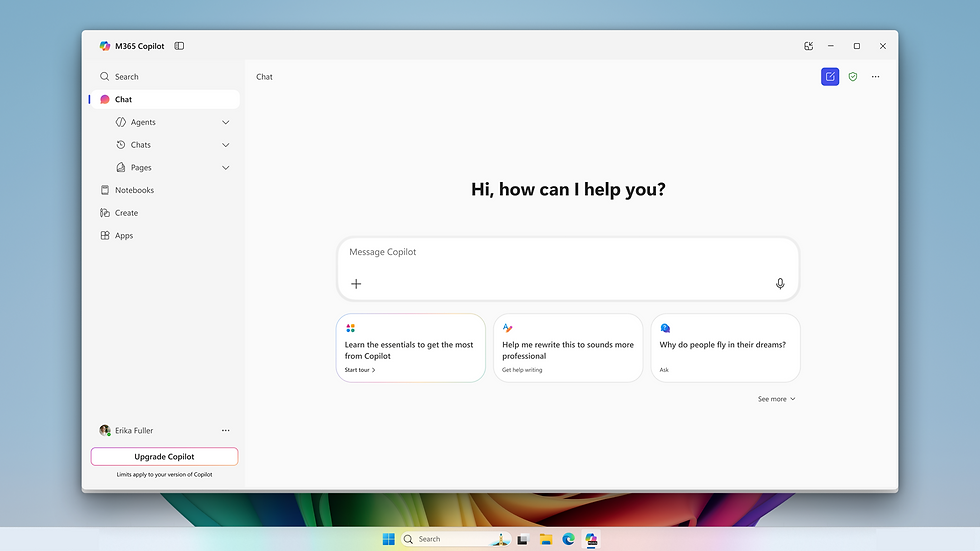
prevailingなMicrosoft Copilot Challengesを考慮すると、ユーザーはしばしばツールの統合を管理するための独自の戦略を考案してきました。この集団的な経験は、Copilot採用の即時的な実用性に関する貴重な洞察を提供し、改善された機能がどのようなものになるかの青写真を提供します。公式のアップデートを待つのではなく、多くの人が積極的にアプローチして独自のCopilot User Experienceをカスタマイズしています。
Copilotのデフォルト存在に対する最も即時的で広範な反応の1つは、それを無効にする方法の検索です。Windows 11での自動タスクバー統合やOfficeポータル内の永続的なリダイレクトに直面し、ユーザーは「how to disable Copilot」に関するガイダンスを検索エンジンで頻繁に探します。これはAI自体への反逆ではなく、コンピューティング環境に対するコントロールを求める欲求です。彼らは確立されたワークフローを妨げたり、知覚される利益を提供しない機能を削除するための簡単な方法を求めています。これは、Copilotのコンポーネントを管理またはアンインストールするためのより明確でアクセスしやすいオプションに対する強いユーザー需要を示しています。現在の状況は、単純なトグルではなく、チュートリアルに従うアプローチを必要とすることが多いです。
視覚要素の無効化以外にも、ユーザーはCopilotがワークフロー効率に与える微妙な影響にも苦労しています。AIが洞察に富んだ要約や下書きを生成するという約束は、AI生成コンテンツを広範囲にファクトチェックまたは書き直す必要があるという現実に衝突します。多くの人にとって、これはAI支援をショートカットから追加の検証ステップに変えました。その結果、AI生成で節約された時間は検証に消費され、全体的な生産性向上を減少させます。この直接的な経験は、AI出力が単に存在するだけでなく、特定の文脈に対して一貫して正確で関連性がある必要があるという重要な必要性を強調しています。コミュニティのフィードバックは、AIの出力が手動の努力よりも確実に優れているか、少なくとも同等でない場合、それは助けではなく障害になるという考えを一貫して指摘しています。
Copilotの機能の基盤となるデータ—組織のM365テナントへのアクセス(SharePointやOneDriveを含む)—は、その運用に不可欠です。ユーザーはこのデータ相互作用について懸念や質問をよく表明します。コミュニティの議論は、Copilotが新しいデータをインポートするのではなく、既存の組織情報をインデックス化して利用しているという理解を示しています。この明確化は、初期のプライバシー懸念によって時々不明瞭にされることがありますが、Copilotの役割を外部のデータバキュームではなく、事前に定義されたデータ環境内で動作するアシスタントとして位置づけるのに役立ちます。しかし、このデータにアクセスするメカニズムは、自動的に洞察に富んだ出力を保証するものではなく、処理と関連性というコアなMicrosoft Copilot Challengesに立ち返ります。
Ultimately, the user community is expressing a clear desire for choice and utility. They want products that are genuinely useful, not merely present. The current workarounds and common disabling practices underscore a critical insight: when an innovative feature becomes an impediment, users will find ways to navigate around it. For Microsoft, these user-driven solutions represent a clear signal for refining Copilot's deployment strategy, offering more control, and prioritizing a frictionless, value-driven Copilot User Experience.
Nadella's Pressure: Addressing Core Microsoft Copilot Challenges for AI Utility

The Microsoft Copilot Challenges aren't just a matter of user perception; they're a topic of intense internal scrutiny at the highest levels of the company. Microsoft CEO Satya Nadella himself has reportedly become deeply involved, exerting pressure on his deputies and engineering teams to accelerate Copilot’s improvement. His engagement has transformed him into something akin to a "chief product manager," directly joining internal Teams channels with top engineers to provide frequent and pointed feedback on the product’s shortcomings.
Nadella's direct intervention stems from a clear-eyed assessment of Copilot's current state: a powerful concept still grappling with fundamental implementation issues. Internal communications highlight his critical view that Copilot's connectivity with vital communication platforms like Gmail and Outlook is often dysfunctional, failing to deliver genuinely intelligent or contextually aware assistance. This isn't just about minor bugs; it's about the core functionality of Copilot as a unified AI layer for enterprise productivity tools. If the basic integrations with primary work platforms are unreliable, the entire value proposition of Copilot is undermined. This puts the spotlight squarely on Microsoft Copilot Challenges in core integration.
This intensified focus signals a strategic shift within Microsoft. The company is actively moving away from what might be characterized as a "software factory" model—one focused on producing a high volume of diverse applications—towards an AI-centric development paradigm. In this new era, AI is not merely an add-on feature but the foundational layer around which all new products and services are expected to coalesce. This pivot is ambitious, reflecting a corporate imperative to lead the AI revolution rather than simply participating in it.
The strategic importance of Copilot for Microsoft cannot be overstated. It's positioned as the company's answer to a rapidly evolving competitive landscape. Competitors like Google are aggressively integrating their own AI models, such as Gemini, directly into their cloud services and productivity suites like Drive and GSuite. This direct competition raises the stakes for Microsoft, creating a race for superior user experience and undeniable utility. If Copilot doesn't deliver a seamless, intuitive, and genuinely helpful experience, Microsoft risks falling behind in a crucial technological battleground. The challenge lies in ensuring Copilot User Experience is not just competitive but truly exceptional.
Nadella’s drive is underpinned by a broader vision: AI must transition from being a novel, interesting technology to an indispensable tool for knowledge workers. For Copilot to justify the enormous investment Microsoft has poured into AI (including its partnership with OpenAI), it must offer a clear, measurable return on investment (ROI). This means moving beyond pilot programs and early adoption to achieving widespread, sticky usage where professionals cannot imagine their workday without it. Reports of low overall adoption rates despite significant marketing efforts only underscore the urgency of these internal demands for accelerated improvement. The imperative is clear: solve the Microsoft Copilot Challenges to unlock its full potential.
Charting a Path for Copilot's Future: Overcoming Microsoft Copilot Challenges

To overcome the existing Microsoft Copilot Challenges and fulfill its potential, Copilot needs to evolve significantly, focusing on practical utility, robust integration, and enhanced user control. The feedback from users and internal directives from leadership converge on several key areas for improvement, aiming to refine the overall Copilot User Experience.
One crucial aspect is accelerating the product iteration cycle. The current pace of development needs to match the rapid advancements in AI and the dynamic needs of users. Faster feedback loops, where user insights translate into rapid product updates, are essential. This agile approach can address emerging issues swiftly, ensuring that Copilot remains responsive to its audience rather than perceived as a static, imposed tool.
Improved, more seamless integration with core productivity tools is paramount. Nadella's critique of Copilot's connectivity with Outlook and Gmail highlights a foundational weakness. Users expect AI to understand context across their applications, not just within isolated silos. This requires not merely linking applications but creating a truly unified AI layer that intuitively grasps user intent and provides relevant assistance regardless of the application currently in use. Achieving this deeper integration will be central to resolving existing Microsoft Copilot Challenges.
Moreover, future developments must focus on demonstrable productivity gains and a clear return on investment. The AI's value cannot be abstract; it must manifest in tangible benefits such as saved time, improved accuracy, or enhanced creativity. This means moving beyond raw feature counts and concentrating on user outcomes. If Copilot can consistently deliver verifiable ROI, it will naturally become "sticky"—an indispensable part of daily work, rather than a feature users tolerate or actively seek to disable.
Perhaps one of the most critical elements for future success lies in offering greater user control. The current lack of straightforward options to disable or uninstall Copilot, coupled with forced redirects, creates friction. Providing easier, more intuitive ways for users to manage Copilot's presence and functionality would empower them. This includes allowing direct access to core applications without intervention and giving users genuine choices about when and how AI assists them. Empowering users can transform a mandatory feature into a valued assistant, fostering a positive Copilot User Experience.
Ultimately, Copilot's journey involves moving from a compelling concept to an essential, loved tool. This requires sustained effort in refining its accuracy, ensuring consistent and relevant contextual understanding, and making it truly responsive to user needs. By addressing these foundational Microsoft Copilot Challenges, Microsoft can position Copilot not just as an innovative technology, but as an indispensable partner that genuinely elevates the productivity and satisfaction of its users, fulfilling the initial promise of AI in the workplace.
Adaptive FAQ Section
Why do users report difficulty with Copilot productivity?
Users often find Copilot's AI-generated summaries inaccurate or its PPT suggestions unengaging. This necessitates manual verification, negating promised efficiency gains and leading to frustration. The current Copilot productivity issues often add steps rather than removing them.
How is Microsoft addressing the current Microsoft Copilot Challenges?
CEO Satya Nadella is personally pressuring teams to accelerate improvements. He emphasizes solving integration flaws with tools like Outlook and ensuring Copilot evolves from a novelty into an essential productivity asset, directly confronting the Nadella Copilot pressure.
What are common user complaints regarding Copilot integration?
Many users dislike being forcibly redirected to Copilot after logging into Office portals, interrupting their workflow. The automatic placement of Copilot on the Windows 11 taskbar also leads to frequent user removal, highlighting forced Copilot redirect problems.
Is there a way to disable Copilot for Windows 11 users?
While a straightforward uninstall isn't always available, users commonly search for and follow online guides to remove the Copilot icon from their Windows 11 taskbar and adjust related settings, managing the disabling Copilot Windows 11 process.
What is the perceived value and ROI of Copilot currently?
Despite significant investment, internal feedback and external reports indicate that many users aren't finding substantial, verifiable productivity improvements. This raises concerns about the Copilot ROI concerns for enterprise adoption.
How does Copilot access organizational data for its features?
Copilot primarily leverages existing data within an organization's M365 tenant. It indexes and crawls content from sources like SharePoint, OneDrive, and file servers, operating within pre-established access permissions to improve context.
What improvements do users wish to see in future Copilot versions?
Users desire direct access to their core applications without being rerouted to Copilot. They also want more reliable AI outputs, easier options for disabling or uninstalling the feature, and a focus on genuinely useful functionalities to enhance their Copilot User Experience.


