Analyze a workbook
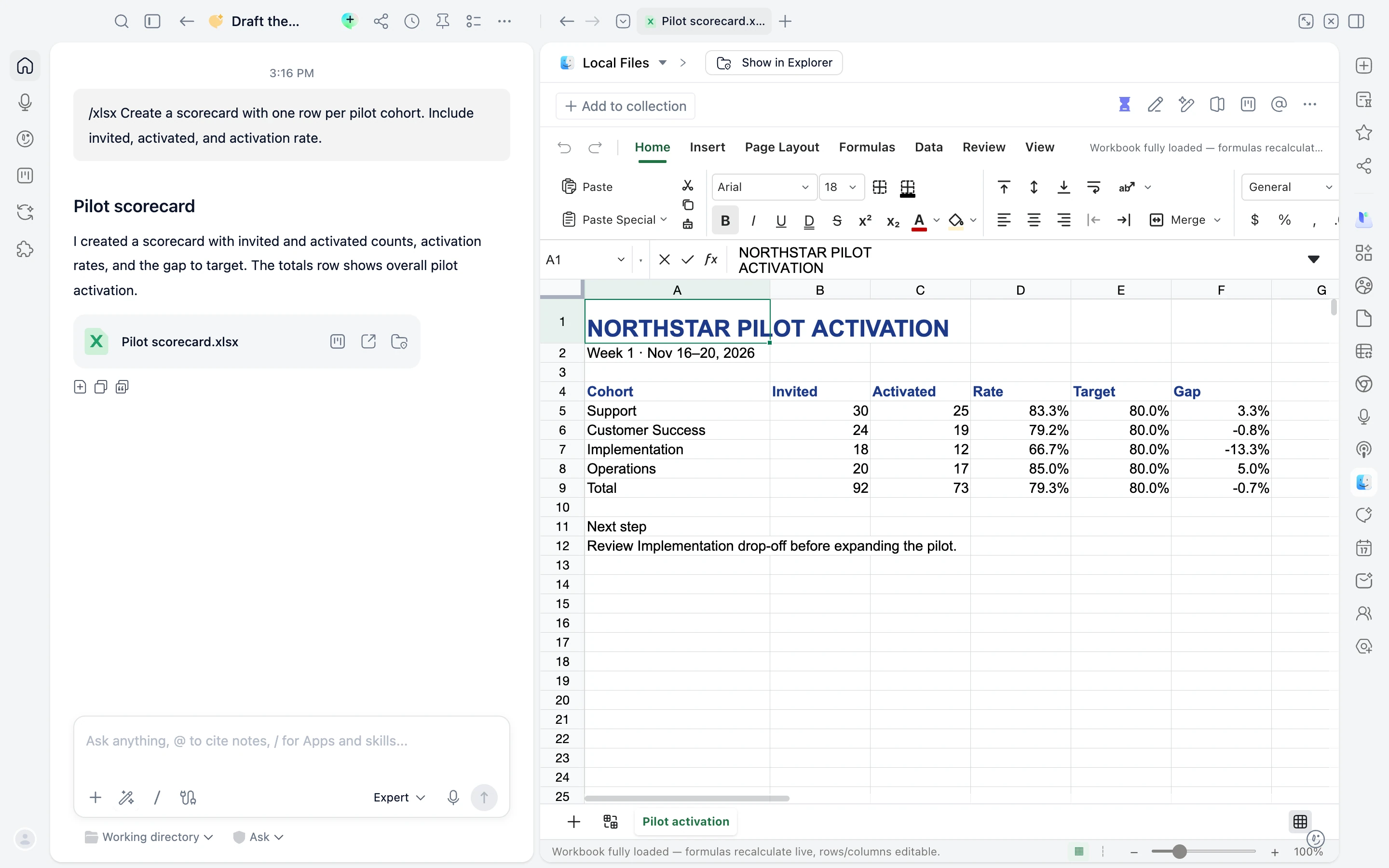
In Chat, use /xlsx and attach the workbook or CSV. Name the sheets, date range, filters, and calculation you want. Ask for the rows included, the assumptions, and any discrepancies. To leave the workbook intact, ask for an analysis without file edits.
Create or edit an Excel file
Request an .xlsx file explicitly when you need a workbook. Specify its sheets, columns, units, and formulas. To edit an existing workbook, name the sheet and cells, explain which formulas or formatting to keep, and ask for a new copy if you need to preserve the original.
Open the returned file and check formulas, totals, data types, and formatting. Tables are useful for maintaining and querying a set of records in remio over time.
FAQ
How do I ask for analysis without changing the original workbook?
Specify the sheets, range, and calculation, and ask for an analysis without edits. Check the assumptions and source rows in the result.
How do I make sure the result is an Excel workbook?
Request an .xlsx explicitly and describe the sheets, columns, and formulas you expect. Open the returned file to check totals and formatting.
Could a remio Table be better for a recurring list of records?
Use a Table when you want to maintain and query rows in remio over time. Use Excel when you need a workbook with its own formulas or formatting.